




A screen behind storefront glass cannot be specified in the same way as one mounted beside the checkout. Daylight, viewing distance, available floor space and customer traffic all change what the display needs to do.
Start with the installation position and normal viewing direction. Screen format, size, brightness and content layout can then be selected around that location.
Window-Facing Displays: Turn Passing Traffic Into Store Visits
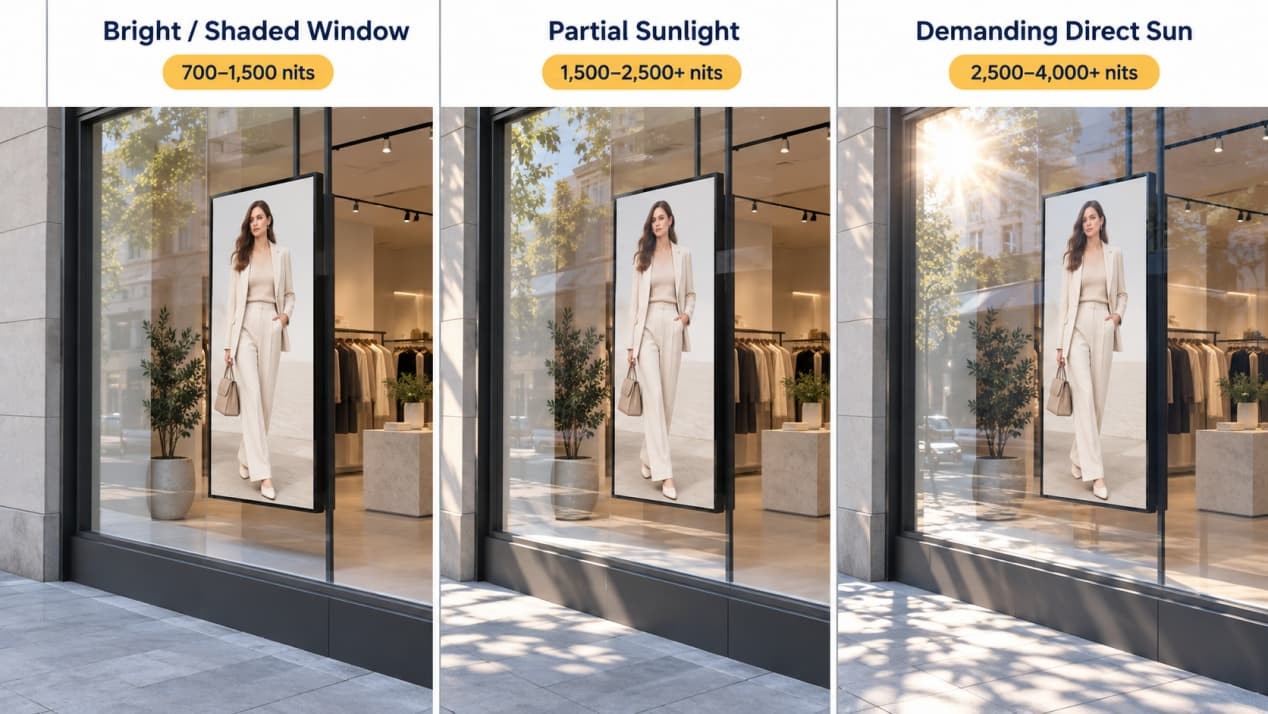
A window-facing retail digital display promotes products to people outside the store without taking up pavement or valuable selling space. The content needs to work at a glance: one featured product, a short campaign message and strong contrast are usually more effective than a crowded promotion page.
Brightness should match the storefront exposure. A bright window with limited direct sun may use approximately 700–1,500 nits. Partial-sun installations often move into the 1,500–2,500+ nit range, while demanding direct-sun storefronts may require 2,500–4,000+ nits.
Treat these figures as a starting point. A west-facing window receiving strong afternoon sun may need a different configuration from a shaded storefront using the same screen size. Glass reflection, screen-surface treatment and heat trapped between the display and the window also affect visibility. An ambient-light sensor can lower the output after sunset, keeping the storefront comfortable to view and reducing power use.
For more detail on brightness, reflection and thermal planning, read our digital window display guide.
Wall-Mounted Displays: Establish a Visual Anchor
Brand walls, checkout backdrops and shelf endcaps usually need the screen to sit within the architecture rather than in front of it. A wall-mounted display uses no sales-floor space and can align closely with nearby fixtures when the bracket and cable route are planned early.
Landscape screens work well for campaign video, product comparisons and layouts containing several information zones. Portrait screens are better suited to fashion imagery, full-length models and digital posters. Before rotating a display, confirm that its panel, enclosure, mounting points and cooling layout support portrait operation.
For permanent retail locations, the RusinDisplay indoor wall-mounted range supports 4K content, integrated playback and landscape or portrait installation. Indoor brightness can adjust automatically between 250 and 800 nits through an ambient-light sensor, helping the image respond to changing store lighting.
Power and network outlets should sit outside the bracket rails. An outlet directly behind the mounting structure may trap the plug and push the display away from the wall. Lightweight partitions may also need reinforcement before the finished wall is closed.
Freestanding Displays: Add a Focal Point Without a Wall
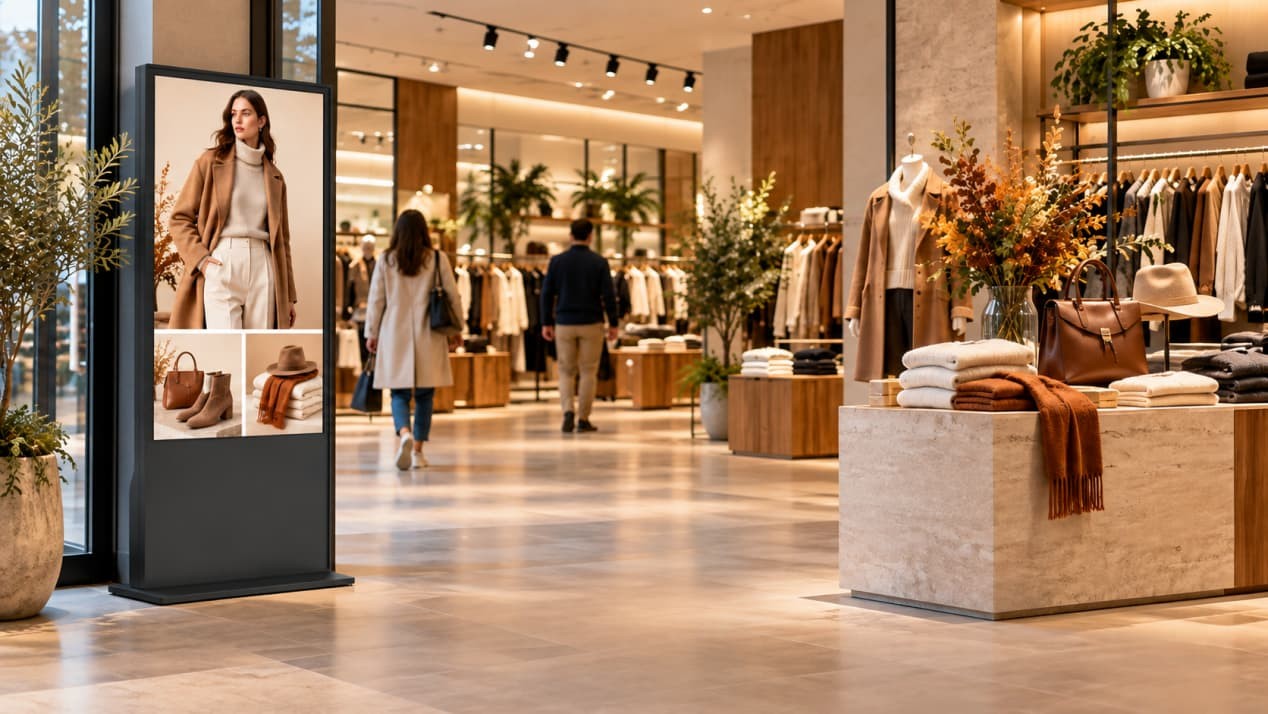
Open entrances, product islands and queueing zones often have no usable wall. A freestanding display creates a defined campaign point without changing the surrounding fixtures.
Its portrait format suits new-product launches, membership campaigns, seasonal posters and store navigation. The RusinDisplay indoor freestanding kiosk range integrates the screen and playback system into one enclosure. Touch can be added when customers need to search products, check availability or find a department. Promotional screens that only play scheduled content generally do not need it.
A standard freestanding unit is normally assigned to one position. If staff need to move it regularly between departments or campaigns, specify locking caster wheels, a suitable mobile base and controlled cable storage when requesting the configuration. In either case, the power cable should connect through a nearby wall or floor outlet without crossing the customer walkway.
Ceiling-Mounted Displays: Use Overhead Space
Some store routes have neither spare wall space nor enough floor area for a kiosk. A ceiling-mounted display can occupy the space above an entrance, narrow aisle or checkout guidance point without obstructing customers below.
The content should be readable from the expected approach distance. Department names, directional information and short promotional messages work better than dense product descriptions or small prices when the display is above eye level.
Mounting points must attach to a suitable structural surface rather than a decorative ceiling panel. Confirm the finished mounting height, maintenance access and cable route before ordering. Power and network cables can then run through the suspension structure instead of hanging visibly beside the display. If customers approach from opposite directions, a double-sided version can be specified without treating it as a separate display category.
Shelf-Edge and Bar Displays: Support Decisions at the Shelf
Stretched bar displays fit shelf edges, beauty counters and refrigerated cabinets where a standard 16:9 screen would occupy too much space. They work best with information related to the products directly in front of them, such as prices, ingredients, color options and short cross-selling messages. Content must be designed for the narrow aspect ratio; shrinking an ordinary landscape layout usually makes the text unreadable and separates the information from the relevant merchandise.
Manage Different Store Areas Through One CMS
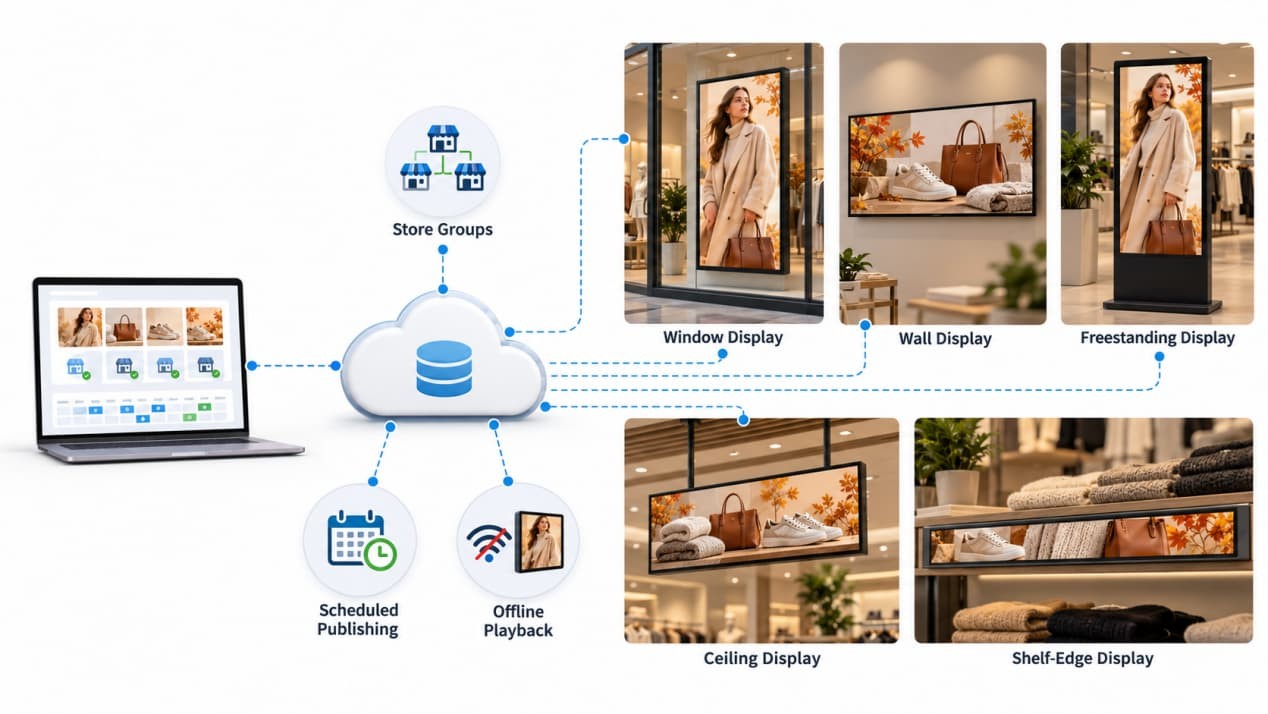
A store may use a landscape display behind the checkout, a portrait kiosk at the entrance and a brighter screen facing through the window. A centralized content management system can organize them by store, department, campaign or screen format.
For a retail chain, head office can lock the main brand template and publish national campaigns across selected locations. Individual stores can receive limited permission to update designated prices, local events or availability information without changing the overall design. Scheduling and expiry controls switch campaigns automatically and remove outdated promotions when they end.
If the network connection drops, downloaded content keeps playing locally. The screens synchronize new campaigns and price changes after the network returns. Automatic power recovery can also restart a display and return it to the scheduled playlist after an interruption.
Central management does not mean sending the same file to every screen. Landscape, portrait, window-facing and stretched displays require different image crops, type sizes and information density. The campaign can retain one visual identity while using layouts prepared for each format.
Choose the Location, Format and Screen Count
Final selection comes down to the installation point, the way customers approach it and the job the screen must perform.
The physical location determines whether the display should attach to a wall, stand on the floor, hang from the ceiling, face through glass or fit into a shelf system. Customer movement then shapes the content. A storefront campaign may have only a few seconds to attract attention, while a product finder can support a longer interaction.
The required workflow completes the specification. Scheduled promotional playback may only need an integrated player and CMS connection. Product search, wayfinding or inventory lookup may require touch and third-party software integration. Touch is therefore a functional option for compatible wall-mounted or freestanding displays, not a separate physical category.
Screen count should follow the amount of content that must remain visible. One larger display is usually enough when the message can fit within a clear visual hierarchy. Multiple screens make sense when several product categories need to remain visible at the same time or when a long wall needs separate content zones. Keep each product name, image and price together rather than splitting one buying decision across two screen bezels.
Planning a new store buildout or upgrading an existing retail space? Contact RusinDisplay with your floor plan, proposed screen positions, and content requirements. Our engineering team will evaluate your architectural constraints and recommend the optimal wall-mounted, freestanding, window-facing, or custom display configuration for each customer touchpoint.
FAQ
How many digital displays does a retail store need?
Start with the positions where a screen has a defined job, such as attracting street traffic, introducing a product category or guiding customers. Adding several screens to the same viewing area rarely helps if they repeat identical content.
Can a landscape retail display be installed vertically?
Only when the display is approved for portrait installation. The panel structure, ventilation layout and mounting points must all support the rotated orientation.
Can a standard indoor display be placed behind a storefront window?
It may work in a shaded window with controlled light, but a sun-facing storefront often needs a dedicated high-brightness configuration. Check sunlight duration, reflections and heat around the enclosure before choosing the screen.
Should retail displays stay on throughout opening hours?
Commercial displays can run to a defined operating schedule and start before the store opens. Scheduled power control avoids relying on staff to switch every screen on and off manually while limiting unnecessary operation after closing.