




A projected capacitive (PCAP) touch screen detects a finger through changes in capacitance across a transparent electrode grid. It can be integrated with LCD or OLED displays.
A touchscreen that works on the bench may start missing touches after installation. The cover glass, metal frame, cable position and power supply can all change the signal reaching its controller. Checking those changes is often more useful than immediately increasing sensitivity.
How Does Cover Glass Affect a PCAP Touch Screen?
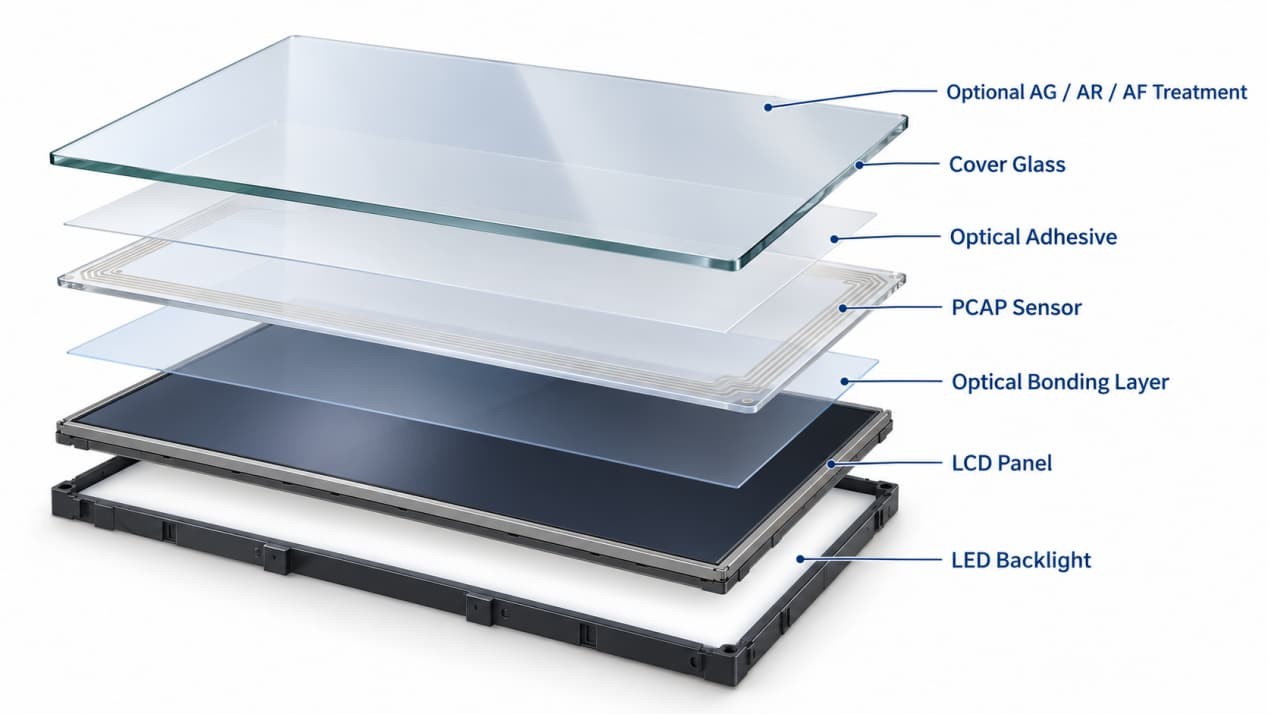
Thicker cover glass increases the distance between the finger and sensing electrodes, generally reducing the touch signal. The glass material, adhesive and any air gap between the cover and sensor also affect the response.
Adding another protective window over an existing touchscreen changes this arrangement. A controller tuned for the original cover may need adjustment or a different sensor configuration to work through the added layer.
Check where the sensor sits before specifying glass. A cover bonded to the touch sensor and a separate window placed in front of a finished touchscreen create different sensing conditions. The spacing behind the sensor, between it and the display, has a different electrical role again.
Keep glass thickness separate from touch accuracy. A specification of 2 mm touch accuracy describes positional performance; it does not mean the controller supports an additional 2 mm glass cover.
Test with the final glass fitted. Trace the edges, tap the corners and drag slowly across the surface. Large buttons in the center can respond normally while weaker areas near the border go unnoticed.
Why Does Touch Change After Mounting in a Metal Frame?
The metal around a sensor affects its electrical surroundings. A front bezel can reduce edge sensitivity, while a loose or electrically floating metal part can make operation unstable.
On an embedded monitor, mounting ears and brackets sit behind the equipment panel. After installation, the sensor may be closer to metal than it was during the bench test. The touch cable may also have been moved against a bracket or routed beside a noisy circuit.
Follow the controller’s specified grounding and shielding arrangement. Protective earth, signal ground and a driven shield serve different purposes. Adding wires without understanding those connections can create another interference path.
If touch becomes unreliable only after mounting, keep the host, power supply and application unchanged. Compare operation before and after the bezel is fitted, then inspect the metal clearance, bonding points and cable route. This isolates the installation change before controller settings are altered.
What Causes Ghost Touches or an Unsteady Pointer?
A pointer that wanders under a stationary finger, unexplained taps or interrupted drags can indicate that electrical noise is interfering with touch detection. Display electronics, switching power supplies and backlight drivers are possible sources.
The condition that triggers the fault helps narrow the search:
| When the Fault Appears | Check First |
| The picture works, but touch is inactive | Controller power, touch connection and host recognition |
| Touch is rotated, mirrored or offset | Coordinate mapping and screen orientation |
| Operation changes after fitting the frame | Bezel clearance, bonding and cable position |
| The fault follows brightness changes | Backlight operating conditions and noise |
| The fault begins with a different power supply | Supply compatibility and electrical noise |
| False touches appear on wet glass | Surface condition and controller water-handling settings |
Change one condition at a time. If several parts are replaced together, a successful result will reveal little about the original cause.
OLED assemblies also need noise checks. They have no LCD backlight, but their display-driving electronics can still affect the touch sensor. PCAP compatibility depends on the selected sensor, controller and display construction.
How Should a PCAP Touchscreen Be Tuned and Tested?
Tune with the final display, glass, enclosure and power supply assembled. Secure the cables in their intended positions and save the original controller configuration.
Confirm communication and coordinate mapping first. Then use the controller’s diagnostic tools to examine touch signals and noise. Higher sensitivity may recover a weak finger signal, but it can also admit unwanted input.
Run a continuous drag around the perimeter and across the center. Check the smallest controls in the actual application and the simultaneous gestures users need. Repeat at low, middle and high brightness with the normal peripherals connected, then check restart and sleep/wake operation.
Look for broken drag paths, unstable coordinates, unexplained contacts and incorrect display mapping. Record the controller model, firmware and settings alongside the tested glass construction so the working assembly can be reproduced.
Outdoor testing needs a more specific description than “waterproof touch.” Rejecting droplets, recognizing a wet finger and accepting input beneath a water film are different tasks. Test the conditions required by the application with the final surface and controller configuration.
Use the intended gloves for glove testing. Material and thickness affect the signal, so a successful test with one glove does not establish performance with another.
Choosing a PCAP Touch Assembly
Specify the display, sensor, cover and controller together. A 10- or 20-point touch specification tells you how many contacts can be tracked simultaneously. Cover-glass capability, noise tolerance and wet operation need their own confirmation.
For retrofit options, see how to turn a screen into a touchscreen.
For your LCD or OLED touch display project, contact RusinDisplay with the screen size, cover-glass requirements and operating environment.
FAQ
Can a PCAP touch screen be used with both LCD and OLED displays?
Yes. PCAP can work with either display technology when the sensor and controller match the assembly. Changing the display may require further noise checks and controller tuning.
Can PCAP work through thick protective glass?
It can, provided the sensor and controller support the complete glass construction. Confirm the cover material, thickness and bonding arrangement together, especially when adding glass over an existing touchscreen.
Does a PCAP touchscreen need calibration?
Many finished USB touch monitors arrive configured for normal operation. Coordinate mapping may still need adjustment for screen rotation or multiple displays. Changes to the glass, frame or electrical environment can require controller tuning, which is different from positional calibration.
Why does touch stop working when the picture is normal?
Video and touch commonly use separate connections. Check whether the host recognizes the touch controller, then inspect its power and USB or other communication connection.
Does 20-point touch improve accuracy over 10-point touch?
Touch-point count describes how many simultaneous contacts the system can track. Accuracy depends on the sensor, controller, configuration and installation. Choose the contact count around the gestures or number of users the application needs.