




Practical Methods, Real-World Use Cases, and What Comes Next
Turning a standard screen into a touchscreen no longer requires replacing existing hardware. Today’s touch technologies allow LCD, LED, and TV displays to gain interactive capabilities through add-on systems designed for different environments and budgets.
This guide brings together the most widely used touchscreen conversion methods on the market. It explains how each technology works, where it performs best, and how to select the right approach for your project. Along the way, it also introduces transparent OLED interactive displays as a forward-looking solution for spaces that demand both visual openness and advanced interaction.

Why More Displays Are Being Upgraded With Touch Interaction
Touch interaction has become a baseline expectation in many environments. From retail and education to exhibitions and control rooms, users increasingly expect displays to respond directly to touch.
Key reasons organizations choose touchscreen upgrades include:
- Improved user engagement – Touch input feels intuitive and reduces learning time for first-time users.
- Cost efficiency and sustainability – Existing displays can be upgraded instead of replaced, lowering overall investment.
- Wide application flexibility – Touch-enabled screens are used in classrooms, stores, museums, meeting rooms, industrial panels, and digital signage.
- Technology maturity – Modern touch systems are stable, accurate, and easier to deploy than earlier generations.
As display technology evolves, screens are no longer passive surfaces. They are becoming interactive interfaces that connect digital content with physical space. Transparent OLED displays clearly reflect this shift by combining visual output, spatial transparency, and interaction into a single system.
The Main Ways to Add Touch Functionality to Existing Displays
There are four mainstream approaches to adding touch capability to non-touch displays. Each option fits different device types, environments, and interaction needs.
| Method | Core Technology | Compatible Displays | Installation Complexity | Touch Capability | Typical Use Cases |
|---|---|---|---|---|---|
| Interactive touch overlays | Capacitive, resistive, infrared, PCAP | LCD, LED, TVs, monitors | Low – attach and connect via USB | Multi-touch up to 40 points | Retail, education, kiosks |
| Infrared touch frames | Infrared light grid | Flat displays and projections | Medium – frame installation | Finger, glove, stylus | Museums, exhibition halls |
| External touchscreen monitors | Built-in touch panel | Used as secondary displays | Low – plug and play | Native touch experience | Offices, design studios |
| Professional conversion kits | Varies by kit | Legacy or specialized displays | Medium to high | Depends on configuration | Custom integration projects |
How Each Touch Technology Works and Where It Performs Best
Interactive Touch Overlays – Fast Retrofit for LCD and LED Screens
A transparent film or glass layer is mounted over the display surface. Touch position is detected through pressure, electrical field changes, or interrupted infrared signals and sent to the host system.
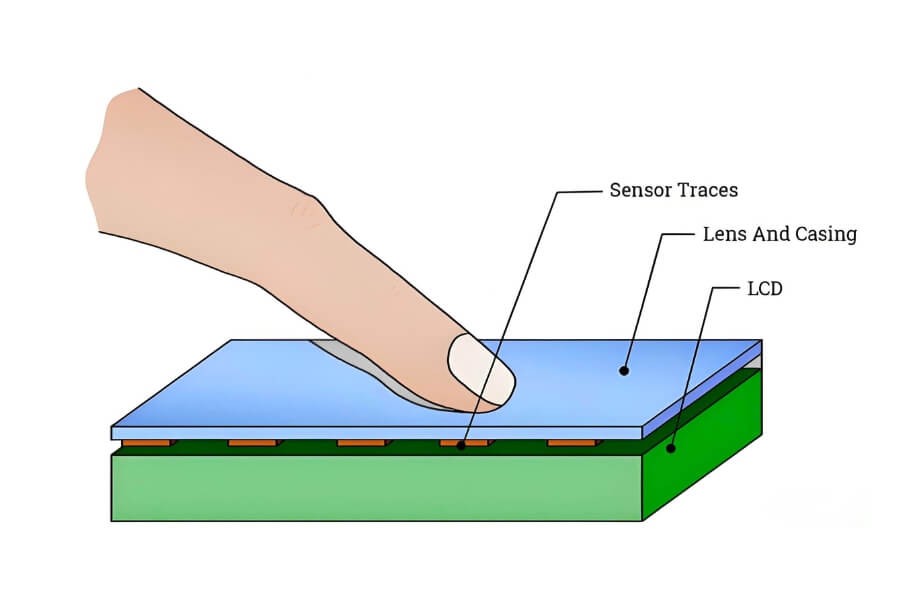
Common overlay types include:
- Capacitive overlays – Fast response and multi-touch support. Best for indoor use with finger or conductive stylus input. Image quality impact is minimal.
- Resistive overlays – Cost-effective and tolerant of dust, moisture, and gloves. Suitable for industrial environments, though brightness and clarity are slightly reduced.
- Infrared overlays – Create a light grid in front of the screen without covering it. Support multiple touch points and different input objects, but can be affected by strong ambient light or dust.
- Optical overlays – Use corner-mounted cameras to track touch position. Offer high precision on very large displays, with higher system complexity.
Typical installation involves accurate measurement, surface cleaning, hardware alignment, USB connection, and basic calibration.
Infrared Touch Frames – Scalable Touch for Large Displays
Infrared touch frames mount around the edges of a display. Emitters and receivers form an invisible grid just in front of the screen. When an object breaks the grid, the touch location is calculated.
This approach does not affect brightness or contrast and scales well to large sizes, making it suitable for wall-mounted displays in museums, exhibition halls, classrooms, and commercial environments. Proper alignment and regular cleaning help maintain accuracy over time.
External Touchscreen Monitors – When a Secondary Screen Makes Sense
An external touchscreen monitor connects to a computer using HDMI or DisplayPort for video and USB for touch input. This option avoids retrofitting the original display.
It offers predictable performance and quick setup, making it useful for multi-screen workstations and design environments. However, it does not upgrade the original screen and requires additional hardware space.

How to Choose the Right Touch Solution for Your Display and Environment
Selecting the right solution depends on display size, installation conditions, and interaction requirements.
| Device or Scenario | Recommended Solution | Key Considerations |
|---|---|---|
| Laptop computers | Capacitive overlay | Thin profile, gesture support |
| Desktop monitors | Infrared overlay or frame | Preserves image quality |
| TVs and large displays | Infrared touch frame | Scales to large sizes |
| Retail windows or glass partitions | Infrared or PCAP touch foil | Interaction through glass |
| Industrial or outdoor use | Resistive overlay | Glove operation, durability |
| High-end visual and spatial integration | Transparent OLED interactive displays | Transparency, spatial impact |
Transparent OLED displays represent a different design approach. Instead of adding touch to an existing panel, the display itself becomes part of the space. Touch layers can be integrated directly, allowing digital content to coexist with real-world visibility. This approach is particularly effective in premium retail, exhibitions, and architectural environments.

What Installation and Calibration Typically Involve
Most touchscreen conversion projects follow a similar workflow:
- Preparation – Power down equipment and prepare cleaning tools.
- Surface cleaning – Remove dust and residue for accurate alignment.
- Hardware installation – Mount overlays, frames, or connect external displays.
- System connection – Link via USB or designated interface.
- Driver and calibration – Use system tools or supplied software to calibrate touch points.
- Testing – Verify accuracy, responsiveness, and multi-touch behavior.
FAQ
Q1: Will touch conversion affect image quality?
Most capacitive and high-quality infrared touch systems have minimal impact on brightness and clarity. Resistive overlays may slightly reduce image sharpness due to additional layers. Infrared touch frames sit outside the display surface, so they do not affect image quality at all and are often preferred for large-format displays.
Q2: Does touch conversion support multi-touch?
Multi-touch support depends on the technology used. Capacitive, infrared, and optical touch systems commonly support 10, 20, or more simultaneous touch points. Resistive touch systems typically support single-touch input and are designed for durability rather than gesture-based interaction.
Q3: Can users wear gloves or use a stylus?
Resistive and infrared touch systems work well with gloves, passive styluses, or other objects, making them suitable for industrial or public environments. Capacitive touch systems require conductive input, so users usually need bare fingers or specialized conductive styluses for reliable operation.
Q4: What is the typical lifespan of a touch conversion system?
Most touch conversion systems operate reliably for three to five years under normal commercial use. Capacitive systems often last longer due to the absence of mechanical wear. Lifespan depends on usage frequency, environmental conditions, and proper maintenance such as regular cleaning and calibration.
Q5: Can curved or non-standard screens be converted?
Standard touch overlays and frames are designed for flat, rectangular displays. Curved screens or non-standard shapes usually require customized solutions. In these cases, touch integration is often handled at the system level, combining tailored hardware, mounting structures, and calibration to ensure accurate performance.
Q6: How do you turn a non-touch screen into a touchscreen?
A non-touch screen can be converted by adding a touch overlay, installing an infrared touch frame, or using an external touchscreen monitor. These solutions connect via USB and work independently from the display panel, allowing existing LCD or LED screens to gain touch functionality without replacement.
Q7: What is the future direction of touch technology?
Touch technology is evolving toward larger display sizes, higher durability, and more flexible form factors. Transparent and flexible displays are becoming more common, while AI-based interaction, gesture recognition, and sensor integration are enabling more natural and immersive ways to interact with digital content in physical spaces.
From Touchscreen Upgrades to the Future of Interactive Displays
Turning a standard screen into a touchscreen is now a mature and accessible process. Overlays, frames, and external displays provide practical upgrade paths without replacing existing hardware.
For projects that demand deeper visual integration and spatial interaction, the focus shifts from adding touch layers to rethinking the display itself. Transparent OLED technology allows screens to blend into architectural environments while supporting touch and interactive content.
RUSINDISPLAY operates at the intersection of transparent display engineering, interactive technology, and spatial integration. By combining transparent OLED panels with tailored system design, interaction technology, and content collaboration, RUSINDISPLAY helps brands and integrators move beyond conventional screens and build interactive visual systems that align with real architectural and operational needs.