





An open frame touch monitor is a display designed to be integrated into a kiosk, machine panel or custom enclosure. Its mounting structure lets the screen become part of the equipment’s front surface.
Choosing one starts with three questions: how it fits into the panel, how touch connects to the host system, and where the finished equipment will operate. Screen size alone answers none of these.
How Is an Open Frame Touch Monitor Mounted?
An open frame monitor typically uses mounting brackets, clamps or a flange to secure it within an equipment panel. Some models also provide rear VESA mounting holes. The installation drawing defines the panel opening, fixing positions and permitted panel thickness.
Two common arrangements are embedded mounting and front mounting:
| Mounting Approach | How It Fits | What to Check |
| Embedded | The display sits within a panel opening and is secured using its specified brackets or rear clamps | Opening dimensions, glass position, clamp clearance and rear access |
| Front-mount | A front flange or bezel overlaps the panel opening, with the body extending behind it | Flange overlap, panel thickness, fixing positions and any gasket contact surface |
Mounting names vary between manufacturers. Use the model’s sectional drawing to establish exactly where the glass, bezel and equipment panel meet.
The distinction matters even on small displays. RusinDisplay’s 10.1-inch embedded monitor measures 259.31 × 177.31 × 44.5 mm, while the 10.1-inch front-mount version measures 253.3 × 172.2 × 45 mm. The same screen diagonal does not produce the same housing or opening.
Neither overall dimension should be copied directly into a cutout drawing. Allow for the mounting arrangement, connector access and cable bends specified for that model.
How Does Touch Connect to the Computer?
A monitor-only configuration receives the image from an external computer and sends touch input back to it.
For the RusinDisplay embedded monitor configuration, HDMI or VGA carries the image, while a separate USB touch connection carries finger input. Connecting HDMI alone can produce a normal picture with no touch response.
RusinDisplay’s indoor embedded series uses 10-point projected capacitive touch, also called PCAP. It detects up to ten simultaneous touch contacts and supports fingers or a compatible capacitive stylus.
The indoor ranges differ in their standard configuration:
- Embedded series, 10.1–23.8 inches: 10-point PCAP touch as standard; non-touch versions can be configured.
- Front-mount series, 10.1–27 inches: non-touch as standard; 10-point PCAP touch can be configured.
Touch operation should be checked after the display is fitted into the equipment. Run a finger along all four edges, tap the corners and test the smallest controls in the intended application. On a system with multiple displays, confirm that touching this monitor moves the pointer on the correct screen.
If the design adds another glass layer in front, confirm the complete glass arrangement with the touch-controller configuration. Extra glass changes the sensing conditions.
Which Screen Size Fits the Application?
Choose the size around the task and the space available in the equipment.
A 10.1- or 13.3-inch screen can fit a compact control panel. 15.6- and 18.5-inch formats provide more space for machine controls or self-service steps. 21.5–27 inches can accommodate larger maps, product selections or interfaces viewed by more than one person.
Resolution affects how that space can be used. In RusinDisplay’s indoor ranges, the 10.1-inch display is 1280 × 800, while the listed 13.3–27-inch models are 1920 × 1080.
A larger Full HD panel enlarges the same pixel grid. It does not automatically create more room for interface detail. Preview the actual application at native resolution, then check text and controls at their intended physical size.
Also decide whether the equipment already has a computer. A monitor-only version suits an existing host system. An Android or Windows configuration integrates computing into the display assembly and changes the required connections, software setup and service arrangement.
What Changes for an Outdoor Open Frame Touch Monitor?
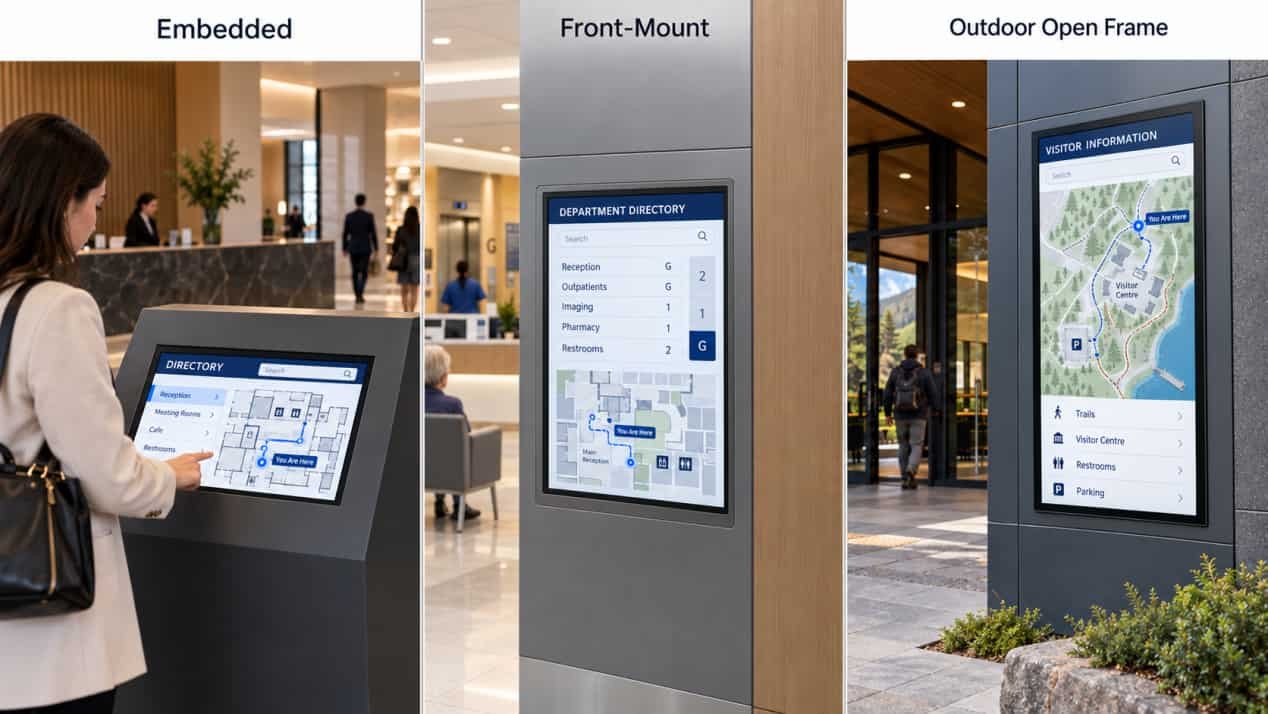
Outdoor installation adds sunlight, rain and a wider temperature range to the design.
RusinDisplay’s indoor embedded and front-mount displays have approximately 200–250 nits of brightness, depending on size and system configuration. The outdoor open frame range covers 32, 43, 49, 55, 65 and 75 inches, with specified brightness options of 1,000–3,000 nits and automatic brightness adjustment.
The outdoor series uses a sealed IP66 enclosure, an IP68-rated power supply and 5 mm anti-glare tempered glass. Outdoor PCAP touch is optional.
Here, “open frame” describes the display’s role in an integrated installation. An outdoor unit can retain a sealed housing while being built into a larger kiosk or architectural structure.
The surrounding installation still needs space for heat release, protected cable entry and access for maintenance. An additional decorative enclosure must accommodate those requirements rather than tightly enclosing the display’s rear and sides.
For a useful comparison, test the proposed screen in its intended orientation and brightest expected daylight. Check both image readability and touch operation with the final glass and mounting arrangement.
What Should Be Confirmed Before Integration?
Start with the mechanical drawing, system connection diagram and operating environment.
The mechanical drawing establishes whether the monitor fits. The connection diagram establishes how video, touch and power reach it. The environment determines the brightness and protection required.
A fitted sample can then answer the remaining practical questions: whether the edges respond correctly, whether cables remain accessible, and whether the display can be removed for service without dismantling the whole machine.
RusinDisplay’s embedded and front-mount displays are available for indoor and sheltered semi-outdoor installations. For fully outdoor locations exposed to rain and direct sunlight, choose the outdoor open frame series.
All three series are available to order, although they are not yet listed on the website. To discuss your requirements, contact RusinDisplay or email info@rusindisplay.com.
FAQ
What is the difference between an open frame touch monitor and a panel PC?
An open frame touch monitor connects to an external computer for video and touch processing. A panel PC includes its own computing hardware and operating system. RusinDisplay offers monitor-only, Android and Windows configurations.
Can embedded and front-mount displays be used outdoors?
Both series can be used indoors and in sheltered semi-outdoor locations, with brightness selected for the installation. For fully exposed outdoor use, RusinDisplay offers a separate outdoor open frame series with an IP66 enclosure.
Do all three series include touch?
The embedded series includes 10-point PCAP touch as standard. The front-mount series is non-touch as standard, with 10-point PCAP available by customization. Outdoor PCAP touch is optional on the outdoor series.
Does HDMI carry the touch signal?
On the monitor configurations described here, HDMI carries the image and a separate USB connection carries touch input. Both connections are needed for touchscreen operation with an external computer.
What sizes are available?
Embedded displays range from 10.1 to 23.8 inches, while front-mount displays range from 10.1 to 27 inches. The outdoor open frame series is available in 32, 43, 49, 55, 65 and 75 inches.