




The hardest part of a restaurant kiosk project is rarely the enclosure. It is making the ordering software, payment terminal, POS and kitchen system exchange the right data without disrupting service.
That work should begin before the screen, processor or mounting style is finalized. A kiosk may respond perfectly to touch and still fail operationally if menu prices cannot synchronize, payments cannot be reconciled or completed orders never reach the kitchen.
When selecting a self-service kiosk for restaurants, define the complete transaction flow first. The hardware can then be configured around it.
Map the Ordering Flow Before Selecting Hardware
A typical kiosk order follows this path:
Menu selection → modifiers and add-ons → price confirmation → payment → receipt → POS or KDS → food preparation and pickup
Each step may involve a different device or software platform. The restaurant should therefore document how an order will move from the customer-facing screen to the kitchen.
Start with a few practical decisions. Will customers pay directly at the kiosk or complete payment at the counter? Should an order go to the existing POS, a kitchen printer or a kitchen display system? Which platform controls menu prices, tax rules, modifiers and sold-out items?
The answers determine the required operating system, payment terminal, peripheral devices and integration work.
RusinDisplay can supply the kiosk hardware, payment components and integration support. The restaurant ordering application is supplied by the customer or a third-party software provider. Establishing that responsibility early prevents the kiosk from entering production before the software environment has been confirmed.
Self-ordering kiosks work alongside customer-facing menu displays rather than replacing them. Overhead digital menu boards for restaurants let guests review core items before reaching the ordering point, while the kiosk handles modifiers, payment and order submission.
Connect the Ordering Software, POS and Payment System
A kiosk ordering system only becomes operational when its customer-facing interface and restaurant systems process the same order correctly.
Ordering Software
The ordering application controls the menu, product images, prices, modifiers, languages, tax settings and checkout process. Depending on the provider, it may also manage loyalty accounts, coupons, inventory status and promotional offers.
RusinDisplay does not supply restaurant ordering software. It can install and integrate an application provided by the customer or an approved third-party developer.
Before production, the software provider should confirm:
- Android or Windows compatibility;
- Processor, memory and storage requirements;
- Touchscreen and display settings;
- Scanner and printer drivers;
- Payment-terminal support;
- POS and KDS interfaces.
This information affects the operating system, ports, peripheral mounting and internal wiring of the finished kiosk.
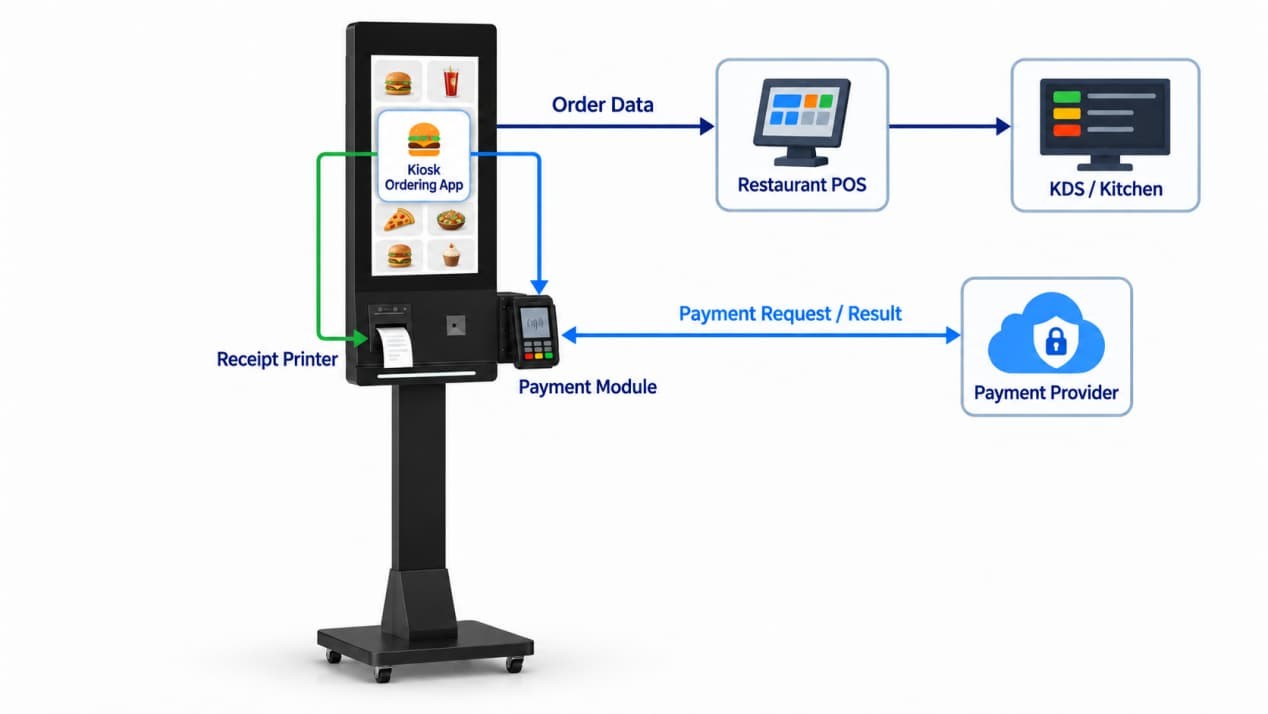
POS and Kitchen Routing
The kiosk can be integrated with the restaurant’s POS, kitchen display system and order-management platform. Compatibility must still be tested against the specific software version and order workflow used at the location.
A pre-deployment test should confirm that menu items, prices and modifiers appear correctly. After checkout, each order must reach the correct POS and kitchen destination with the same order number, product selections and customer notes.
The test should also cover cancelled transactions, payment failures, sold-out items, refunds and printer errors. These conditions may not appear during a basic product demonstration, but they directly affect restaurant operations once the kiosk is in daily use.
Payment and Scanning
The SO-K27 comes standard with an embedded 2D QR code scanner for mobile payments, member ID verification, and order pickup scanning.
For card and contactless transactions, the kiosk integrates an embedded unattended payment terminal rather than an external countertop reader. Because terminal dimensions, mounting styles, and interfaces vary by payment provider and country, the exact device model must be confirmed before enclosure fabrication. RusinDisplay customizes the front-panel cutout, internal mounting, and cabling so the reader sits flush with the housing.
Note that physical mounting is only one part of the deployment—the restaurant and software provider must also complete merchant onboarding, payment gateway configuration, and any required certifications before processing live transactions.
Select the Kiosk Hardware
Once the transaction flow and third-party software requirements are clear, the physical configuration becomes much easier to define.
The 27-inch self-ordering kiosk provides a practical reference for restaurants, cafés, dessert shops and food courts.
| Component | SO-K27 Configuration | Why It Matters |
| Display | 27-inch, 1920 × 1080 FHD | Provides space for menu images, modifiers and checkout controls |
| Touch | 10-point PCAP touchscreen | Supports responsive finger-based ordering |
| Brightness | Automatic adjustment from 250 to 800 nits | Adapts the screen to changing ambient light |
| Computing Platform | Intel Core i5 or i7, 8 GB RAM and 128 GB storage | Runs the selected kiosk and restaurant applications |
| Operating System | Android or Windows | Matches the software environment without changing the i5/i7 hardware platform |
| Network | Wi-Fi and Gigabit Ethernet | Connects the kiosk to restaurant systems and online services |
| Standard Devices | QR code scanner and 80 mm thermal printer | Supports code scanning and receipt printing |
| Optional Devices | Payment terminal, NFC, camera and sensors | Configured around the required transaction flow |
| Installation | Floor-standing or wall-mounted | Accommodates different restaurant layouts |
The display uses a light sensor to adjust brightness automatically across the 250–800-nit range as ambient light changes. It can increase output near a bright entrance and reduce it under lower indoor illumination. The range describes active light-sensitive adjustment rather than a fixed 800-nit output.
Screen position still matters. Reflections from windows or overhead lighting can reduce apparent contrast even when the display is bright enough, so the proposed location should be reviewed from the customer’s normal standing position.
Both Android and Windows use the same Intel Core i5 or i7 hardware platform. The choice is therefore based on the software environment rather than a different processor tier. If the third-party ordering application is built for Android, the kiosk can be supplied with Android; software requiring a Windows desktop environment can use Windows on the same class of computing hardware.
Choose the Installation Format
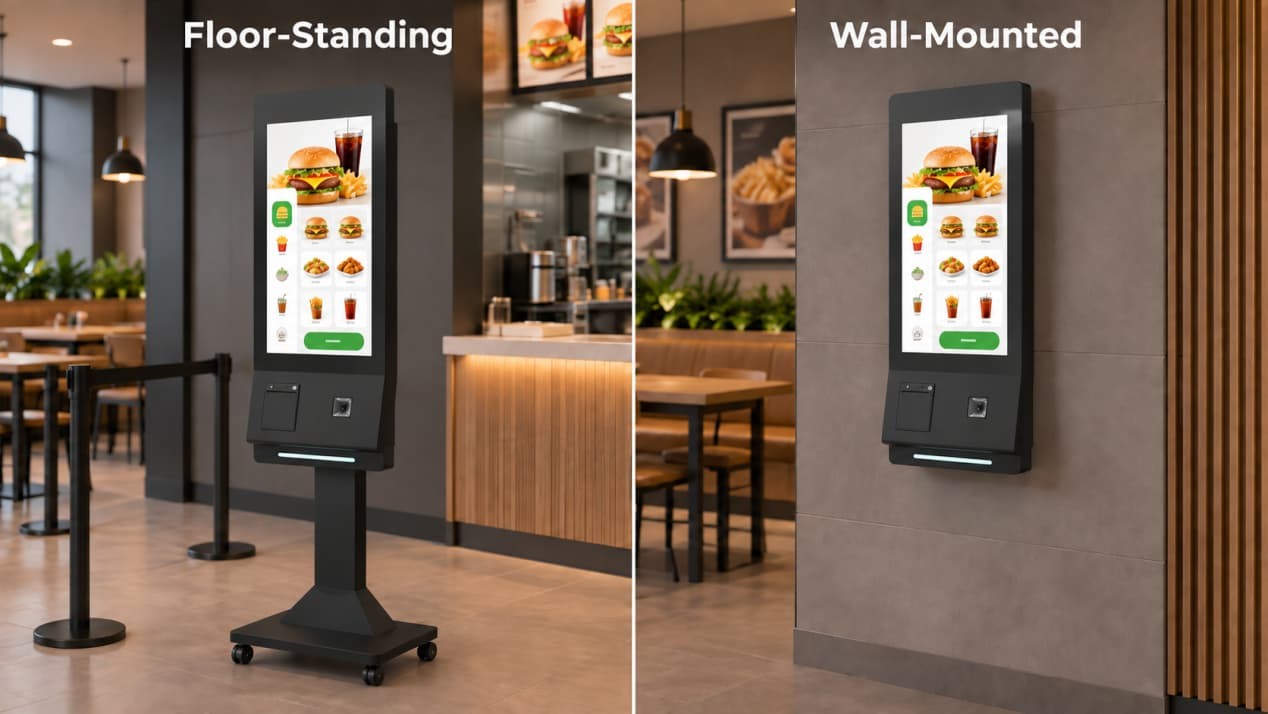
Floor-standing is the most common restaurant configuration. It can be positioned near the entrance, at the beginning of the ordering queue or beside a staffed counter. The full-height enclosure also provides space for the printer, scanner, payment components and internal computer.
A wall-mounted kiosk saves floor space and may suit compact cafés or narrow ordering areas. Its position must be coordinated with the wall structure, electrical outlet, network point and maintenance access before installation.
Both formats are available. The restaurant layout should determine which one is appropriate.
The kiosk must not obstruct the entrance, pickup area or main circulation route. Customers also need enough room to use the touchscreen without blocking people moving through the restaurant.
For a floor-standing installation, confirm the cable-entry position and whether the base will be secured. For a wall-mounted installation, ensure that staff can still access the printer, internal components and service door.
What Determines Self-Ordering Kiosk Price?
A fixed online price would not accurately represent every restaurant project because the screen and enclosure are only part of the finished system. RusinDisplay therefore provides quotations based on the required configuration.
The starting hardware includes the 27-inch touch display, enclosure, internal computing system, QR code scanner and 80 mm thermal printer. The final price then changes according to several project variables.
Computing configuration includes the choice between i5 and i7 hardware and the required Android or Windows environment.
Payment hardware may include a card terminal, NFC/contactless reader or another market-specific transaction device. The terminal model can also affect enclosure openings, brackets and internal wiring.
Software integration depends on the third-party ordering application, POS, KDS, printer drivers and payment interfaces. A standalone ordering application requires less coordination than a system that must synchronize menus, payments and kitchen orders across several platforms.
Structural customization may include housing colors, logo treatment, payment-terminal openings, device brackets, mounting format and other external components.
Delivery and installation requirements depend on order quantity, packaging, destination and whether the project uses a standard or customized structure.
The minimum order quantity is one unit. Standard configurations generally require 5–10 working days, while customized projects need additional production time. All RusinDisplay products include a three-year warranty.
When comparing quotations, check whether payment hardware, software licences, integration, freight and installation are included. Two kiosks with similar screen specifications may represent very different project scopes.
Plan for Cleaning and Service Access
Restaurant kiosks are touched repeatedly throughout the day. The front surface and transaction areas should therefore be included in the restaurant’s regular cleaning routine.
The touchscreen, QR scanner, optional camera, optional card-reading area and receipt outlet must remain clean and unobstructed. Grease, dust and paper debris can interfere with touch input, scanning or receipt delivery.
The rear service door provides access to the mainboard, power components, thermal printer and ventilation openings. Leave enough space for staff or technicians to open the panel, replace the receipt-paper roll and inspect internal components.
Do not block the ventilation openings with decorative panels, stored supplies or nearby furniture. Service access should be checked again after counters, queue barriers and other restaurant fixtures have been installed.
To configure a kiosk, first confirm the third-party ordering software, payment-terminal model and POS/KDS workflow. RusinDisplay can then match these requirements to the appropriate processor, operating system, peripheral layout and installation structure.
Contact the RusinDisplay team to discuss the hardware and integration requirements for your restaurant project.
Frequently Asked Questions
Does the kiosk include restaurant ordering software?
No. RusinDisplay provides the kiosk hardware and can support peripheral and system integration. The ordering application must be supplied by the customer or a third-party software provider.
Can the kiosk connect to an existing POS or KDS?
Yes. It can be integrated with POS and kitchen display systems, but compatibility must be confirmed for the restaurant’s specific software, interfaces and order workflow before deployment.
Are the QR scanner and receipt printer included?
Yes. The standard SO-K27 configuration includes a QR code scanner and an 80 mm thermal receipt printer. Payment terminals, NFC readers, cameras and other sensors are optional.
Does every kiosk include card payment?
No. Card and contactless payment components are selected according to the restaurant’s payment provider, local market and ordering software. The exact terminal model must be confirmed so that the enclosure opening, mounting bracket and cables can be configured correctly.
Do Android and Windows use different processors?
No. Both operating-system options use the same Intel Core i5 or i7 computing platform. The choice between Android and Windows depends on the requirements of the restaurant’s third-party ordering application.
Can the kiosk be wall-mounted?
Yes. Floor-standing and wall-mounted structures are supported, although the floor-standing format is more common in restaurant ordering areas.
How long does production take?
A standard unit generally requires 5–10 working days. Customized housings, payment-device integration and other project-specific changes require additional time.