




Printed menu boards are easy to understand but slow to update. Every price change, sold-out item, or new promotion means redesigning and replacing the printed panel.
Digital menu boards solve that problem, but the screens still need to fit the menu, the counter, and the way customers order. A small café may be well served by one display. A quick-service restaurant with meals, sides, drinks, and rotating promotions will usually need two or three.
This guide covers indoor menu screens installed above or behind restaurant ordering counters.
How Many Menu Screens Do You Need?
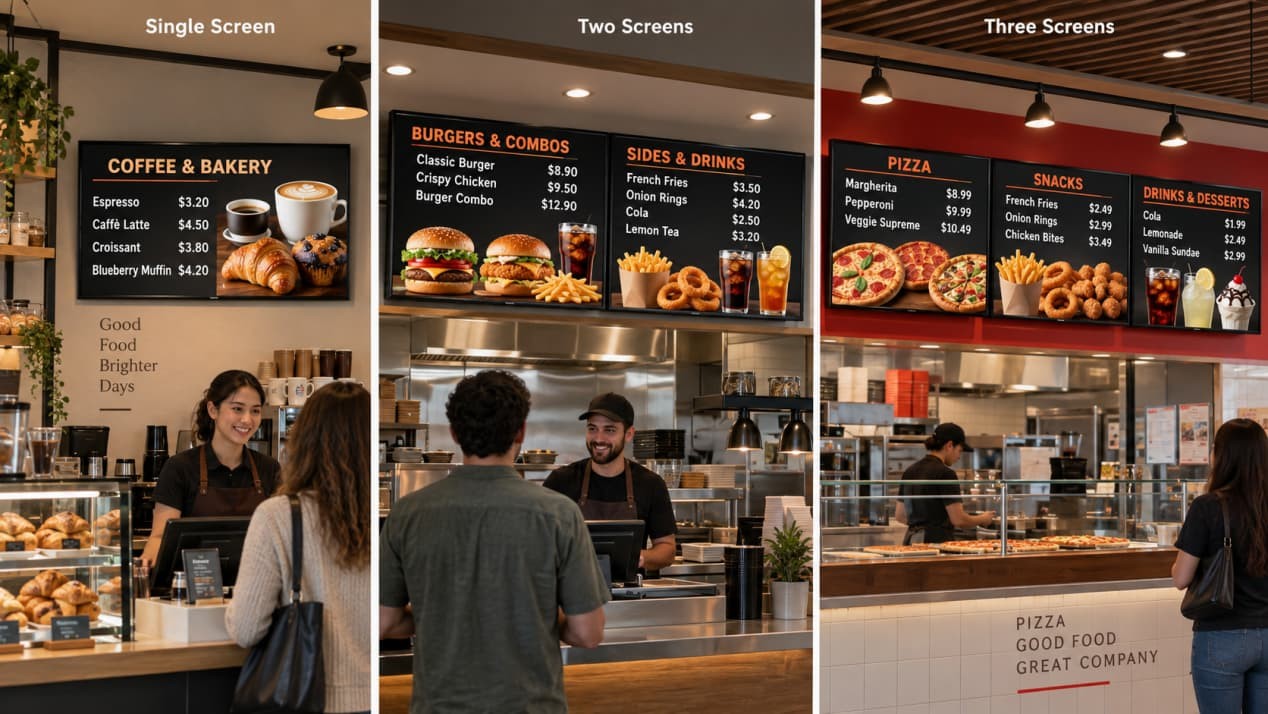
Start with the menu structure—not the number of screens used by another restaurant.
A café with a short drinks list may only need one screen. A bakery can use one display for products and prices, then place seasonal promotions elsewhere in the store. A larger QSR or fast-casual counter may need two or three screens to separate meals, sides, drinks, and promotional content.
More screens do not automatically make a menu easier to read. If every panel is packed with products, badges, photographs, and animated offers, customers still have to search for basic information.
Multi-screen layouts generally support three useful content arrangements:
- Different categories on each screen
- Separate schedules controlled from one management account
- One coordinated campaign extending across the screen row
The RusinDisplay digital menu board series supports both single-screen and multi-screen restaurant layouts. Screen count should be confirmed after checking menu density, available wall space, and the customer’s normal viewing position.
Sort Out the Installation Before the Walls Close
Menu screens are often chosen after the restaurant interior has already been finalized. That is when simple installation problems become expensive: outlets sit behind mounting rails, the wall lacks reinforcement, or ceiling lights reflect directly across the menu.
Give the final screen dimensions and mounting layout to the contractor before wall finishes, millwork, and electrical work are completed.
Structure and spacing: The wall, bulkhead, or ceiling support must carry the complete display and mounting hardware. A multi-screen row also needs consistent mounting height and spacing. Small alignment errors become obvious when several screens sit next to one another.
Power and network: Keep AC outlets and data ports outside the central bracket area. Otherwise, plugs may be trapped behind the mounting rails and prevent the screen from sitting correctly. Wi-Fi is convenient, but Ethernet is usually the more predictable option in restaurants with crowded wireless networks.
Lighting and sightlines: Review the screens from the entrance to the queue, the main waiting area, and the ordering point. Ceiling spotlights, large windows, polished tiles, and bright entrance areas can create reflections that wash out prices or smaller text.
Brightness alone does not solve every reflection problem. Ask the manufacturer about the available screen surface treatments and check the proposed position under the restaurant’s actual lighting.
Why 55 Inches Is a Useful Starting Point
For many ordering counters, 55 inches provides a practical balance between content area, mounting space, and cost. It is large enough for structured menu zones without occupying as much wall space as a larger display.
It is still only a starting point. A short café menu may work on a smaller screen, while a dense fast-food menu may need several 55-inch displays rather than one oversized panel.
The RusinDisplay 55-inch 4K digital menu board shows what an all-in-one commercial setup can include. The display has a 3840 × 2160 resolution and is specified at ≥350 cd/m² for controlled indoor lighting. It supports landscape or portrait installation and 24/7 operation.
Android playback is built into the display, with Wi-Fi and Ethernet available for content delivery. Windows configurations can be supplied when the restaurant needs a different software environment.
Because playback is integrated, each screen can run scheduled content without a separate computer mounted behind it. That keeps the installation cleaner and reduces the number of devices that staff need to manage.
Managing Prices, Promotions, and Dayparts
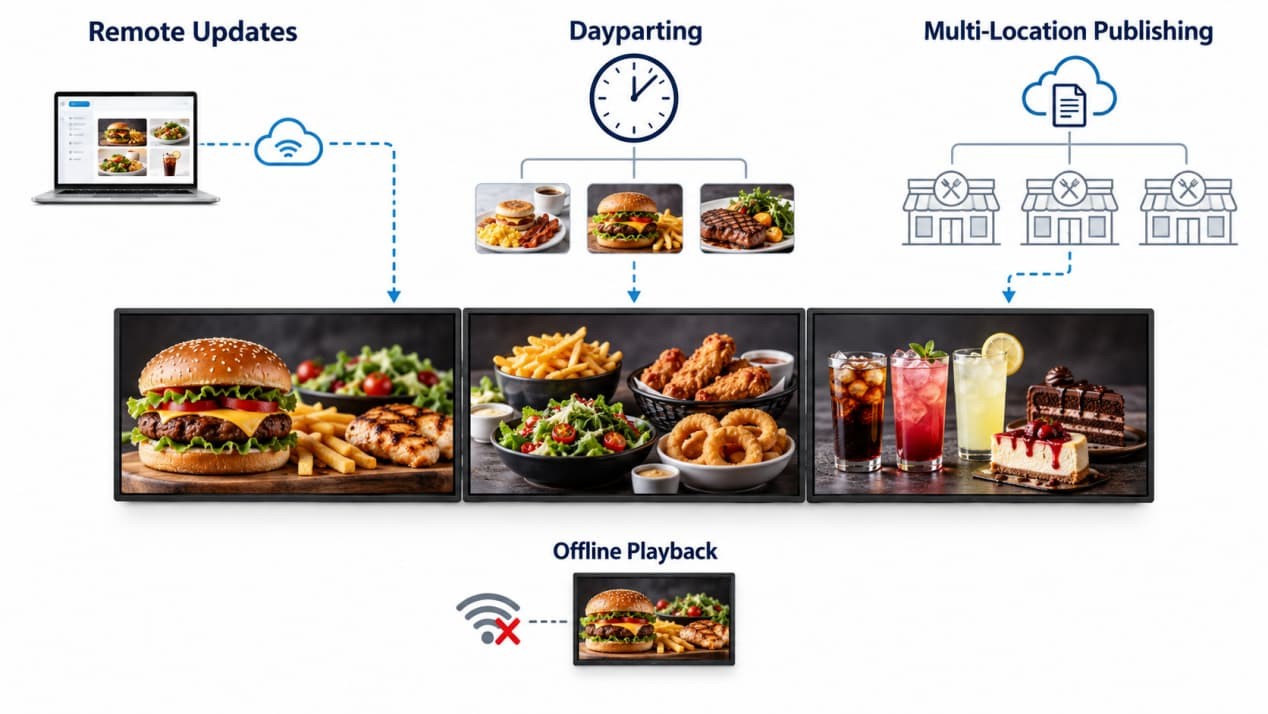
For restaurant staff, the main benefit of digital signage is not animation. It is the ability to change menus without replacing printed material or accessing every screen with a USB drive.
A cloud content management system allows authorized staff to update prices, replace product images, and remove sold-out items remotely. Dayparting can switch the screens from breakfast to lunch or dinner at preset times.
For restaurant groups, the same system can publish a shared promotion across several locations while retaining store-specific prices or menu items. Each screen can also follow its own playlist, which is useful when meals, drinks, and promotional content occupy separate panels.
Downloaded media remains available for local playback if the network connection drops. Remote changes will synchronize after the display reconnects.
Scheduled power control and automatic restart after a power interruption are equally useful. Restaurants that shut down the main electrical supply overnight should test that the displays return directly to the scheduled menu when power comes back.
Design the Menu at the Customer’s Distance
A menu that looks clear on a laptop may be unreadable above a counter. The only reliable check is to view the finished layout from the actual queue.
Stand where customers first enter the line, where they spend most of their waiting time, and where they place the order. Check the smallest price, modifier, and product name at each position. If these details disappear at the farthest normal viewing point, simplify the layout or increase the text size.
Keep the reading order consistent. Product names and prices should appear in predictable positions, and related items should stay together. Large photographs work well for featured meals, but using a separate image, badge, description, and offer for every item quickly overwhelms the page.
Motion also needs restraint. Short animations can attract attention to a promotion, but the main menu should remain accessible. A customer should not have to wait for a promotional sequence to finish before finding a product or price.
Review the final artwork at full scale on the intended screen. This exposes problems that a desktop preview will not show, including excessive content density, weak contrast, awkward screen-to-screen transitions, and reflections from nearby lighting.
What Determines the Project Cost?
The display price is only part of the budget.
Initial costs may include the commercial displays, mounting hardware, electrical and network preparation, installation, content design, and content-management setup. Multi-screen rows may require more accurate wall preparation because uneven height or spacing is much easier to notice across several displays.
Ongoing costs include content updates, network service, software management, and eventual maintenance. An all-in-one display simplifies the hardware side because it does not need a permanently connected playback computer for every screen. Remote publishing also reduces the time spent updating individual locations.
When comparing quotations, check whether they cover the same scope. One quotation may include mounting hardware, content software, and warranty support, while another covers only the display.
All RusinDisplay products include a three-year warranty. During the warranty period, parts damaged by non-human causes can be replaced after the issue has been verified. RusinDisplay also provides remote guidance for replacement and troubleshooting.
Six Checks to Complete Before Opening
Run these checks while the contractor and content team are still available. Use the restaurant’s real menu, normal lighting, and intended operating schedule.
| Acceptance Check | Pass Condition | Problem to Correct |
| Queue-view test | Product names, prices, and modifiers are readable from normal waiting positions | Text only works when viewed directly in front of the screen |
| Reflection test | Important menu content remains visible under normal restaurant lighting | Spotlights or windows obscure prices and smaller text |
| Update test | Staff can publish a change to the intended screen | Content reaches the wrong display or still requires local USB access |
| Offline test | Downloaded content continues playing after the network is disconnected | The screen freezes, goes blank, or shows a connection error |
| Power-recovery test | The display restarts and returns to scheduled content after AC power is restored | It remains in standby or stops at the system interface |
| Schedule and alignment test | Daypart changes occur at the correct time and multi-screen content is positioned correctly | The previous menu remains active or coordinated artwork does not line up |
Plan Your Restaurant Menu Display
RusinDisplay provides indoor digital menu boards for single-screen and multi-screen installations, with integrated playback, remote publishing, dayparting, offline playback, and configurable Android or Windows systems.
To discuss the screen count, mounting layout, and content setup for your restaurant, contact the RusinDisplay team.
Frequently Asked Questions
How many digital menu screens does a restaurant need?
A small café or bakery may only need one screen. A QSR with meals, sides, drinks, and promotional content will often benefit from two or three. The final number depends on menu density, wall space, and the distance between the queue and the screens.
Can multiple restaurant menu screens show different content?
Yes. Each screen can run its own content and schedule while being managed from the same system. The screens can also display coordinated artwork across the complete row.
Will the menu keep playing without an internet connection?
Downloaded content can continue playing from local storage after the connection drops. New prices, images, or schedules will synchronize when the display reconnects.
Does each screen need a separate media player?
No. An all-in-one digital menu board includes the playback system inside the display enclosure. An external player is only needed when the project uses specialized software or a different control architecture.