




Floor standing digital signage is a self-supporting commercial display used for advertising, wayfinding, event information, and interactive content. It can be installed in shopping malls, hotels, exhibitions, retail stores, reception areas, and other indoor public spaces without occupying a wall.
Choosing the right display involves more than selecting a screen size. Its position must suit the movement of visitors, the base must match the installation, and the operating system must support the intended content. Touchscreens and cameras are useful for some projects but unnecessary for others.
30-Second Procurement Cheat Sheet
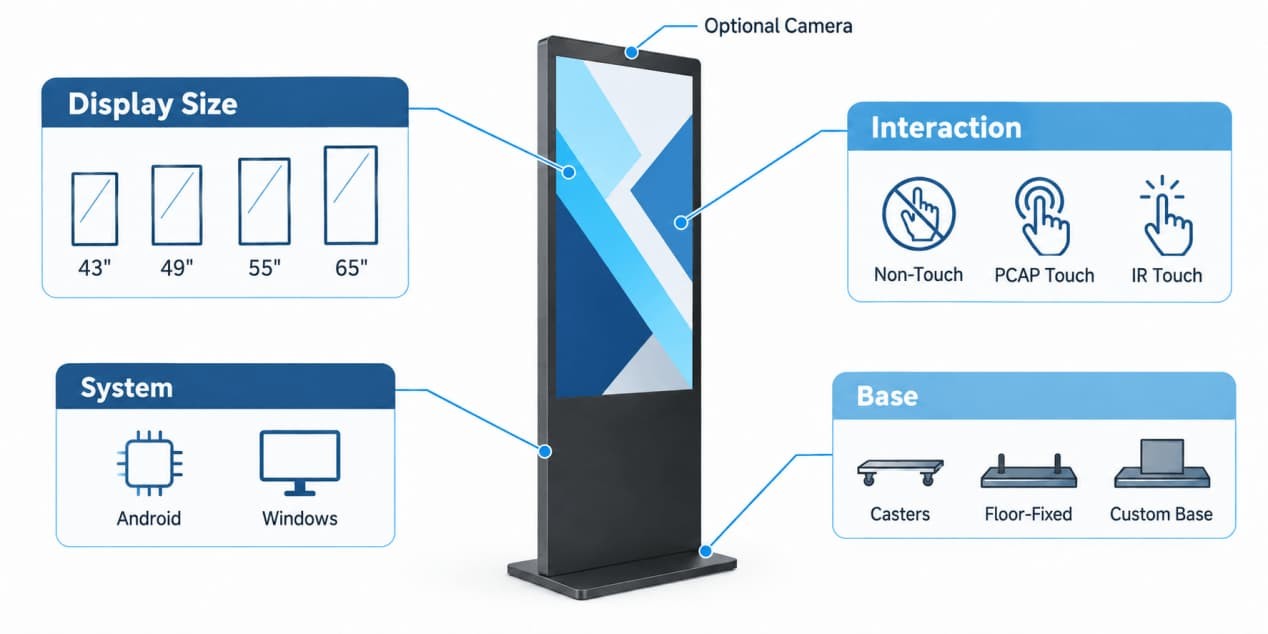
The following combinations provide practical starting points for common projects. The final configuration can be adjusted to suit the installation and software requirements.
| Project Type | Suggested Configuration | Suitable Applications |
| Simple advertising | 43" or 55" + Android + non-touch + caster wheels | Retail campaigns, hotel information and temporary displays |
| Premium interactive display | 55" or 65" 4K + PCAP touch + Windows | Flagship stores, shopping mall atriums and interactive brand presentations |
| Cost-conscious interaction | 55" + infrared multi-touch + Android or Windows | Exhibitions, public directories and information displays |
A simple advertising display does not need touch or Windows. Interactive catalogs, directories, and customer-facing applications may require additional hardware and software.
What Is Floor Standing Digital Signage?
A floor standing digital signage display combines an LCD screen, enclosure, base, power system, and optional media player in one upright structure. Most models use a portrait layout because it works well for advertising posters, directories, product images, and vertically arranged information.
The terms “floor standing digital signage” and “freestanding digital signage” usually describe the same product format. Unlike a wall-mounted display, the unit stands independently on the floor and can be positioned where customers or visitors naturally pass through a space.
A floor-standing display can operate as a simple advertising screen or as an interactive terminal. Its function depends on the operating system, software, touchscreen, camera, and selected accessories. It does not automatically include the payment, scanning, or printing hardware associated with a complete self-service kiosk.
Applications and Screen Size Selection
Choosing the right screen size means balancing available floor space, content detail, visitor movement, and the distance from which people will use the display.
| Screen Size | Typical Viewing Pattern | Recommended Locations | Typical Content |
| 43 inch | Close-range viewing | Corridors, compact entrances, checkout queues and product areas | Individual promotions, product details and short text |
| 49 inch | Close- to mid-range viewing | Hotel elevator lobbies, retail entrances and medium exhibition booths | Event schedules, brand notices and directories |
| 55 inch | Mid-range viewing and interaction | Shopping mall walkways, campaign zones and exhibition booths | Promotional video, digital posters and interactive applications |
| 65 inch | Mid- to longer-range viewing | Large hotel lobbies, flagship-store atriums and spacious showrooms | Large campaign visuals and interactive product catalogs |
Choose a 43- to 55-inch display when visitors need to read detailed information or interact with the screen at close or medium range. A 55- or 65-inch display is better suited to open spaces where the content must remain noticeable from farther away. Final visibility still depends on the content: detailed directories need larger text and closer placement, while simple campaign visuals can be understood from a greater distance.
Visitors rarely approach a freestanding screen from directly in front. A broad LCD viewing angle helps the chosen screen size remain useful as people pass from either side, instead of delivering its full visual impact only from the center.
55-Inch 4K Floor Standing Digital Signage
The 55-inch 4K freestanding digital signage display is a practical middle-size option for shopping malls, hotels, exhibitions, and retail entrances.
| Specification | 55-Inch Configuration |
| Display panel | S-IPS TFT-LCD with tempered glass |
| Resolution | 3840 × 2160, 4K UHD |
| Brightness | 250–800 cd/m² configurable |
| Viewing angle | 178° horizontal and 178° vertical |
| Touch options | Non-touch, 10-point capacitive touch or 20-point infrared touch |
| System options | Android or Windows |
| Connectivity | USB, HDMI, RJ45 Ethernet, MicroSD, Wi-Fi and audio |
| Product dimensions | 1830 × 728.4 × 80 mm |
| Net weight | 41.3 ± 1.5 kg |
The 55-inch model combines an S-IPS panel with 178° horizontal and vertical viewing angles, helping content remain visible as visitors approach from different directions. Its 3840 × 2160 4K UHD resolution keeps fine text, interactive directories, and promotional video clear, while the configurable 250–800 cd/m² brightness range allows the display to be matched to different indoor lighting conditions.
Mobile, Floor-Fixed, or Custom Base?
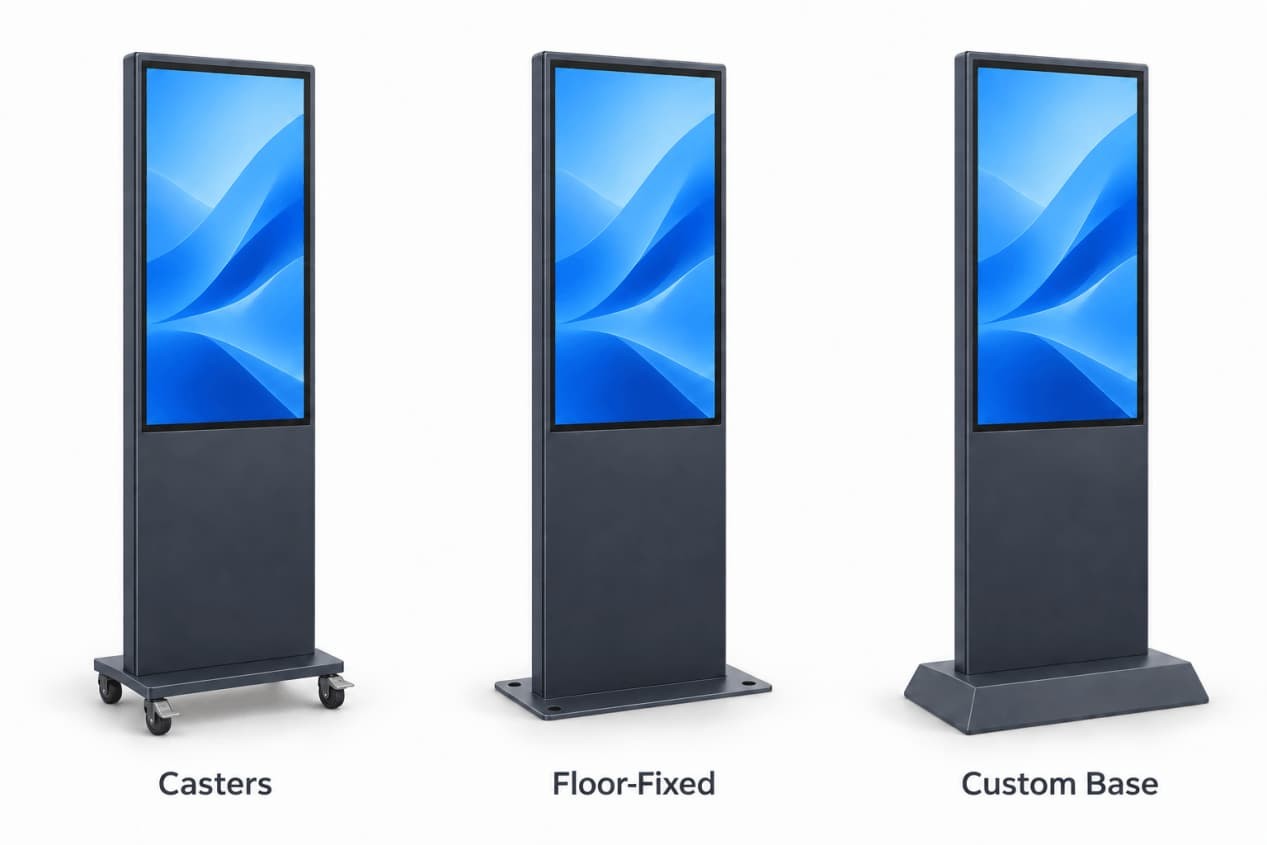
The base should follow the way the space is used. Mobility is useful when layouts change, while permanent installation is usually more appropriate in a fixed, high-traffic location.
| Project Requirement | Suitable Base | Why |
| Promotions and layouts change frequently | Caster wheels | Staff can reposition the display when the space changes |
| The display stays in one busy location | Floor-fixed base | Provides a stable, permanent installation |
| The enclosure must match furniture or architecture | Custom base | Allows the structure to fit the space and interior design |
A display with wheels should be disconnected from power and network cables before it is moved. After positioning the unit, staff should lock the wheels and keep the cables outside the walking path.
For a floor-fixed installation, confirm the final position, floor condition, and cable route before installation. The base should not obstruct doors, exits, store fixtures, or normal visitor circulation.
RusinDisplay can also configure a custom base when the standard structure does not fit the available space or design. Appearance, stability, wiring, and maintenance access can be considered within the same structural design.
Android vs Windows: Which System Fits the Project?
Android and Windows describe the operating system inside the display. They do not refer to the LCD panel or image quality.
| System | Best Suited To | Practical Advantage |
| Android | Advertising playback, scheduled content, split-screen layouts and routine signage management | Simple deployment for standard digital signage |
| Windows | Product lookup software, visitor systems, web applications and complex interactive programs | Supports PC-based software and broader system integration |
Android is usually sufficient when the display primarily plays images, videos, promotions, and scheduled information. Windows is more suitable when the display must run a specific desktop program or connect with an existing PC-based system.
The operating system should follow the software requirement. Windows may add unnecessary complexity to a display that only needs scheduled advertising, while Android may not support software developed specifically for Windows.
Non-Touch, PCAP, or Infrared Touch?
Touch selection should follow the required appearance, interaction method, application, and budget.
| Touch Option | Best Suited To | Purchasing Advantage |
| Non-touch | Advertising, promotions, schedules and passive information | Lower configuration cost, no accidental touch input and simpler maintenance |
| 10-point PCAP | Premium retail, flagship stores and finger-operated interfaces | Clean, modern front surface with responsive multi-touch interaction |
| 20-point infrared | Public information, exhibitions and large interactive displays | Cost-effective large-screen interaction with support for gloves and suitable styluses |
RusinDisplay can also integrate an optional camera when the project requires image or video input. The camera and its associated software should be selected according to the intended application.
Project Showcase: 80 Units Shipped to Europe
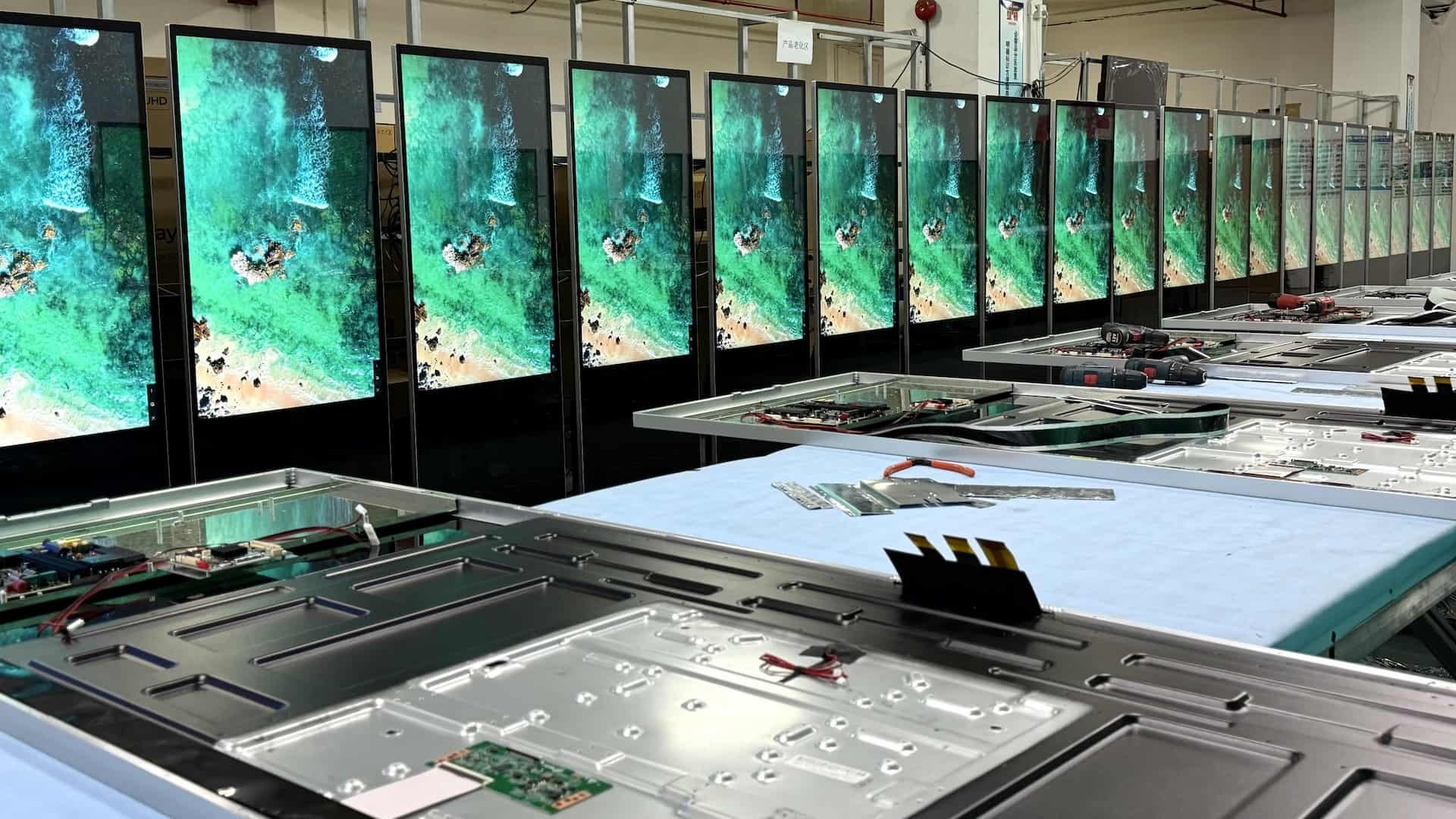
RusinDisplay produced and shipped 80 units of 55-inch floor-standing digital signage kiosks for a European client. The delivered configuration included 4K resolution, PCAP touch, and 500-nit brightness.
The production record covers assembly, functional testing, protective packing, and container loading. The displays were prepared for export using honeycomb packaging and wooden cases to protect the units during transportation.
For this order, the client reduced procurement costs by 30% compared with its previous supplier while retaining the required product configuration and after-sales support. The project included a three-year warranty and replacement support for qualifying defective units.
View the assembly, testing, packing, and shipping process on YouTube.
Plan Power, Network, and Maintenance Before Placement
A floor stand allows flexible positioning, but the display still needs power, content access, and maintenance space.
Place the unit close enough to a suitable power source to avoid running a loose cable through a visitor walkway. If the content system depends on a network connection, check Wi-Fi coverage or plan an Ethernet route before fixing the base.
The ports and service areas must remain accessible. Placing the rear of the display tightly against furniture can make cable replacement and routine maintenance difficult.
Reflections from spotlights, windows, mirrors, or polished surfaces can reduce contrast even when the display is sufficiently bright. Test the proposed position with representative content under the lighting normally used in the space.
Configure Your Floor Standing Digital Signage
The RusinDisplay indoor floor standing digital signage series is available in multiple core sizes for shopping malls, hotels, exhibitions, retail stores, and other indoor commercial environments. Configurations include Android or Windows industrial computer systems, non-touch or multi-touch operation, optional cameras, and caster-wheel, floor-fixed, or customized structural bases. Black, white, and customized enclosure finishes are also available.
All models are covered by a three-year manufacturer warranty. If you have further technical questions or purchasing requirements, contact the RusinDisplay team to discuss the configuration for your project.
Frequently Asked Questions
Can floor standing digital signage work without a touchscreen?
Yes. Non-touch models can display advertising, directions, announcements, and scheduled information. Touch is only necessary when visitors need to control or browse the content.
Should I choose Android or Windows?
Choose Android for standard advertising playback and routine content management. Choose Windows when the project requires PC software, a custom Windows application, or integration with another business system.
Can floor standing digital signage be moved?
It can be moved when configured with caster wheels. Disconnect its cables before moving it, then lock the wheels and secure the connections in the new position.
Can an indoor floor-standing display be installed outdoors?
No. A higher brightness option does not make an indoor enclosure suitable for rain, dust, direct sunlight, or extreme temperatures. Outdoor installations require a display designed for those environmental conditions.