




An outdoor kiosk enclosure protects the display and electronics from weather, heat and unauthorized access. It also supports the screen, internal hardware and service doors as one complete structure.
Finalize the enclosure only after the installation site is known. A sheltered entrance, roadside location and coastal promenade place very different demands on the same cabinet.
What Does an Outdoor Kiosk Enclosure Protect?
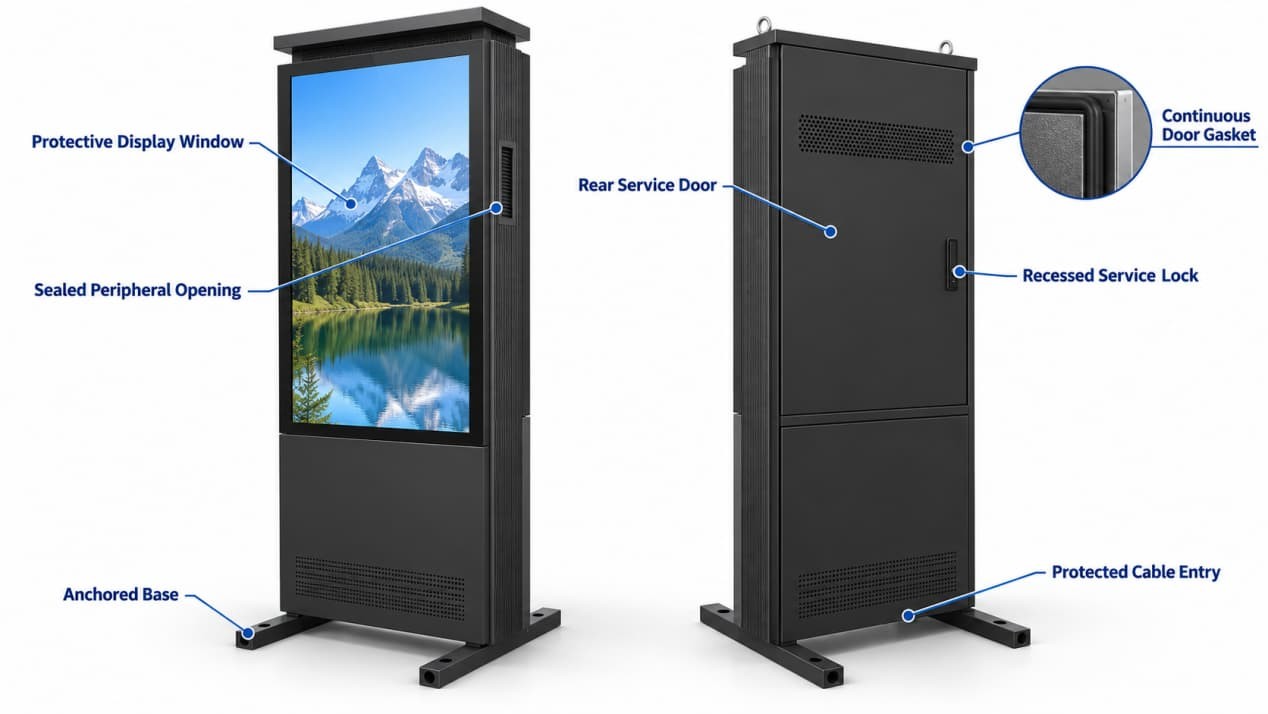
The protection boundary includes the display window, doors, gaskets, locks, cable entries, vents or cooling equipment and every opening made for a peripheral. Water can bypass a well-built cabinet through a poorly compressed gasket, unsuitable cable gland, speaker grille or printer outlet.
A printer outlet, scanner window, antenna fitting or field-drilled cable hole becomes part of the enclosure boundary. Each opening needs suitable sealing, edge protection and strain relief.
The cabinet also carries structural loads. A freestanding outdoor display needs a level, securely anchored base. A wall-mounted unit needs fixing points suited to both the equipment weight and the supporting wall.
Material Choice Starts with the Site
Powder-coated steel is rigid and readily formed into doors, bezels, brackets and reinforced bases. Its outdoor durability depends on surface preparation, coating coverage, protected edges and the treatment of any holes made during installation.
Stainless steel is often considered where salt, cleaning chemicals or persistent moisture increase corrosion risk. The grade still matters. Coastal protection also depends on the hinges, locks, fasteners, weld treatment and contact between dissimilar metals—not only the main cabinet panels.
Aluminum reduces weight and offers useful inherent corrosion resistance. It can suit wall-mounted kiosks or projects with installation-weight limits, provided the design accounts for stiffness, joint construction and surface finish.
Check welded seams, fasteners and exposed cut edges separately. Their coatings and corrosion behavior may differ from the main panels.
IP and NEMA Ratings Describe Different Tests
The IP Code in IEC 60529 classifies the protection an enclosure provides against access, solid objects, dust and water. The first digit concerns access and solid-object protection; the second concerns water ingress.
The rating applies to the tested assembly. A separately rated power supply does not establish the rating of the finished kiosk. Doors, display windows, fittings and installed accessories must all preserve the intended protection level.
North American projects may specify a NEMA enclosure type. NEMA and IP classifications overlap, but they do not describe identical tests. The official NEMA enclosure-type conversion guide allows NEMA types to be compared with the IP requirements they meet or exceed; it explicitly warns against using the table to convert an IP classification into a NEMA type.
A brighter backlight also adds heat inside the cabinet, so optical and thermal requirements should be planned together. The outdoor LCD brightness and IP rating guide explains that relationship in more detail.
Heat Management in a Sealed Cabinet
Sunlight heats the front glass and metal enclosure. The LCD backlight, computer, power supply and network hardware add heat from inside. Sealing the cabinet restricts how easily that heat can escape.
Some cabinets can release heat through the metal structure and controlled internal circulation. Higher solar or equipment loads may require a heat exchanger or active cooling.
Check the operating-temperature rating rather than relying on the storage range. The expected cabinet temperature under continuous load must remain within the operating limits of the installed components.
Rapid temperature changes can also produce condensation even when no rain has entered. Insulation, controlled heating, pressure-equalizing vents or humidity management may be needed, depending on the climate and service conditions.
The Display Window Is Part of the Protection System
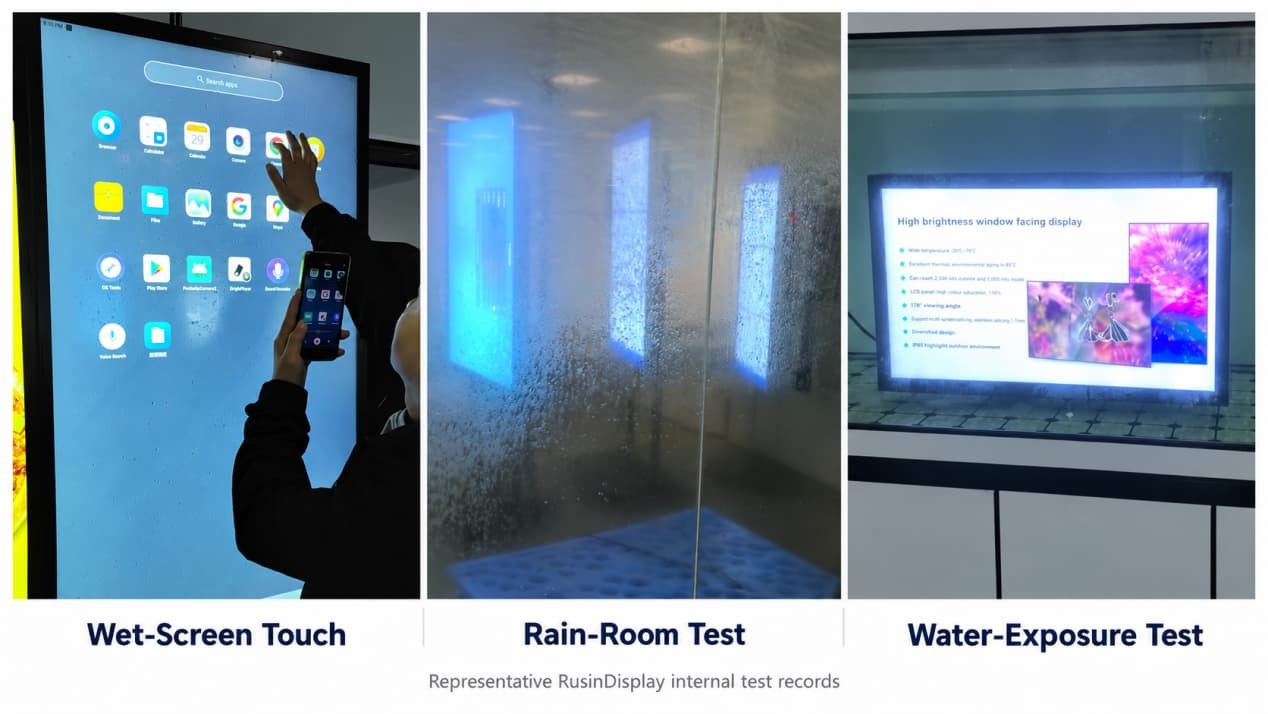
The front glass has to protect the LCD without making the screen difficult to read or use. Glass thickness, strengthening, surface treatment, edge support, gasket compression and mounting method form one interface.
Anti-glare treatment diffuses sharp reflections, while anti-reflective treatment reduces the amount of light reflected at the surface. Optical bonding removes the air gap between the cover glass and LCD, which can reduce internal reflections, but it also changes the construction and repair process.
Touch operation adds another set of variables. Rain droplets, gloves, cleaning residue and controller settings can affect input. Wet-screen behavior should therefore be checked under conditions that resemble the intended installation.
Basic touch input can still register when droplets remain on the glass. This describes touch behavior under surface moisture; it does not establish the enclosure's IP rating.
Security Without Sacrificing Service Access
Service doors need continuous gasket compression and protected locks. Concealed hinges, tamper-resistant fasteners and internally routed cables reduce obvious attack points.
Inside the cabinet, technicians should be able to reach replaceable parts without disturbing the display seal. Cables need room to move without being pinched. IP covers access, solids and water, while mechanical impact may be assessed separately through an IK rating.
Installation Planning Comes Before Groundwork
A freestanding kiosk normally needs a level structural foundation, correctly positioned anchors and a protected route for power and data. Bringing cables through the base keeps them away from pedestrians, but the entry still requires sealing and strain relief.
Leave enough space for heat release and service-door access. The screen should be visible from the natural approach without narrowing the main pedestrian route. Resolve drainage, snow, irrigation spray, vehicle movement and accessibility before the concrete base, conduit and paving are complete.
What to Provide When Specifying the Enclosure
Before enclosure design begins, confirm three items:
- Site exposure: sunlight direction, rain, ambient temperature and cleaning method.
- Internal heat load: the display, power supply, computer and network hardware.
- Installation details: anchoring, cable entry, peripheral openings and service-door clearance.
FAQ
Is IP65 sufficient for every outdoor kiosk enclosure?
No. The required protection depends on whether the kiosk faces sheltered rain, wind-driven dust, hose cleaning, standing water or full weather exposure. Use the site conditions and applicable local requirements to set the rating.
Does adding a printer or scanner affect enclosure protection?
It can. A printer outlet, scanner window, speaker grille, antenna fitting or other accessory changes the cabinet boundary. Review the final configuration with those parts installed.
Can installers drill cable holes in the cabinet on site?
Only when the hole location, fitting, corrosion treatment, sealing method and cable strain relief have been approved for that enclosure. An unplanned opening can expose bare metal, bypass the intended cable-entry path and compromise the protection of the finished kiosk.