




An outdoor touch screen kiosk must remain readable and responsive through changing daylight, rain, temperature shifts and frequent public use. These conditions affect the complete unit: the LCD, touchscreen, protective glass, enclosure, computing system and installation structure.
This guide uses a 55-inch freestanding kiosk as the main reference. The same selection process applies to 43-, 49-, 65- and 75-inch units used at scenic areas, campuses, transport facilities and public information points.
Outdoor Touch Screen Kiosk at a Glance
- Standard touch configuration: 10 points, upgradeable to 20 points
- Standard brightness: 200–3,000 nits with ambient-light adjustment
- Front protection: 5 mm AG etched tempered glass and IK10 impact resistance
- Environmental protection: IP66 enclosure and IP68-rated outdoor power supply
- Standard operating system: Android 14, with Windows 10/11 available as an option
- Representative 55-inch hardware price: approximately USD 2,000 before customization, software, freight and installation
When Does an Outdoor Kiosk Need Touch?
Touch becomes useful when visitors need to search, filter or navigate information. A tourist may look for an attraction, a campus visitor may select a building, and a passenger may need to compare routes or change the interface language.
Typical applications include:
- attraction maps and visitor information at scenic areas;
- campus directories, building searches and parking guidance;
- station, interchange and passenger-service information;
- public-service instructions and searchable facility directories.
Locations that only need to show a fixed arrow, service announcement or advertising loop can use a non-touch outdoor display. Larger projects often combine both formats: interactive kiosks at entrances and non-touch directional displays farther along the route.
Once interaction is required, touch performance must be evaluated under the same conditions in which people will use the kiosk.
Touch Performance in Water, Rain and Gloves
Ten touch points are sufficient for most public information applications. Searching, selecting a destination, moving around a map and changing language rarely require more than a few simultaneous contacts. A 20-point configuration is available for interfaces that use more complex multi-touch gestures or allow several people to interact at once.
The specified touch accuracy is 5 μm, and the system supports gloves up to 5 mm thick. Touch sensitivity can be adjusted to suit the project, while the touch controller communicates with the Android or Windows computer through USB.
The gloves expected at the installation site should be included in acceptance testing. Material, thickness, moisture and fit can all affect how a glove interacts with the touch surface.
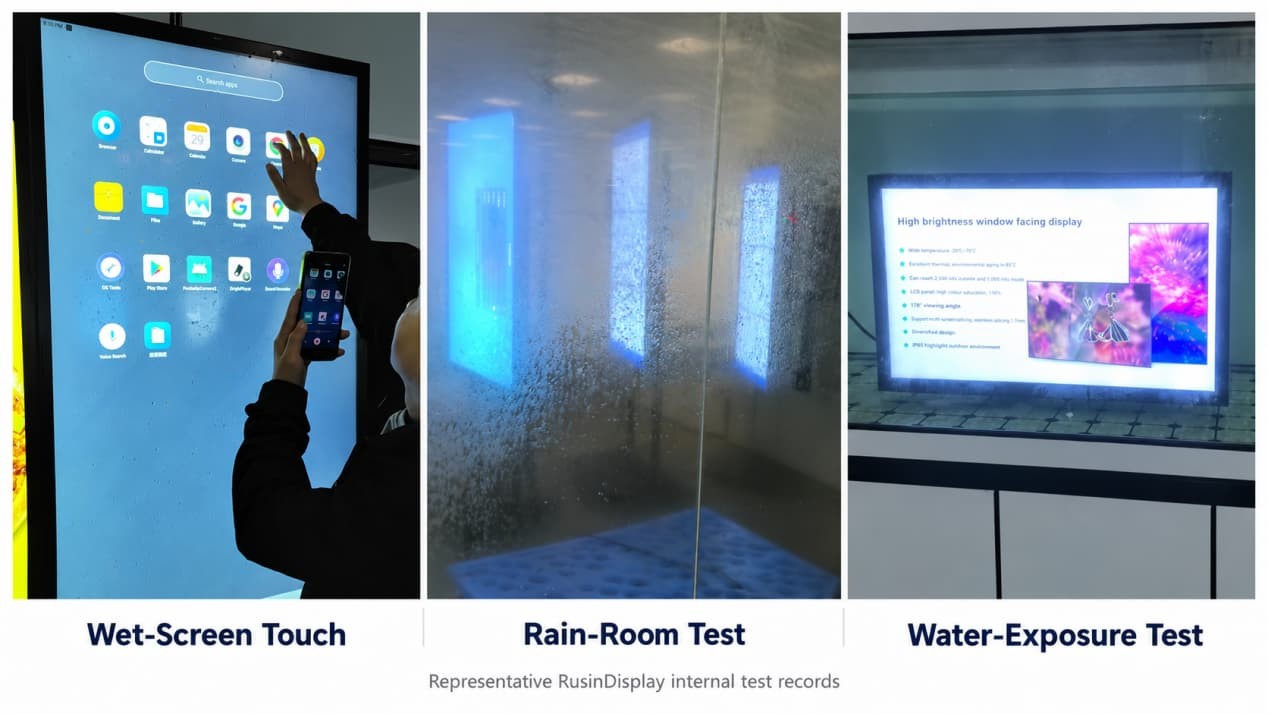
RusinDisplay’s internal test records cover three relevant outdoor conditions:
- touchscreen operation with visible water droplets on the glass;
- rain-room exposure testing of representative outdoor units;
- water-soak testing of representative sealed units.
The wet-screen test shows the interface responding while droplets remain on the active surface. The rain-room and water-soak tests provide further engineering evidence for the sealed structure under sustained water exposure. Together, these tests give project teams a more useful reference than a dry indoor touch demonstration alone.
The application interface should also suit outdoor use. Large touch targets, clear feedback and enough spacing between adjacent controls make the kiosk easier to operate with wet fingers or gloves.
Daylight Readability Requires More Than Peak Brightness
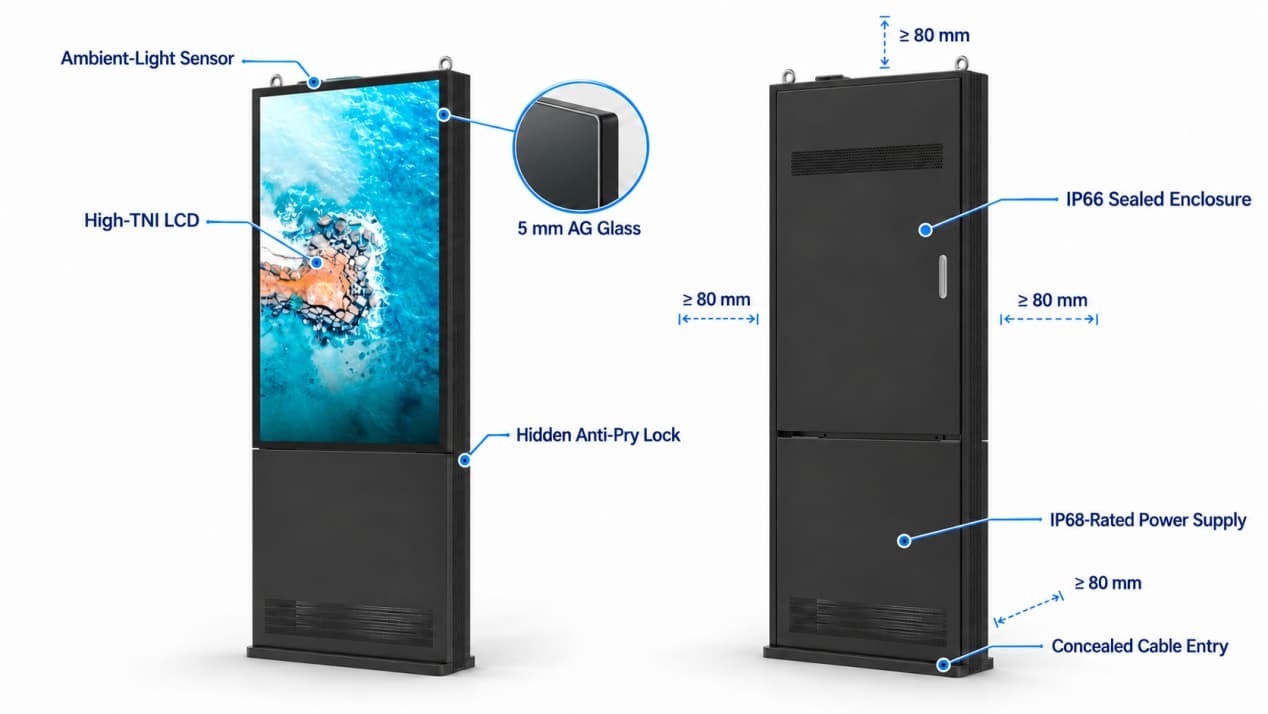
The standard display adjusts automatically between 200 and 3,000 nits through an ambient-light sensor. It raises the backlight in strong daylight and reduces it as ambient light falls, improving visibility while limiting unnecessary power consumption and heat.
Surface reflection still affects how the screen looks outdoors. A screen facing low afternoon sun may be harder to read than one installed under a canopy, even when both use the same LCD and brightness setting.
The standard front surface uses 5 mm AG etched tempered glass. AG treatment scatters concentrated reflections so that overhead light and bright surroundings are less likely to appear as sharp mirror images.
AR treatment and optical bonding are available as project options. AR reduces light reflected from the front surface, while optical bonding removes the air gap between the protective glass and LCD to reduce internal reflections.
AG softens concentrated glare, AR reduces surface reflection, and optical bonding limits reflections within the screen assembly. Their value depends on the kiosk’s orientation, daylight exposure and viewing position.
Content design also affects outdoor readability. Strong contrast, solid color fields and clear type usually perform better than pale gray text, fine lines or visually busy backgrounds.
For a broader explanation of brightness, reflection control, enclosure protection and heat, see the outdoor LCD display guide.
High-TNI LCD for Direct-Sun Installations
Direct sunlight can raise the LCD-cell temperature well above the surrounding air temperature. This is why the kiosk uses a High-TNI LCD panel designed to tolerate higher internal panel temperatures and reduce the risk of temporary dark patches or screen blackening during prolonged solar exposure.
The High-TNI panel works together with automatic brightness adjustment and the enclosure’s heat-release design. This combination helps the display maintain readable content across changing daylight and temperature conditions, including installations that receive several hours of direct sun.
Site orientation still affects the thermal load. A west-facing kiosk exposed to strong afternoon sunlight requires more careful heat-release planning than the same unit installed beneath a shaded entrance.
Enclosure Protection, Impact Resistance and Physical Security
The representative kiosk uses an IP66 sealed enclosure, an IP68-rated outdoor power supply, IK10 impact resistance and 5 mm protective glass.
The IP66 enclosure protects the internal display and electronics against dust and powerful water jets. The IP68-rated outdoor power supply strengthens protection at the power subsystem, while the IK10-rated front structure and tempered glass add impact resistance for unattended public locations.
The public-facing exterior uses no exposed screws. Service access is positioned away from normal users and secured through concealed anti-pry lock openings, reducing opportunities for unauthorized opening, component removal or cable tampering.
The standard glass configuration operates from −25°C to 50°C. An optional wide-temperature glass configuration extends the specified range to −35°C to 75°C. The wide-temperature option is intended for very cold regions, high summer temperatures and installations exposed to prolonged solar heating.
Ambient temperature is only one part of the thermal load. The LCD backlight and computing hardware generate heat inside the enclosure, while direct sun heats the glass and metal cabinet from outside. Nearby walls, decorative panels and landscaping can then restrict heat release.
For this product family, allow at least 80 mm of open space behind, above and on both sides unless the approved project drawing specifies a different arrangement. Service doors and access panels also need enough room to open without dismantling surrounding construction.
Android, Windows, Cloud CMS and Application Software
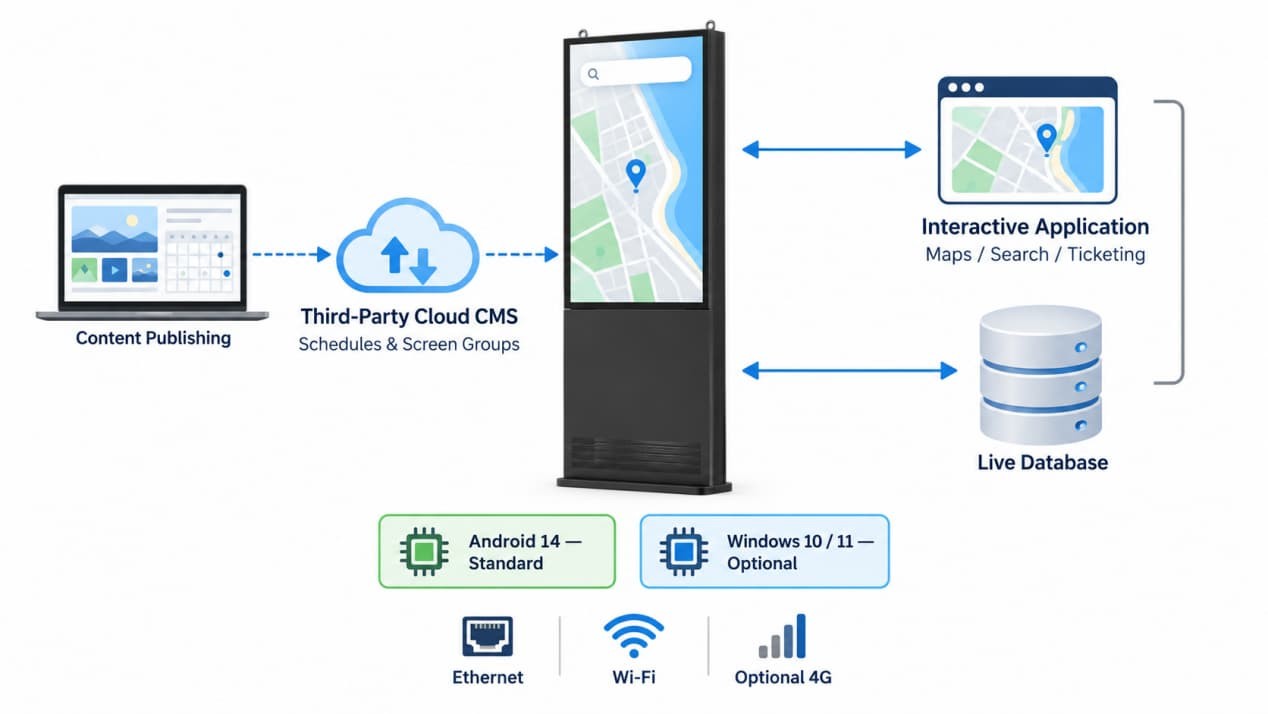
Android 14 is the standard operating environment. It suits browser-based information services, content playback and Android-compatible touch applications. Windows 10/11 is available where the project depends on desktop software, Windows-specific drivers or an established corporate IT environment.
The kiosk supports integration with third-party Cloud CMS platforms for remote publishing, playlist scheduling, screen grouping and device management. The CMS platform, user account and software license are supplied by the customer or its selected software provider.
Third-party Cloud CMS and interactive applications perform different jobs. A CMS manages published media and screen schedules; the interactive application handles maps, searches, ticketing or live service data. Confirming both software layers before production allows the operating environment, network connection and hardware interfaces to be configured correctly.
RusinDisplay supplies the display hardware, touch system, Android or Windows environment and required interfaces. The customer or third-party software developer supplies the searchable map, attraction database, passenger-information service, ticketing workflow or other project-specific application.
Ethernet and Wi-Fi can be used where suitable infrastructure is available. Optional 4G connectivity is useful at remote campus, scenic-area or transport locations where installing a wired connection would add substantial civil work.
Cameras, readers, printers and other peripherals can be integrated for projects that need identification, scanning, document output or additional user input. Their physical position, drivers, power requirements and software API should be confirmed before the enclosure enters production.
Installation Is Part of the Specification
A freestanding outdoor kiosk works best at a point where visitors naturally stop and make a decision: beside an entrance, near a route junction or within a designated information area. Positioning it outside the main pedestrian flow keeps the interface easy to approach without narrowing the route.
The foundation must match the kiosk structure, local ground conditions and expected wind exposure. Power and network lines should enter through the base so that no cable crosses the walking path. Surface drainage should direct water away from the foundation and cable entry.
The layout also needs to accommodate real users. Search, language, help and route controls should remain within a practical reach zone. On a large portrait screen, the software can provide a mode that moves important controls into the lower part of the interface. The finished installation should be reviewed against the accessibility requirements that apply at the project location.
Before construction begins, confirm the direction of direct sunlight, the path of surface water, underground utilities and the clearance required for servicing. These details affect the foundation and cable plan and are expensive to correct after installation.
Power recovery should be included in commissioning. After electricity returns, the kiosk should restart, launch the designated application and return to its full-screen operating interface without requiring staff to access the operating-system desktop.
Representative 55-Inch Configuration
The 55-inch model provides a useful reference configuration for public information and interactive outdoor projects.
| Item | Representative specification |
| Display size | 55 inches |
| Available sizes | 43, 49, 55, 65 and 75 inches |
| Brightness | 200–3,000 nits with ambient-light adjustment |
| Touch | 10 points standard; 20 points optional |
| Touch accuracy | 5 μm |
| Glove operation | Up to 5 mm |
| Front glass | 5 mm AG etched tempered glass |
| Surface options | AR treatment and optical bonding |
| Enclosure | IP66 |
| Outdoor power supply | IP68 rated |
| Impact resistance | IK10 |
| Standard operating system | Android 14 |
| Optional operating system | Windows 10/11 |
| Standard temperature range | −25°C to 50°C |
| Wide-temperature option | −35°C to 75°C |
| Cloud CMS | Supports third-party CMS integration |
| Warranty | Three years |
The 55-inch outdoor freestanding LCD kiosk provides a starting point for reviewing the current configuration and available customization.
What Does a 55-Inch Outdoor Touch Screen Kiosk Cost?
A standard 55-inch hardware configuration is typically around USD 2,000. Touch options, computing hardware, glass treatment, connectivity and peripheral integration determine the final quotation.
Freight, import taxes, foundation work, site cabling, installation and third-party software are additional project costs unless they are specifically included in the quotation.
RusinDisplay accepts orders from one unit. Standard configurations generally require 5–10 working days. Custom structures, special glass and peripheral integration require additional production time. The product warranty is three years.
What to Confirm Before Ordering
A project brief should establish six points:
- screen direction and periods of direct sunlight;
- rain exposure and expected wet-hand or glove use;
- Android, Windows or browser-based application requirements;
- responsibility for the interactive software, Cloud CMS and database;
- Ethernet, Wi-Fi or optional 4G connectivity;
- foundation, cable entry, drainage and service clearance.
This information allows the hardware supplier, software developer and installer to work from the same operating conditions before production begins.
Choosing the Final Configuration
The final configuration has to match the site’s sunlight, temperature, user interaction, software and installation conditions. Brightness and surface treatment affect what visitors can see. Touch settings affect how they operate the interface. The enclosure, power supply and thermal design protect the hardware, while the operating system and third-party application determine what the kiosk does.
For a project recommendation, contact RusinDisplay with the installation location, site photographs, screen direction, local temperature range, required size, software environment, network method and peripheral requirements. The team can then confirm the suitable standard features, project options, production time and quotation.
Frequently Asked Questions
Can an outdoor touch screen kiosk work when the screen is wet?
Representative units have been tested for touch operation with visible water droplets on the screen. The touch sensitivity and interface can be configured around the expected wet-use conditions of the project.
Is 10-point touch enough for an outdoor information kiosk?
Yes. Ten touch points are sufficient for common search, map, zoom and language-selection functions. A 20-point configuration is available for interfaces that require more complex multi-touch input.
Can visitors use the kiosk while wearing gloves?
The touch system supports gloves up to 5 mm thick. The intended gloves should be included in project testing because their material, fit and moisture level affect touch response.
What does the IP66 enclosure protect against?
The IP66 enclosure protects the display and internal electronics against dust and powerful water jets. The kiosk also uses an IP68-rated outdoor power supply, IK10 impact resistance and 5 mm protective glass.
Does the kiosk include wayfinding, ticketing or Cloud CMS software?
RusinDisplay supplies the hardware, Android 14 or optional Windows environment and integration interfaces. The kiosk supports third-party Cloud CMS, wayfinding, ticketing and public-information applications supplied by the customer or its software provider.
Can the kiosk work without wired internet?
Wi-Fi or optional 4G can be used where a wired connection is unavailable. Locally stored content can continue playing during a temporary network interruption, while live searches and database services resume when connectivity returns.
How much does a 55-inch outdoor touch screen kiosk cost?
A standard 55-inch hardware configuration is typically around USD 2,000. The final quotation reflects the selected computing system, touch configuration, glass, connectivity, peripherals, freight and installation requirements.