




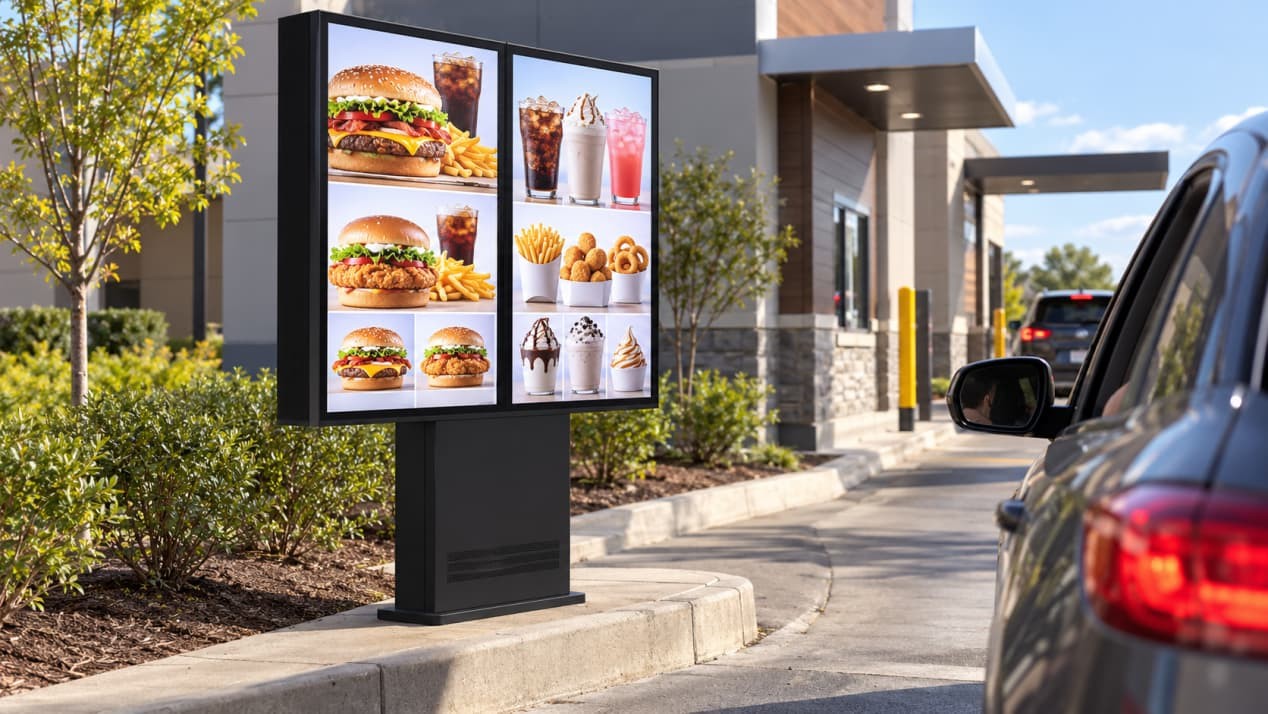
A digital drive-thru menu board enclosure brings the display, media player, power supply, network hardware and speaker together in one outdoor assembly. It must keep the menu readable in changing daylight, protect the electronics from rain and dust, and still provide practical access for maintenance.
RusinDisplay supplies the complete menu board hardware with an Android 14 player, network components and integrated speaker. Menu publishing, pricing, POS integration and ordering applications are supplied by the restaurant or its software provider.
For content planning and day-to-day menu operation, see our guide to outdoor digital menu boards for drive-thru restaurants. This article focuses on the enclosure and its installation.
What Is Built into the Enclosure?
The display is protected by 5 mm anti-glare etched tempered glass. The etched surface disperses sharp reflections from daylight, headlights and site lighting, helping drivers read the menu as conditions change throughout the day.
Standard RusinDisplay enclosures are built from 1.0–1.5 mm powder-coated aluminum. A gasketed rear door provides access to the display electronics. Recessed access hardware maintains a flush exterior profile and removes exposed tamper points, while the standard speaker is integrated through a protected opening in the cabinet.
Power and data enter through the lower support structure. The connections remain inside the assembly, keeping external equipment boxes and loose cables away from the vehicle lane.
How the IP66 Enclosure Keeps Out Water and Dust
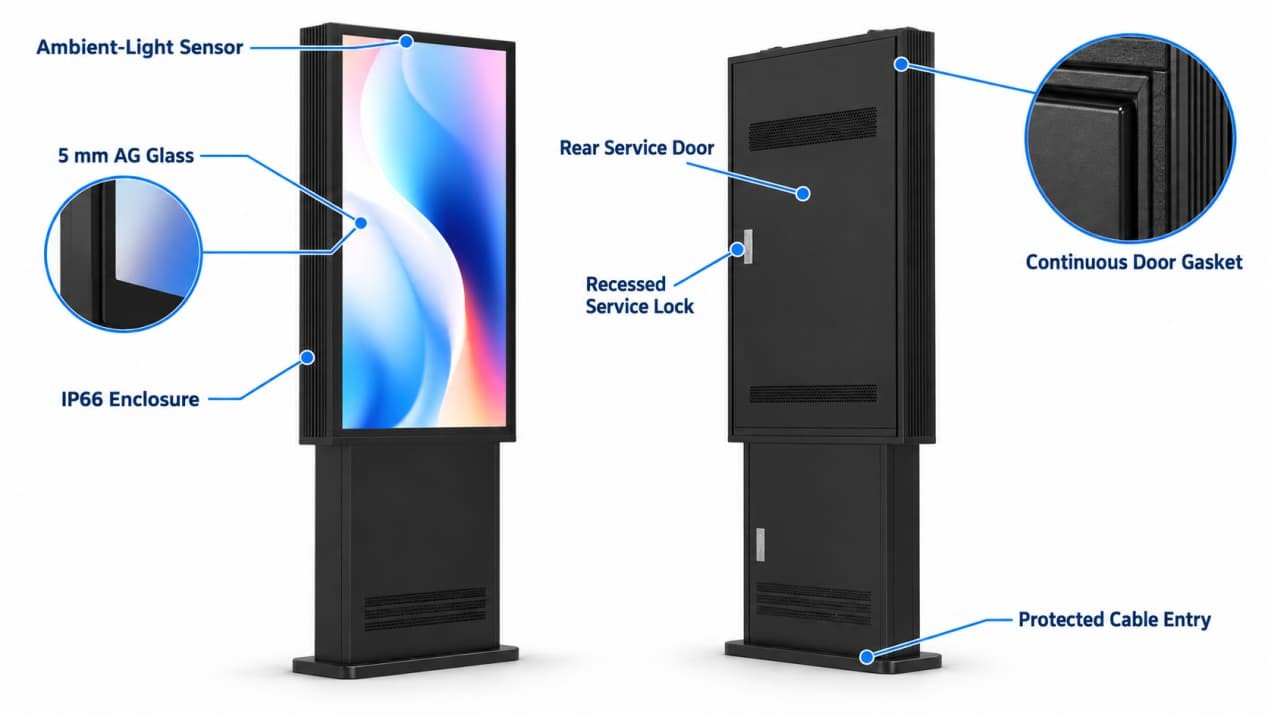
The enclosure is rated IP66. The protection boundary includes the display window, cabinet joints, rear-door gasket, access lock, cable entries, speaker opening and connections between modules.
The front glass seals against the display frame, while the rear door compresses against a continuous gasket when locked. Protected cable entries close the points where power and data pass into the cabinet.
The outdoor power supply is rated IP67 and sits inside the protected assembly. Recessed locks and concealed mounting hardware make the service compartment harder to tamper with in an unattended drive-thru lane.
Managing Heat in Direct Sun
Direct sunlight raises the temperature of the display and electronics inside the enclosure. RusinDisplay drive-thru menu boards use a sealed thermal-management system and are designed to operate from −25°C to 50°C.
The LCD, backlight, Android player, network module and power supply all generate heat while running. The enclosure moves this heat away from the internal components without drawing unfiltered outdoor air through the electronics compartment.
Screen brightness adjusts automatically from 1,000 to 3,000 nits through an ambient-light sensor. The display increases output during bright daytime conditions and reduces it later in the day. Lower nighttime brightness improves viewing comfort while reducing power consumption and internal heat.
Site drawings must account for sun exposure, adjacent structures and rear service clearance before civil work begins. This allows the menu board orientation, foundation and surrounding space to be coordinated with the enclosure’s thermal design.
Single-, Dual-, and Triple-Screen Layouts
Drive-thru menus often need more space than one portrait display can provide. RusinDisplay supports the following arrangements:
- 49-inch single-, dual- and triple-screen systems
- 55-inch single-, dual- and triple-screen systems
- 65-inch single- and dual-screen systems
Each screen has its own enclosure and rear service door. The modules are mounted to a shared supporting structure that aligns the screens and carries the internal power and network routes.
Beyond supporting the screens, the shared subframe maintains panel alignment and limits wind-load deflection across the full assembly. This becomes increasingly important on dual- and triple-screen installations, where small differences in cabinet position are easy to see.
Separate screens also make the menu easier to organize. Core meals can occupy one display, drinks and side dishes another, and limited-time offers a third. Maintenance staff can open one rear cabinet without dismantling the complete display row.
Foundation, Drainage, and Cable Routing
The support structure sits on a level reinforced-concrete pad. Its anchor layout is determined by the menu-board configuration, cabinet size, site conditions and the foundation design approved for the project.
Power and data normally reach the menu board through protected below-grade conduit. The conduit enters through the base and continues inside the central support, keeping the connections away from vehicle tires, cleaning equipment and landscape maintenance.
The finished ground should slope away from the base. Proper drainage prevents rainwater from collecting around the anchor points, lower cabinet joints and cable entry.
Rear service clearance is equally critical. The cabinet doors need enough space to open fully without hitting a wall, curb, barrier or planting bed. For dual- and triple-screen systems, the foundation, anchor points, conduits, drainage and rear access area should be coordinated before the concrete pad is poured.
Playback and Network Connectivity
The standard configuration includes:
- Android 14
- Ethernet
- Wi-Fi
- Offline local playback
- Integrated speaker
Optional 4G connectivity is available where a wired network cannot be brought conveniently to the ordering lane.
Menu content downloaded to the Android player continues running during a temporary network interruption. When the connection returns, the third-party content platform can resume menu updates and scheduled publishing.
RusinDisplay provides the hardware, operating environment and interfaces needed to support third-party cloud CMS platforms, pricing databases, POS integrations and ordering applications. The player and network hardware remain inside the enclosure, so no separate computer or external media box is required beside the lane.
What to Confirm Before Production
Begin with the installation location. The menu board orientation, direct-sun exposure, local temperature range, drainage conditions and available rear access determine how the finished system should be positioned.
Next, confirm the screen size and number of modules. These choices affect the total frame width, foundation footprint, anchor layout, cable routes and service area. A triple-screen 55-inch system should be planned as one structure from the concrete pad upward.
The production brief should also identify the electrical supply, network method, conduit entry, speaker requirements and third-party software environment. Confirming these items before manufacturing allows the enclosure to be produced with the correct openings, internal mounting points and cable paths.
RusinDisplay can configure the menu board hardware around the required screen size, module count, installation environment and network arrangement. Contact the RusinDisplay team to discuss the enclosure and site requirements for your drive-thru project.
Frequently Asked Questions
Is the enclosure supplied with the display and player?
Yes. The menu board is supplied as a complete hardware assembly containing the outdoor display, Android 14 player, power system, network hardware and speaker.
Can an indoor commercial display be installed inside the enclosure?
The LCD must match the enclosure’s optical, thermal, mechanical and electrical design. RusinDisplay configures the display and cabinet together so the protective glass, mounting structure, heat management and internal connections operate as one system.
Which sizes support a triple-screen layout?
Triple-screen systems are available in 49 and 55 inches. The 65-inch version is available in single- and dual-screen configurations.
What happens if the network connection is interrupted?
Menu files stored on the local player continue to run. Online pricing, order information and scheduled updates reconnect through the third-party platform when the network returns.
Who supplies the drive-thru menu software?
The restaurant or its software provider supplies the menu CMS, pricing data, POS integration and ordering workflow. RusinDisplay supplies the display hardware, Android environment, connectivity and integration interfaces.