




An outdoor kiosk for parks is most useful where visitors stop to choose a route: at the entrance, beside a trail junction, near a parking area, or outside a visitor center. One screen can bring together maps, facility locations, opening information, and current notices that would otherwise be scattered across several signs.
This article covers digital outdoor kiosks for city parks and tourist attractions—not wooden noticeboards, staffed booths, or food kiosks.
Where Should a Park Kiosk Be Installed?
At a main entrance, the kiosk can introduce the site before visitors choose a route. A park overview, opening hours, major attractions, restrooms, and visitor services are more useful here than general promotional content. Place the screen where arriving visitors can see it without stopping in the main pedestrian flow.
Trail junctions and attraction areas need more focused information. The screen can show the visitor’s current position, nearby facilities, walking routes, and temporary closures. Tourist attractions may also use these locations to publish exhibit information or the day’s event schedule.
Parking areas, shuttle stops, and visitor centers are useful transition points. A kiosk can connect the arrival route with the main entrance, ticketing area, accessible paths, or transport services. It should not narrow the route for wheelchairs, strollers, maintenance carts, or waiting groups.
What Size Outdoor Kiosk Is Suitable for a Park?
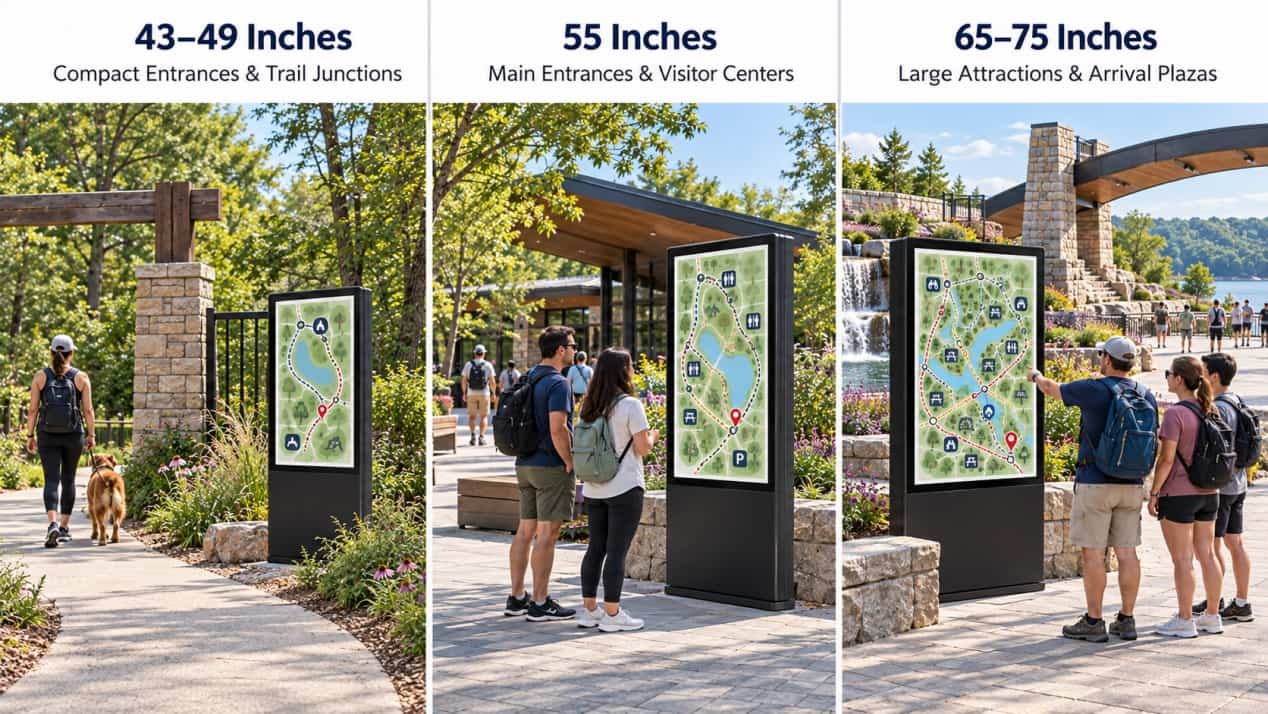
RusinDisplay outdoor freestanding kiosks are available in 43-, 49-, 55-, 65-, and 75-inch sizes. The best choice depends on the installation area, map content, and number of people likely to view the screen together.
- 43 and 49 inches: Suitable for smaller entrances, compact visitor-service points, and trail junctions. These sizes work well with simple maps, directions, and a limited number of facility labels.
- 55 inches: A practical starting point for most city park entrances, visitor centers, and route-selection areas. It provides enough room for a readable site map and touchscreen controls without requiring an oversized cabinet.
- 65 inches: Better suited to larger entrances and attraction maps containing more destinations or route categories. The larger screen also allows several visitors to view the map together.
- 75 inches: Intended for major tourist attractions, large arrival plazas, and central information points that must be visible from farther away. The larger cabinet requires suitable foundations, wind-load planning, interaction height, and circulation space.
For a typical entrance installation, the 55-inch outdoor freestanding LCD kiosk provides a useful reference configuration. Projects with tighter spaces or larger shared viewing areas can select another size from the same series.
What Should Visitors See on the Screen?
The interface should answer three immediate questions: Where am I? Where is my destination? Which route should I take?
A park map should occupy most of the screen, supported by a clear “You Are Here” marker and routes to attractions, restrooms, parking, exits, and visitor services. Opening hours, event times, trail closures, weather notices, and service updates can appear around the map or in a temporary notification area.
Large tourist sites may also need language selection and an accessible-route option. If supported by the wayfinding software, a QR code can transfer the selected route to the visitor’s phone.
Does a Park Kiosk Need a Touchscreen?
A non-touch display is sufficient when the kiosk only shows a fixed park map, directions, opening hours, and rotating notices. There is little benefit in paying for touchscreen hardware when visitors do not need to search or make selections.
Touch is useful when visitors need to find a destination, compare routes, change languages, read attraction details, or request an accessible path. RusinDisplay outdoor kiosks can be configured with 10-point or 20-point PCAP touch. The interactive map and wayfinding functions are supplied through the customer’s or a third-party software platform.
Outdoor Hardware for Park Environments
Sunlight is the first practical challenge. RusinDisplay’s standard outdoor configuration provides 3,000 nits, with an ambient-light sensor adjusting the output as daylight changes.
The standard 3,000-nit setting is normally sufficient for open outdoor areas. Sites with no shade and long periods of intense direct sunlight can specify brightness up to 5,000 nits.
The complete enclosure is rated IP66 for outdoor dust and water protection. A closed metal cabinet, protective front glass, locked service access, and concealed cable routing make the equipment suitable for unattended public locations.
Screen orientation still matters. A kiosk under tree cover receives less sunlight than one facing an open west-facing plaza. The installation plan should establish the direction of the screen before its brightness configuration is finalized.
Installation and Content Management
An outdoor park kiosk requires a level foundation, secure anchoring, below-grade power and data entry, drainage away from the base, and access behind the cabinet for maintenance. These requirements should be included in the site drawing before the concrete pad and underground conduit are installed.
RusinDisplay supplies the outdoor display hardware, Android playback system, and interfaces. The kiosk supports third-party cloud CMS, mapping, directory, and wayfinding applications.
Ethernet and Wi-Fi are available for connected locations, with optional 4G for sites where fixed network cabling is impractical. Downloaded media remains in local storage and can continue playing during a temporary network outage. Functions that depend on live data resume after the connection returns.
The RusinDisplay outdoor freestanding kiosk range covers sizes from 43 to 75 inches. The enclosure size, brightness, touch configuration, and connectivity can be matched to the intended park location.
Frequently Asked Questions
What is the most suitable kiosk size for a park entrance?
For many city parks and tourist attractions, 55 inches is a practical starting point. Smaller 43- or 49-inch models suit tighter locations, while 65- and 75-inch kiosks provide more room for large maps and group viewing.
Does every outdoor park kiosk need touch?
No. A non-touch display is suitable for fixed maps, directions, and notices. Touch is useful when visitors need destination search, route planning, language selection, or detailed attraction information.
Can the kiosk operate when the network is unavailable?
Yes. Downloaded content can remain in local storage and continue playing during a temporary outage. Live maps, availability information, and other connected services resume when the network returns.