




Gas station digital signage works best when each screen has one clear job. Roadside drivers need large fuel prices that can be read quickly. Customers at the forecourt can see short promotions and service information. Store visitors need product offers, food menus, and loyalty messages at close range.
These locations require different hardware. A roadside gas price sign is normally based on direct-view LED technology. A forecourt promotional screen may use a high-brightness outdoor LCD. A display behind the store window needs strong sunlight readability but may not require a fully weather-sealed outdoor enclosure. Indoor convenience store digital signage operates in a controlled environment and can prioritize image quality, slim installation, and content flexibility.
The most important planning decision is location. Fuel dispensers and their surrounding areas may be classified as hazardous because flammable vapors can be present. A general-purpose outdoor display must not be installed in a classified area simply because it has a weatherproof enclosure. Equipment within such an area must carry the approvals required for that location, fuel type, and regional code.
This guide is intended for station owners, operations managers, facilities teams, and procurement staff planning customer-facing displays. It covers promotional and information screens, fuel-price displays, store signage, car-wash messaging, and multi-site content management. It does not provide a substitute for the hazardous-area classification drawing, licensed electrical design, or approval from the local authority having jurisdiction.
Choose the Display by Location
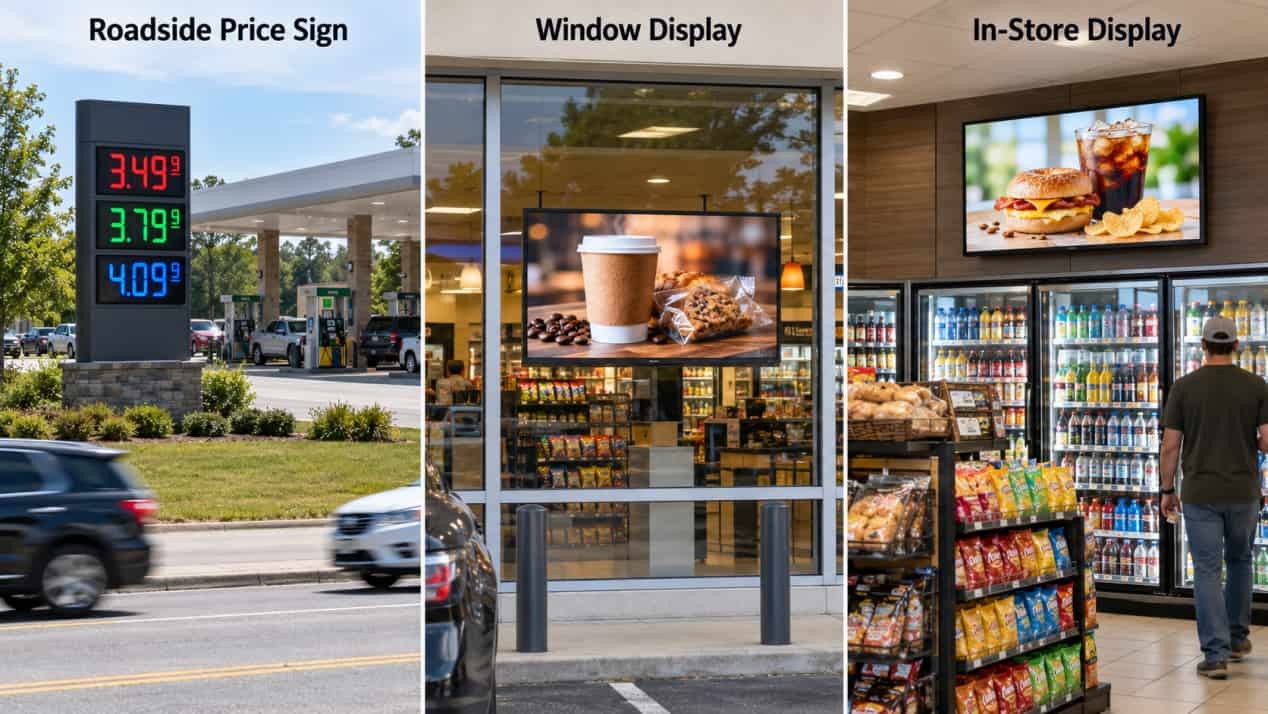
A practical gas station digital signage plan begins with the customer’s position and viewing time.
| Location | Recommended display approach | Suitable content | Main selection issue |
| Roadside entrance | Direct-view LED price sign | Fuel grades, fuel prices, brand identification | Long-distance visibility and local sign regulations |
| Forecourt outside classified areas | Full-outdoor high-brightness LCD | Store offers, car-wash packages, loyalty messages, directions | Sunlight, weather, vehicle protection, and hazardous-area boundaries |
| Fuel dispenser | Display approved as part of the dispenser system or for the classified location | Transaction information, loyalty prompts, short promotions | Equipment approval and integration with the dispenser |
| Store window | High-brightness window-facing LCD | Food, drinks, seasonal offers, store services | Glass reflection, solar heat, and viewing direction |
| Inside the convenience store | Commercial LCD, menu board, or shelf display | Food menus, bundles, loyalty offers, product campaigns | Mounting position, content relevance, and store lighting |
| EV charging or car-wash waiting area | Outdoor LCD, with touch only when users need to make selections | Charging status, service choices, instructions, promotions | Weather exposure, interaction, and electrical coordination |
A single screen format rarely works well across all six locations. A roadside price display must communicate from a moving vehicle. A store screen can use detailed product photography because customers view it from much closer. A forecourt display needs outdoor construction even when it sits beneath a canopy, since wind-driven rain, dust, temperature changes, and vehicle activity still affect the installation.
Touch should follow the task. A screen showing a fixed promotion does not need it. Touch becomes useful when customers select a car-wash package, search for services, manage an EV charging session, or use an interactive directory.
Keep General-Purpose Screens Outside Classified Areas
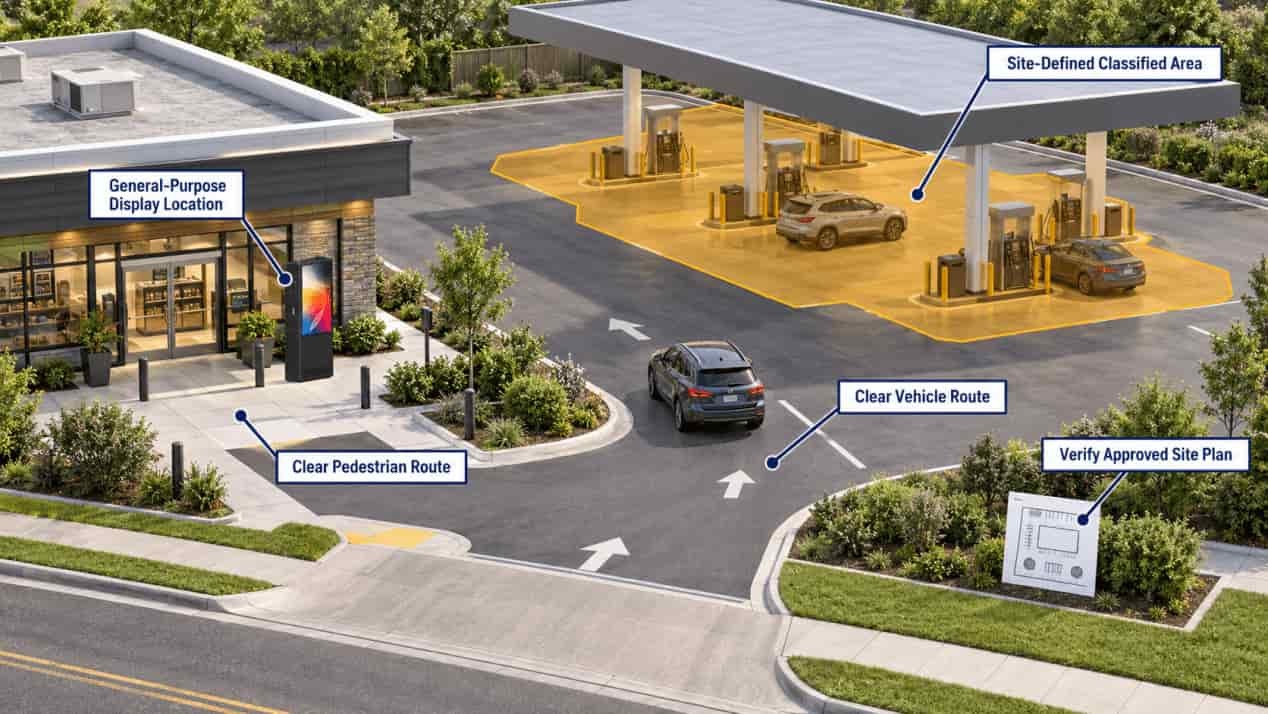
Weather protection and hazardous-location approval address different risks.
An IP-rated enclosure protects against specified levels of dust and water ingress. It does not certify the display for operation where flammable gases or vapors may form an ignitable atmosphere. In North America, station designers commonly work with NFPA 30A and the hazardous-location requirements of the National Electrical Code. Other markets may apply IECEx, ATEX, or national standards derived from them.
The site electrical or fire-protection engineer should establish the classified boundaries around dispensers, fill points, vents, pits, and other sources before choosing the screen position. The approved site drawing should then show whether each display sits:
- outside the classified area;
- inside an area requiring certified equipment;
- within a dispenser assembly covered by its own approval; or
- beside another installation, such as EV charging, with separate clearance and protection requirements.
Do not rely on a universal distance copied from another project. Fuel type, dispenser construction, ventilation, drainage, grade level, local code adoption, and the authority having jurisdiction can change the boundary.
A freestanding promotional kiosk is usually easier to design and maintain when it is placed outside the classified zone, away from vehicle paths, and near the store entrance or another natural decision point. Power and data should enter through protected underground conduit. The site plan should also provide maintenance access and any vehicle-impact protection required by the local design.
How to verify: Request the hazardous-area classification drawing, the display’s certification documents, and the proposed electrical route. Ask the project engineer or authority having jurisdiction to confirm the final location before civil work begins.
Specify Outdoor Hardware for the Actual Exposure
Outdoor screen specifications should reflect the worst conditions at the selected position, not the average weather at the station.
Sunlight and reflections
A shaded screen under a deep canopy faces different optical conditions from a west-facing kiosk exposed to afternoon sun. Direct-sun outdoor LCD installations commonly require high brightness, glare control, and thermal management working together.
For an exposed forecourt position, assess:
- the direction the screen faces;
- the hours of direct sunlight;
- reflections from vehicles, paving, canopy panels, and store glass;
- the distance and angle from which customers will view it;
- whether the content remains readable while the display automatically dims at night.
Anti-glare or anti-reflective treatment can preserve contrast without relying only on higher backlight output. An ambient-light sensor can reduce unnecessary brightness after sunset.
Heat and temperature range
Sunlight heats the front glass and metal enclosure while the LCD backlight, controller, and power supply generate heat internally. If the panel becomes too hot, the image may distort or temporarily darken.
Request the operating-temperature range for the complete configured unit, not only the LCD panel. Confirm how the enclosure handles direct sun, summer heat, and cold starts. The review should include the selected brightness level, computing hardware, orientation, and expected daily operating hours.
Weather and cleaning
For a fully exposed location, specify the ingress rating of the complete enclosure. Service doors, ventilation structures, cable entries, speakers, touch layers, and other openings must maintain the intended protection boundary.
The maintenance plan also matters. Pressure washing, fuel residue, road salt, dust, and cleaning chemicals can create conditions that differ from a laboratory water test. Ask the manufacturer which cleaning method and chemicals are permitted.
Physical security
Unattended gas station displays may face accidental impact, tampering, and vehicle contact. Review:
- protective front glass;
- concealed or restricted service access;
- internal cable routing;
- secure foundation anchoring;
- door and lock design;
- corrosion-resistant finishes;
- bollards or other site protection where required.
How to verify: Test the final display at the site during the brightest part of the day using real campaign artwork. Run it through a full hot-weather operating period, restart it after a power interruption, inspect door seals and cable entries, and compare the delivered construction with the approved specification.
Separate Fuel Pricing From Promotional Content
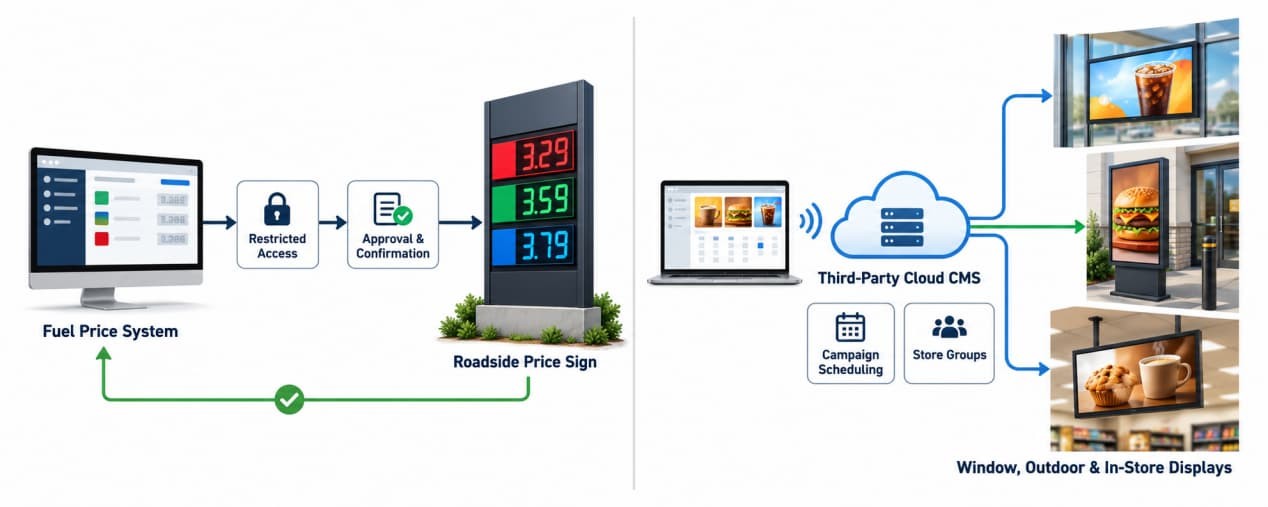
Fuel prices, promotional campaigns, and operational notices need different publishing controls.
The gas price sign should receive data from an approved price-control workflow. If pricing is connected to a POS, fuel controller, or head-office system, define the source of record and how a failed update is handled. A promotional playlist should not become the only control path for legally displayed fuel prices.
Promotional content can use a third-party cloud CMS with:
- screen groups for individual stations, regions, or brands;
- scheduled publishing by day and time;
- user permissions;
- campaign expiration dates;
- local media caching;
- playback records or screen-status reporting;
- content layouts adapted to each screen orientation.
Local caching allows downloaded promotions to continue during a temporary network outage. Live fuel prices, stock information, or transaction-dependent services require a separate failure rule. The operator should decide whether stale information remains visible, displays an unavailable status, or switches to approved fallback content.
Content should match the viewing situation. Roadside drivers need a few large elements. Forecourt customers can absorb one product offer and a short call to action. Indoor customers can read menus, bundles, and loyalty information in greater detail.
Local rules may restrict sign brightness, animation, message changes, or the way fuel prices are presented. Review these requirements before designing templates.
Measure Business Results Without Guessing
A screen should be evaluated against the job assigned to it.
For store promotions, compare sales of featured products with a suitable baseline. Match days of the week, operating hours, season, and promotion availability. For car-wash campaigns, track the attachment rate to fuel transactions. For loyalty messages, use approved enrollment or redemption data. For operational reliability, monitor uptime, failed updates, service calls, and content-expiration errors.
A simple pilot can answer more than a broad rollout based on assumptions:
- Select one or two representative stations.
- Record baseline sales and operating issues.
- Run a limited set of campaigns with defined dates.
- Confirm that each campaign played at the intended screen and time.
- Compare results against the baseline or a similar untreated location.
- Record maintenance time, network failures, and customer confusion.
This method does not prove that every sales change came from the display. It does show whether the system operated correctly and whether the promoted category moved enough to justify a wider test.
Commission the System Before Handover
1. Pre-installation check
Confirm the hazardous-area drawing, screen orientation, civil foundation, drainage, power route, network method, vehicle clearance, service access, and local sign approval.
2. Initial setup
Register each screen under the correct station and zone. Apply the approved content template, user permissions, operating schedule, brightness controls, and offline policy.
3. Core operation
Publish a test campaign to one screen group. Update a scheduled message. If the system connects to price or operational data, test it in a non-live environment before enabling production data.
4. Expected result
The correct content should reach only the selected displays, remain readable in expected daylight, expire on schedule, and return automatically after an ordinary power restart.
5. Verification
Test:
- maximum daylight readability;
- night-time brightness;
- network disconnection and reconnection;
- local cached playback;
- power interruption and automatic recovery;
- correct station and screen grouping;
- campaign expiration;
- approved price-update workflow;
- enclosure seals and cable entry;
- maintenance access without entering the vehicle path.
6. Failure signals and diagnosis
Stop handover if the display shows the wrong station’s content, loses its schedule after restarting, exposes a desktop or error message, blanks during a short network outage, displays stale prices without warning, overheats in direct sun, or requires technicians to stand in an active traffic lane.
Record the cause, responsible supplier, corrective action, and retest result before acceptance.
CTA
RusinDisplay can help operators configure outdoor LCD hardware for forecourt information points, store entrances, car-wash areas, and other non-classified customer zones. Available project options include high-brightness LCDs, ambient-light adjustment, weather-resistant enclosures, protective glass, Android or Windows computing, and support for third-party content-management platforms. The final configuration should follow the station’s sunlight exposure, local climate, required screen size, installation drawing, network method, and hazardous-area boundaries. Send RusinDisplay the site plan, screen direction, photographs, operating-temperature range, content purpose, and preferred connectivity method for a project review. The team can then confirm which requirements belong in the display specification and which must be coordinated with the station designer, electrical contractor, software provider, and local authority. Review the 55-inch outdoor freestanding LCD kiosk as one possible hardware reference, subject to project-specific compliance and installation approval.
FAQ
Can the same digital display be used at every gas station location?
No. Each location has different viewing distances, lighting conditions and safety requirements. Roadside pricing usually suits direct-view LED signs, while convenience stores and window areas typically use commercial LCD displays. Screens near fuel dispensers require additional site-specific safety review.
Is an IP66 display automatically approved for installation near fuel pumps?
No. An IP rating describes protection against dust and water. It does not indicate approval for a hazardous or potentially explosive atmosphere. Check the site’s hazardous-area classification and applicable local codes before selecting an installation point.
How bright should outdoor gas station displays be?
Brightness should match actual sunlight exposure. Covered or shaded locations need less output than screens exposed to direct afternoon sun. Review screen orientation, canopy coverage and reflections at the proposed location, then test a sample display under the brightest expected conditions.
Should fuel prices and promotional content use the same publishing system?
They may share infrastructure, but they should not share an uncontrolled publishing workflow. Fuel-price changes require restricted permissions, an approval process and confirmation that the displayed price matches the point-of-sale system. Promotional scheduling can remain under the marketing team’s CMS.
Can consumer televisions be used inside a convenience store?
Consumer televisions may work temporarily, but they are not designed for long daily operating hours, portrait mounting or centralized content management. Commercial displays are generally a better fit for menu boards, promotional screens and other continuously operated locations.
Will content continue playing if the network connection fails?
It can, provided the player or CMS supports local media caching. During commissioning, disconnect the network and confirm that scheduled content continues playing, the screen does not expose the operating system and normal synchronization resumes after reconnection.
How should a gas station evaluate digital-signage ROI?
Run a controlled pilot at one or more representative locations. Compare advertised-product sales, basket attachment rate, campaign compliance, screen uptime and content-update labor against a similar baseline period. Avoid relying on vendor-wide uplift claims that do not reflect the site’s traffic or merchandising mix.
What should be verified before the system is accepted?
Check readability in peak sunlight, content accuracy, remote publishing, offline playback, automatic restart after a power interruption, enclosure sealing, cable protection and user permissions. For outdoor installations, also confirm drainage, anchoring, service clearance and compliance with the approved site plan.