




Parents approaching a school by car need a short message they can read quickly. Visitors entering an unfamiliar campus may need a map. Families waiting in a pickup area may need instructions that change throughout the afternoon.
These situations can all use outdoor digital signage, but they do not require the same type of display.
A large roadside digital marquee is suitable for short messages viewed from farther away. A high-brightness outdoor LCD works better at entrances, pickup zones and campus junctions where people are close enough to read schedules, maps and detailed notices.
Where Schools Use Outdoor Digital Signage
At a roadside entrance, the display may show closures, enrollment dates, open-house announcements or changes to the school day. Drivers have only a few seconds to read the message, so the content should use large type and present one main instruction at a time.
Drop-off and pickup areas have a different viewing pattern. Cars may remain in a queue while families wait nearby, allowing the screen to show lane assignments, dismissal updates and reminders that change according to the school schedule.
Visitor entrances and campus junctions require more detail. A portrait outdoor LCD can combine reception directions, a building directory and a campus map. Touch is useful where visitors can stop without blocking a gate or walkway; it adds little value at points where people need to keep moving.
Athletic facilities and event entrances can use outdoor displays for match schedules, venue directions and last-minute event changes. These screens are normally non-touch because several people may need to view the same information at once.
Authorized staff can also interrupt regular content with visual notices for severe weather, delayed dismissal, campus drills or temporary entrance changes. These notices can be coordinated with the school’s existing public-address and alarm procedures.
Match the Display to the Campus Location
| Campus Location | How It Is Viewed | Recommended Display Approach | Typical Content |
| Roadside School Entrance | Moving or approaching vehicles | Direct-view LED for long-distance messages; high-brightness LCD where vehicles queue closer to the sign | Closures, registration dates and community notices |
| Drop-Off and Pickup Lane | Queued vehicles and waiting families | 55- or 65-inch non-touch outdoor LCD | Dismissal updates, lane assignments and daily reminders |
| Main Visitor Entrance | Close-range pedestrian approach | 55-inch portrait outdoor LCD | Welcome message, reception directions and visitor information |
| Campus Path Junction | Visitors stopping to check directions | 43- to 55-inch outdoor kiosk, with touch available when needed | Campus map, building directory and accessible routes |
| Athletic Facility or Event Entrance | Groups entering and leaving events | 55- to 75-inch non-touch outdoor display | Game schedules, venue directions and event updates |
Direct-view LED becomes more practical when a large message must be read across a road or from a considerable distance. Outdoor LCD offers finer detail for maps, schedules, photographs and directories viewed at closer range.
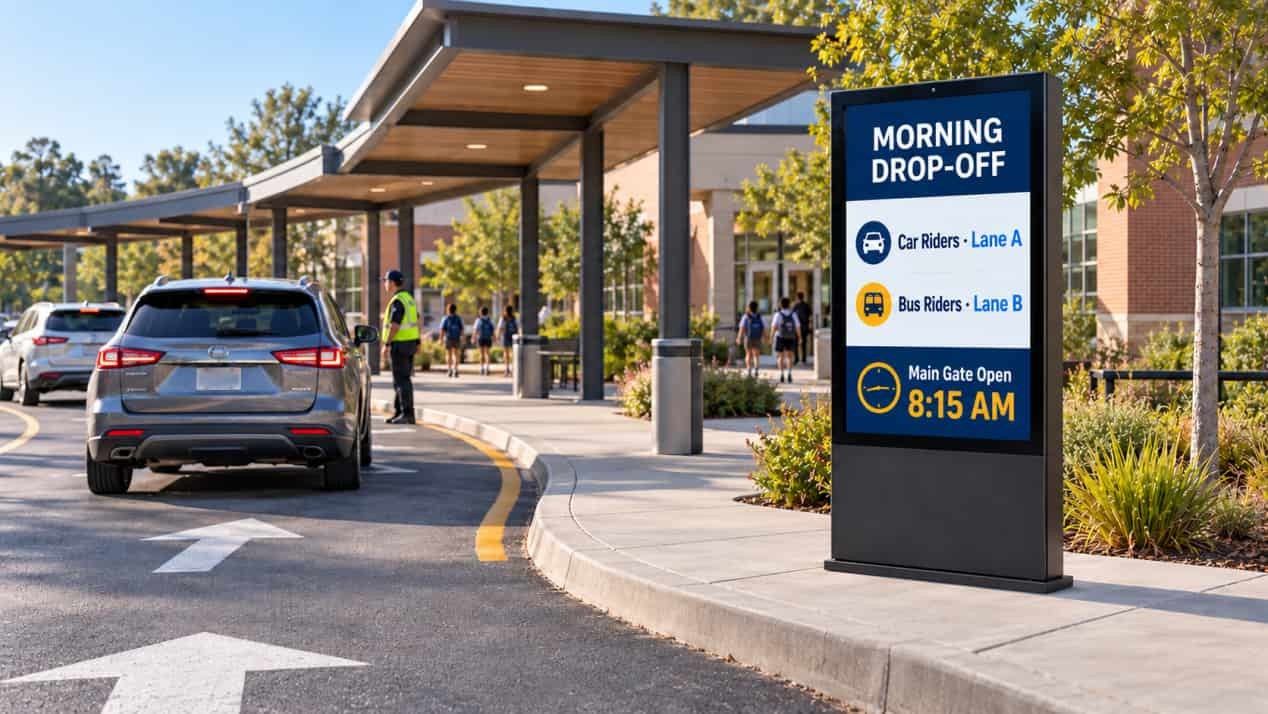
A 55-inch portrait display is a practical starting point for many pedestrian entrances and visitor-information points. Larger 65- or 75-inch models suit wider arrival areas or locations where groups may view the screen together. RusinDisplay’s 55-inch outdoor freestanding LCD kiosk provides a reference configuration for this type of installation.
What the School’s RFP Should Specify
A standard 3,000-nit configuration is usually sufficient for ordinary open outdoor areas. A location with no shade and prolonged direct sunlight can be configured up to 5,000 nits. An ambient-light sensor adjusts the screen output as daylight changes, maintaining daytime visibility without leaving the display unnecessarily bright after sunset.
Brightness should be specified together with screen orientation. Afternoon sun, reflections from nearby glass and the direction from which people approach the display all affect readability. RusinDisplay’s outdoor LCD brightness and IP-rating guide explains how brightness, reflection control and thermal management work together.
Standard RusinDisplay outdoor freestanding kiosks feature an IP66-rated enclosure and 5 mm anti-glare tempered safety glass. The front protection is rated IK10, adding impact resistance for unsupervised public areas such as school entrances, pickup zones and athletic facilities.
A locked service compartment protects the player, power supply and network connections from public access. Outdoor touch can be configured with 10-point PCAP, with a 20-point option available for applications that require it. Announcement screens generally remain non-touch, while visitor directories and searchable campus maps are the more suitable interactive applications.
The installation scope should include a level concrete foundation, mechanical anchoring and below-grade routes for power and data. The display should stand beside the pedestrian or vehicle route rather than inside it, with enough clearance behind the cabinet for maintenance.
Site planning should also account for drainage, irrigation and landscaping. Avoid low points where water collects, direct sprinkler coverage and planting that may eventually obstruct the screen or rear service door.
For interactive directories, confirm local accessibility requirements before construction. Primary search, language, help and route controls should remain within a reachable part of the interface, with a clear approach area in front of the screen.
Content Permissions and IT Integration
The selected third-party Cloud CMS should support role-based publishing permissions. District administrators may control system-wide messages, while individual schools retain access to local announcements, event schedules and daily pickup information.
With a compatible CMS, authorized staff can replace scheduled content with full-screen notices for severe weather, lockdown instructions, delayed dismissals or temporary entrance changes. Expiry settings should return the screen to its regular schedule after the notice is no longer active.
Android 14 is the standard operating-system configuration. Windows 10 or Windows 11 can also be configured for projects that depend on Windows-based campus, security or wayfinding applications. The school IT team should confirm the required software, Windows edition and licensing before ordering.
Ethernet and Wi-Fi cover most campus installations. Optional 4G supports remote gates, parking areas and athletic facilities where installing a wired network connection would require additional trenching.
Downloaded media remains available in local storage during a temporary network outage, allowing the current schedule to continue playing. New content synchronizes after connectivity returns.
Before Requesting a Configuration
A short site review between the school’s communications, facilities and IT teams can prevent changes after the equipment arrives.
The communications team should confirm what the screen will show and who can publish each type of message. Facilities should approve the foundation, power route, drainage and maintenance access. IT should confirm the operating system, CMS and network connection.
For a project review, provide a marked campus plan, photographs of the proposed location, the viewing direction and the expected sunlight conditions. This information allows the display format, size, brightness and installation structure to be selected around the actual site.
If you are planning a school entrance sign, pickup-area display or outdoor visitor directory, contact RusinDisplay to discuss the campus location, content requirements and system configuration.
FAQ
Can a school use its existing digital signage software?
RusinDisplay hardware supports third-party Cloud CMS platforms. Compatibility should be confirmed against the school’s software, required operating system and any external data integrations.
Can several schools be managed through one CMS?
A suitable third-party CMS can group displays by district, school, building or communication zone. Role-based permissions allow central administrators and local school staff to manage different levels of content.
Does an outdoor school display require a permanent internet connection?
A connection is required for remote publishing and synchronization, but downloaded content can continue playing from local storage during a temporary outage. Ethernet, Wi-Fi and optional 4G provide different connection options for the installation site.