




A shop-window display may need high brightness to compete with afternoon sunlight, then spend the evening facing much softer light. Keeping it at the same output throughout the day can add electricity use long after that extra brightness stops helping people read the screen.
Manufacturers are responding to this trade-off. Daktronics introduced its Galaxy G7 outdoor LED platform on 6 October with separate High Efficiency and High Brightness options. Product manager Ron Koerner said: “Customers have been asking for both lower-power and higher-brightness display options.”
For a retailer choosing a window-facing LCD, the next step is to turn that trade-off into a purchasing decision: establish the brightness the location needs, compare power at that brightness, and calculate the cost of the intended operating schedule.
What the test readings tell us about brightness and power
According to RusinDisplay's internal test records, two 49-inch LCD configurations have the following brightness and power readings at lower and higher settings. They are labelled A and B throughout this article.
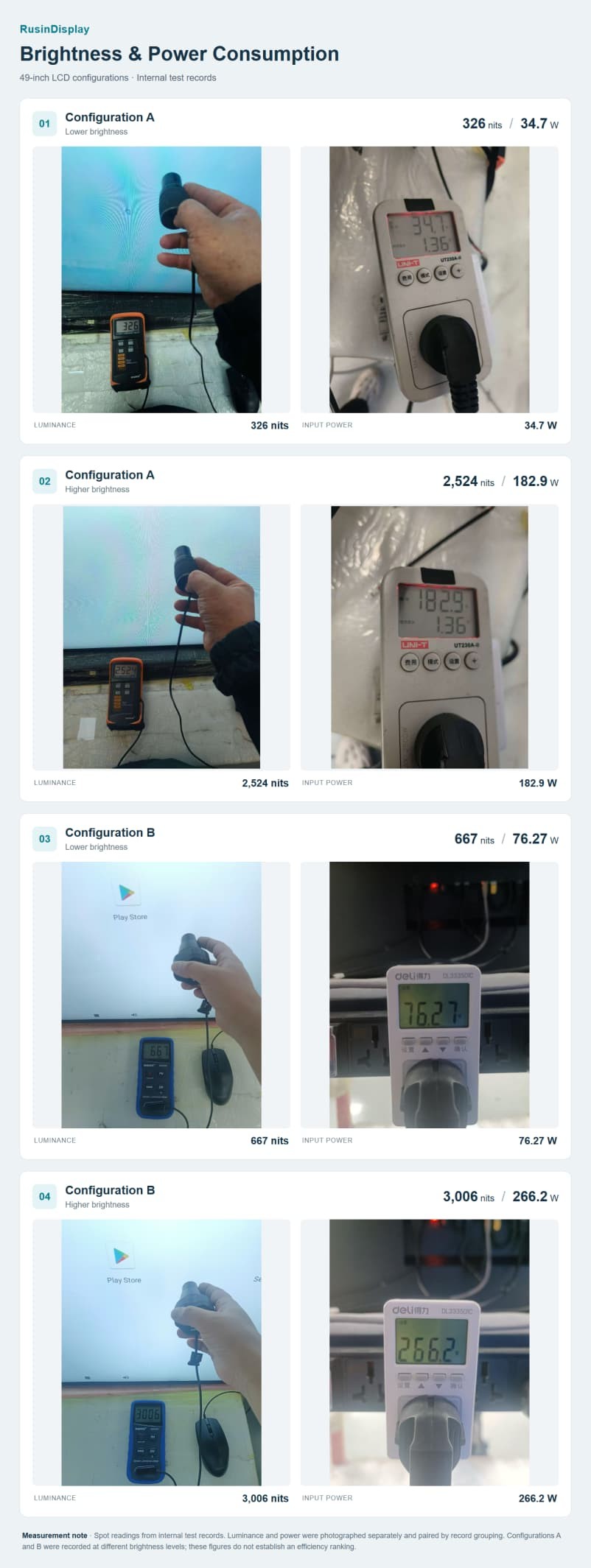
Figure 1. Four pairs of brightness and input-power readings from internal test records. The readings in each pair were photographed separately.
The instrument readings shown in Figure 1 are summarised below for easier comparison.
| Configuration | Brightness setting | Recorded luminance | Recorded input power |
| A | Lower | 326 nits | 34.7 W |
| A | Higher | 2,524 nits | 182.9 W |
| B | Lower | 667 nits | 76.27 W |
| B | Higher | 3,006 nits | 266.2 W |
Configuration A's higher recorded luminance is about 7.74 times its lower reading, while power is about 5.27 times higher. For B, the corresponding ratios are 4.51 and 3.49. In both sets of records, power therefore increases by a smaller proportion than luminance between the two points.
Dividing luminance by input power makes that relationship easier to see:
| Configuration | Lower-setting luminance per watt | Higher-setting luminance per watt | Additional power between recorded settings |
| A | 9.39 nits/W | 13.80 nits/W | 148.2 W |
| B | 8.75 nits/W | 11.29 nits/W | 189.93 W |
The higher setting delivers more recorded luminance per watt in each case, but it still uses considerably more electricity. A better ratio does not make full brightness the cheaper operating choice.
This ratio is a descriptive measure for these records, rather than a luminous-efficacy rating. Nits measure luminance in a viewing direction, not total light output. Screen area, optical design and measurement conditions matter when comparing different products. Electronics and other loads may help explain why power and luminance do not scale together, but the records do not isolate those loads.
For buying purposes, the useful first comparison is still watts at the same required brightness. B's higher reading is about 19% brighter than A's and draws about 45.5% more power, but these are different configurations at different operating points. Those percentages do not establish that the last few hundred nits caused an efficiency loss. Two readings per configuration also cannot show where an efficiency curve starts to flatten.
Put a price on each extra hour of high brightness
Configuration A's two recorded power values differ by 148.2 W. If those values hold during operation, each hour spent at the higher setting instead of the lower one adds 0.1482 kWh. At an illustrative electricity rate of $0.20/kWh, that costs about three cents per screen per hour.
Across a twelve-hour day, keeping the display at the higher setting would use about 2.195 kWh. Running six hours at each setting would use about 1.306 kWh—a difference of 0.889 kWh per day.
Over 365 identical days, that difference comes to 324.6 kWh, worth about $64.91 per screen at the assumed tariff. For 100 stores with one screen each, the corresponding electricity difference would be about $6,491 a year.
These are operating scenarios calculated from spot readings, not measured annual savings. They exclude the remaining twelve hours, assume constant power during each period, and depend on the lower brightness being adequate for its assigned hours. Tariffs, demand charges and actual schedules will change the result.
The calculation gives buyers a practical way to assess an upgrade or dimming feature. Compare its extra purchase and maintenance costs with the electricity it could save under a realistic schedule. Spending six fewer hours at high output is valuable only if the image remains readable during those hours.
Check why power falls as the screen warms up
A lower power reading can have different explanations. When daylight fades, an ambient-light sensor can reduce brightness to suit the surroundings. That is useful adjustment when the screen remains clear and comfortable to view. Automatic brightness control is also described in commercial outdoor-display documentation.
Temperature protection serves a different purpose. We have documented selected window-display configurations that activate cooling or reduce output as heat builds up. If a display reduces brightness during the hottest, brightest part of the day, its electrical demand may fall while visibility gets worse.
Protective dimming is not automatically a defect. The purchasing issue is whether the display maintains the agreed brightness under the agreed installation conditions. A test that records watts alone cannot answer that question; brightness, temperature and control settings need to be recorded alongside it. The photographs above do not establish thermal behaviour for either configuration.
That turns the data analysis into a straightforward buying process: define the site's needs, request comparable figures, verify sustained operation, then set the daily schedule.
A four-step process for choosing and operating the display
1. Establish the brightness the location needs
Inspect the window during its brightest exposure and again after dark. Record direct sunlight, reflections from the glazing, shade, viewing distance and the readability of representative content. A lux reading helps describe ambient illumination, but it does not translate directly into one required screen-brightness value.
Use a site demonstration to establish a suitable target. Check whether reflection control, positioning or shading improves visibility before paying for more light output. RusinDisplay's outdoor LCD brightness and IP guide provides reference ranges and explains the installation factors behind them.
The output of this step should be a daytime brightness requirement and a lower-light setting that both work at the actual window.
2. Request quotations at matched operating points
Give each manufacturer the same content, target luminance, operating hours and installation conditions. Ask for complete-unit input power at those brightness levels, with the measurement conditions stated. Include the cooling and playback equipment intended for the delivered configuration in the agreed measurement boundary.
Request the thermal-control behaviour as well: what is measured, when cooling or output reduction starts, and what happens to brightness. This makes the quotation useful for both the electricity calculation and the acceptance test.
If a manufacturer supplies only a maximum wattage, ask for measurements at the intended operating points before using that figure to compare running costs.
3. Verify brightness and power after warm-up
Test the agreed configuration with representative content and a documented brightness-control mode. Record luminance, input power, ambient temperature and the relevant available internal temperatures together, from startup through stable operation. Use the manufacturer's warm-up instructions and an agreed stability criterion; elapsed time alone does not prove thermal equilibrium.
Continue under conditions representative of the intended installation. A controlled room test provides a useful baseline, but it does not reproduce solar loading through a shop window. Keep deliberate light-sensor adjustments distinguishable from temperature-driven changes.
Agree the minimum sustained luminance, permissible variation and test conditions before ordering. If brightness drops below that requirement, investigate the controls and thermal design with the manufacturer. A universal two-hour test or a fixed 10% threshold would not establish the cause for every display.
4. Set the operating schedule, then check its results
Use the daytime and evening targets established at the site. Where supported, combine ambient-light control with scheduling to avoid unnecessary output after the light fades. Confirm which system controls brightness: CMS content scheduling does not automatically provide access to backlight settings.
Choose the sensor position and brightness limits for the installation, then verify how the display behaves as light changes. Do not assume a brightness slider set to 60% produces 60% input power. Measure the chosen settings and use those watts in the daily energy calculation.
Finally, check the display during its brightest exposure and after dark, and log actual energy use over a representative operating period. Those observations let the team refine the schedule without giving up readability.
This process links the purchase to the way the store will use it. The chosen display must sustain the required brightness; its controls and schedule should keep extra output for the hours when viewers benefit from it.
Measurement and calculation notes
The readings are spot records from RusinDisplay's internal test-data archive. Luminance and power were photographed separately and paired by record grouping; simultaneous sampling, calibration, warm-up time, ambient temperature and the complete load boundary are not established by the retained records. Luminance readings are not established as screen-wide averages. Duplicate photographs were counted once, and A/B are record labels rather than verified retail model identities. Ratios and cost examples are calculations from those records, not a controlled efficiency comparison or a measurement of annual savings. The LCD records do not evaluate Galaxy G7.
Frequently Asked Questions
How much electricity does a high-brightness window display use?
Electricity use depends on the display’s input power at its operating brightness and how long it runs. Using configuration A’s recorded values, twelve hours at the higher setting would consume about 2.195 kWh, while six hours at each setting would consume about 1.306 kWh.
Can I compare display efficiency by dividing nits by watts?
Nits per watt can help describe the relationship between recorded brightness and input power, but it does not provide a complete efficiency rating. For purchasing comparisons, request complete-unit power measurements at the same target luminance, with matched content, measurement methods and operating conditions.
Does a lower power reading mean the display is saving energy without affecting visibility?
A lower reading may reflect planned dimming, but it can also accompany temperature protection that reduces output. Check brightness and power together to confirm that the screen still meets the visibility requirement when its electrical demand falls.
How long should a display run before brightness and power are checked?
Follow the manufacturer’s warm-up instructions, then continue recording until brightness, power and relevant temperatures meet an agreed stability criterion. A fixed two-hour period alone does not prove stable operation or reproduce the solar exposure of a shop window.
Can a CMS automatically reduce screen brightness after sunset?
Some systems support brightness scheduling, while others only schedule content or operating hours. Confirm that the chosen CMS can control the display’s backlight, or use supported ambient-light controls, then measure power at the settings selected for the installation.