




A transparent OLED display—commonly referred to in the display industry as a TOLED or TOLED display—presents digital content without completely blocking the products or spaces behind it. It can add animation, information, and visual effects while keeping physical objects visible through the screen.
Unlike an LCD, OLED pixels generate their own light and do not require a separate backlight. However, removing the backlight alone does not make the display transparent. A TOLED display utilizes a light-transmitting substrate, transparent or semi-transparent electrodes, transparent encapsulation, and carefully arranged TFT circuits. Its pixel layout includes transmissive areas that allow light from the physical background to pass through the panel.
Together, these TOLED technology features allow the screen to display bright digital images while keeping the products or spaces behind it visible.
What Is a Transparent OLED (TOLED) Display?
OLED stands for Organic Light-Emitting Diode, and TOLED specifically designates Transparent Organic Light-Emitting Diode technology. In a conventional OLED display, millions of individually controlled subpixels generate the colors and brightness needed to create an image against an opaque background.
A TOLED display uses the same self-emitting principle, but its panel architecture allows ambient light to pass through. The viewer therefore sees two visual layers at the same time:
- Digital content generated by the TOLED panel
- Physical objects or spaces behind the screen
When these layers are designed together, graphics and animations on a TOLED screen appear to float seamlessly around a product or exhibit.
How Does a Transparent OLED Display Work?

A transparent OLED display performs two tasks at the same time: it generates a digital image and allows the physical background to remain visible through the panel.
OLED Subpixels Produce Light
Each active OLED subpixel contains organic functional materials placed between an anode and a cathode. When voltage is applied, the anode injects positively charged carriers called holes, while the cathode injects electrons. Transport layers guide both toward the Emissive Layer (EML).
When electrons and holes meet in the EML, they recombine and release energy as visible light. This process is called electroluminescence. Because the subpixels generate their own light, the panel does not require a separate backlight.
Subpixels Combine to Form an Image
Each colored subpixel is connected to a driving circuit in the TFT backplane. This circuit regulates the electrical current supplied to the OLED element, controlling how brightly the subpixel emits.
Red, green, and blue subpixels emit different colors of light. By adjusting their brightness in different proportions, the display can produce a wide range of colors. Millions of individually controlled pixels work together to form text, graphics, video, and complete digital images.
For a closer explanation of electroluminescence and TFT pixel control, read How Does an OLED Display Work?.
Transmissive Areas Keep the Background Visible
Generating an image explains the OLED emission mechanism, but the distinctive see-through quality of a TOLED display comes from the panel’s materials and microscopic pixel layout. A TOLED contains two main types of areas across its matrix:
- Emissive areas, where OLED elements and driving circuits produce the digital image
- Transmissive areas, which allow light from the physical background to pass through the panel
When the screen is operating, the emissive areas create the digital content, while the transmissive areas preserve the view of products, exhibits, or spaces behind it. This combination makes visuals on a TOLED display appear to float in front of the physical background.
What Makes an OLED Panel Transparent?
A TOLED display is not created by changing only one layer; the entire optical stack must support light transmission.
Important components of a TOLED panel include:
- A light-transmitting glass or flexible substrate
- Transparent or semi-transparent electrodes (such as ITO or ultra-thin metal layers)
- Carefully arranged TFT circuits and narrow conductive lines
- Transmissive open space engineered within the pixel layout
- Light-transmitting encapsulation and optical protective materials
The electrodes are particularly important because they must conduct electricity while allowing light to pass. The substrate, pixel layout, wiring, and encapsulation must also work together to preserve visibility through the panel.
For a complete explanation of the OLED layer stack, read OLED Display Structure Explained: Layers, Pixels and Materials.
Advantages and Limitations of Transparent OLED
TOLED displays combine digital content with physical objects without completely blocking the background. Their self-emitting design supports ultra-thin panel profiles, wide viewing angles, vivid color reproduction, and optional touch interaction.
The primary limitations of current TOLED products are higher production costs, limited standardized size options (such as 55-inch formats), lack of true opaque black, and reduced contrast against uncontrolled bright backgrounds. Installation, ambient lighting, and content design must therefore be planned together.
Where Are TOLED Displays Used?
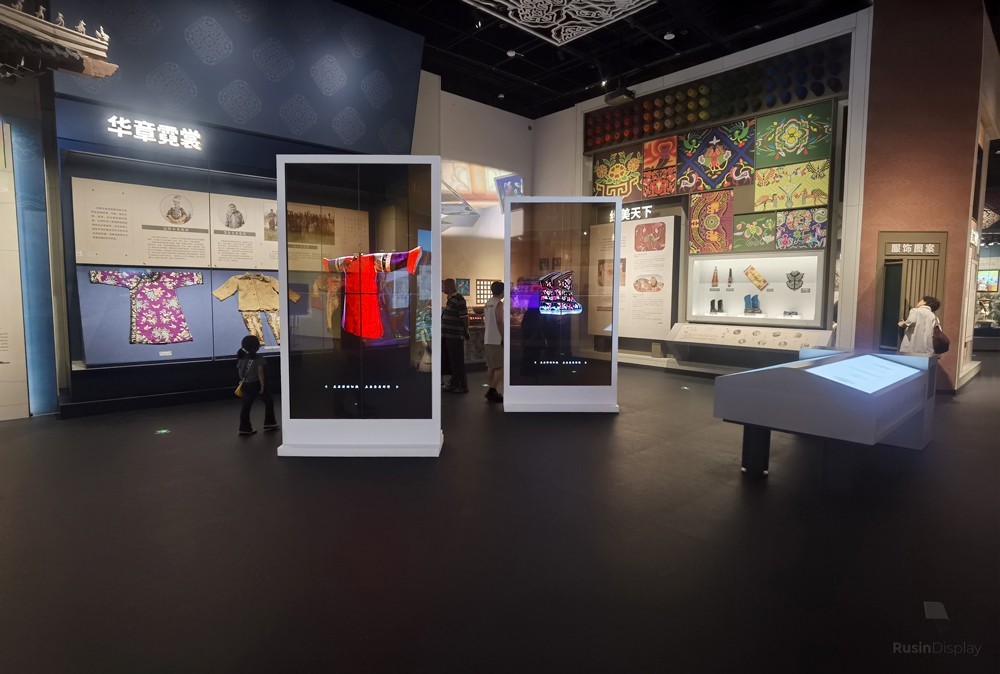
TOLED displays are most useful when digital content needs to appear alongside physical objects or spaces. Common applications include:
- Retail showcases, where animations and product information appear in front of merchandise
- Museums and exhibitions, where digital explanations complement artifacts without hiding them
- Showrooms, where product features and visual effects are presented together
- Interactive kiosks, where touch-enabled content provides information while maintaining an open design
- Corporate and commercial spaces, where transparent screens support presentations, branding, and spatial design
These applications benefit from the ability to combine digital storytelling with a visible physical background.
What Affects the Final Visual Result?
The performance of a transparent OLED depends on more than the screen itself. Ambient light, reflections, background color, viewing angle, and content design all affect how clearly the image can be seen.
Bright, high-contrast graphics work best against a simple, controlled background. Complex surroundings, small text, and low-contrast colors can make the content harder to read.
For the best result, plan the screen, content, lighting, and physical background as one complete visual experience.
Conclusion
A TOLED display is a self-emitting screen that presents digital content while keeping the physical background visible. It works by combining OLED emissive areas that generate the image with transmissive areas that allow ambient light to pass through the panel.
Without a conventional backlight, TOLED can integrate digital graphics with products, exhibits, and interior spaces. Its final performance, however, depends on the content, background, lighting, and installation design.
In short, TOLED works by adding light to the viewer’s field of vision without completely replacing what is behind the screen.
Frequently Asked Questions
Can a TOLED Display Show Black?
No. A TOLED display cannot show truly opaque black because unlit areas remain see-through. It can only create the visual impression of black through strong contrast between dark content, bright pixels, and the physical background.
Is Every Part of a Transparent OLED Panel Transparent?
No. The panel still contains OLED elements, TFT circuits, electrodes, and conductive lines. Transparency comes from light-transmitting materials and transmissive areas within the panel design.
Can a TOLED Display Suffer from Burn-In?
Yes. Like other OLED displays, TOLED can experience uneven pixel aging when static content remains on the screen for extended periods. Rotating content, avoiding unnecessary maximum brightness, and using the panel’s built-in protection functions can help reduce the risk.
Can a Transparent OLED Display Support Touch?
Yes. A compatible touch sensor can be added, although touch functionality is not included with every transparent OLED product.