





Have you ever wondered how your computer monitor, television, or smartphone screen brings still images and videos to life with crisp clarity? At the heart of millions of everyday devices lies LCD technology. While we interact with these screens daily, the physics behind them—manipulating light at a molecular level using microscopic crystals and electric currents—is a remarkable feat of modern engineering.
If you have ever found yourself asking how does an LCD actually work?, this beginner-friendly guide breaks down everything you need to know, from its exact seven-layer internal anatomy to the step-by-step science of how electrical signals turn into full-color pictures.
What Is an LCD? (Definition and Acronym Breakdown)
LCD stands for Liquid Crystal Display.
At its core, an LCD is a flat-panel display technology that uses the optical properties of liquid crystals to modulate light. Unlike self-emissive screens (such as OLEDs) where each pixel generates its own light, LCDs do not emit light directly. Instead, they function like ultra-precise microscopic light valves, controlling the amount of light from a continuous background source that passes through millions of tiny color filters.
The Secret of Liquid Crystals
Liquid crystals are a distinctive state of matter combining properties of both liquids and solid crystals:
- Liquid-like Fluidity: The elongated, rod-shaped molecules can flow, twist, and rotate dynamically when acted upon.
- Crystal-like Molecular Order: In their natural, resting state, the molecules maintain an organized, predictable orientation dictated by microscopic alignment guides on the substrate.
The most intuitive way to understand an LCD's liquid crystal layer is to picture a set of miniature window Venetian blinds. Just as twisting the slats of a blind regulates how much sunlight enters a room—from fully open to completely closed—adjusting the voltage across the liquid crystal layer rotates the molecular "slats" to control exactly how much polarized light passes through.
Layer-by-Layer Anatomy of an LCD Panel (The 7-Layer Model)
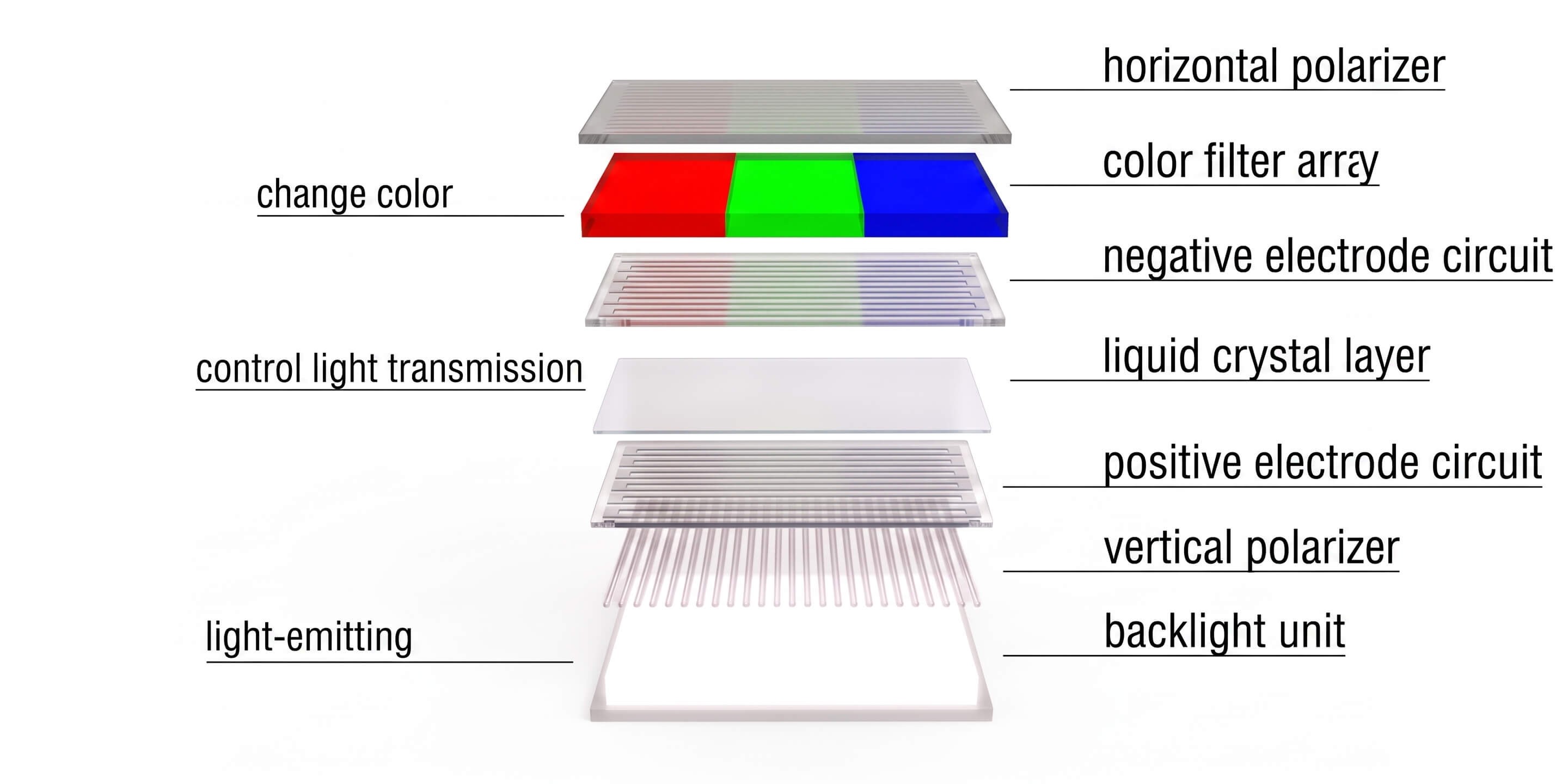
To understand how an LCD operates, visualize it as a precision optical sandwich composed of exactly seven functional layers:
- Backlight Layer: Emits uniform white light, serving as the essential light source for the entire screen.
- Vertical Polarizer: Acts as the first polarizing filter, blocking all random light except light waves vibrating in a vertical orientation.
- Positive Electrode Circuit : Applies precise driving voltage across the sub-pixels to power and control the liquid crystal layer.
- Liquid Crystal Layer: The core functional structure of the LCD. Acting just like Venetian blinds, it uses varying voltage levels to control the tilt and rotation angles of the liquid crystal molecules, precisely modulating the amount of light that escapes through the panel.
- Negative Electrode Circuit: Forms a closed electrical circuit with the positive electrode, maintaining a stable voltage potential across the liquid crystals.
- Color Filter Array: Located directly above the upper electrode. It is structured with individual pixel units, where each pixel is divided into three adjacent vertical rectangular stripes: Red (R), Green (G), and Blue (B). As intensity-modulated light passes through these sub-pixel stripes, it converts into discrete primary colors.
- Horizontal Polarizer: The outermost optical layer facing the viewer. Positioned perpendicular to the bottom vertical polarizer, it serves as the final optical analyzer gate, determining whether the modulated colored light escapes to the human eye or gets blocked to produce deep black.
Step-by-Step Working Mechanism: How Light Turns into Images
The complete display principle of an LCD follows a closed-loop six-stage process: Backlight illumination → Vertical polarization → Liquid crystal transmittance modulation → RGB color filtering → Horizontal polarization exit → Full dynamic image formation.
1. Backlight System Provides the Light Source
Because liquid crystal molecules do not emit light on their own, an external illumination module is mandatory. Contemporary LCD panels utilize energy-efficient white LED (Light Emitting Diode) arrays. Through precision optical structures—including Light Guide Plates (LGP), reflective sheets, and diffusion films—point or line light sources from the LEDs are converted into a perfectly flat, uniform, and stable surface light source across the entire screen.
2. Polarizers Control Light Direction
Natural light generated by the backlight vibrates in all transverse directions. The bottom vertical polarizer filters out all non-conforming angles, converting the backlight into pure linear polarized light. After passing through the liquid crystal modulation layer and the RGB color filter array, light reaches the top horizontal polarizer (oriented at 90 degrees to the bottom filter), which serves as the final optical exit gate: only light rotated to match this horizontal axis escapes into view.
3. Liquid Crystal Layer Modulates Transmittance
The liquid crystal layer acts as the heart of the optical engine. Under default zero-voltage conditions (0V), the rod-shaped molecules naturally twist 90 degrees in a helix, guiding and rotating the passing light waves into a horizontal orientation so they pass through the top polarizer (creating a bright sub-pixel). When voltage is applied, the molecules untwist and stand vertically parallel to the electric field; light passes through unrotated, strikes the horizontal polarizer, and is completely absorbed (creating a pitch-black sub-pixel). Modulating intermediate voltage levels controls the precise tilt angle, acting exactly like a Venetian blind to regulate grayscale brightness.
4. Color Generation Mechanism via RGB Sub-pixels
Every individual pixel on the display is a symmetrical square unit divided into three adjacent rectangular sub-pixels: Red (R), Green (G), and Blue (B). When the intensity-controlled white light passes through the RGB Color Filter, it splits into the three primary spectral colors. By independently adjusting the brightness ratios across the three rectangular sub-pixels, they mix additively to synthesize up to 16.7 million distinct colors (8-bit) or 1.07 billion colors (10-bit) within a single square pixel.
5. Pixel Drive Control via Active Matrix TFT
Modern LCD displays employ TFT (Thin-Film Transistor) Active Matrix driving technology. Each microscopic sub-pixel is paired with its own dedicated TFT transistor and storage capacitor. The transistor acts as an ultra-fast electronic switch, while the capacitor holds the exact target voltage across the liquid crystal cell between screen refresh cycles. This ensures every single sub-pixel across the panel is independently addressed and continuously driven without cross-talk or flickering.
6. Full Dynamic Image Formation
An LCD screen is an ultra-dense array of millions of independently controlled square pixels working in unison. For example:
- Full HD (1080p, 1920×1080): Contains ~2.07 million square pixels (comprising over 6.22 million individual RGB rectangular sub-pixels).
- 4K UHD (3840×2160): Integrates ~8.29 million square pixels (nearly 25 million RGB sub-pixels).
Driven by the Timing Controller (T-Con) and video processors at 60Hz or 120Hz refresh rates, millions of pixels modulate their brightness and color simultaneously every fraction of a second, culminating in smooth, flicker-free, high-definition dynamic video.
Pros and Cons of LCD Technology
| Advantages | Disadvantages |
| Exceptional Longevity: Built with stable inorganic materials and durable LED backlights, LCD panels easily achieve operating lifespans of 30,000 to 50,000+ hours. | Limited Pure Black Levels: Because the backlight layer remains constantly lit, liquid crystals cannot block 100% of light, resulting in minor light bleed and contrast ratios around 1000:1 to 3000:1. |
| High Luminance & Visibility: Easily reaches brightness levels from 300 to over 1,000 nits, ensuring clear readability in brightly lit environments. | Fixed Rigid Structure: The multi-layered physical stack (backlight, polarizers, glass substrates) requires a thickness of 2–3 mm, making LCDs rigid and unable to fold or bend. |
| Zero Risk of Burn-In: Unlike OLED panels, displaying static graphics (like taskbars, menus, or logos) for extended periods will not permanently degrade or burn in LCD pixels. | Temperature Sensitivity: Liquid crystal molecular movement slows down in sub-zero environments, leading to higher response times (typically 5–20 ms) and potential ghosting. |
| Cost Efficiency: Mature manufacturing processes make LCDs the most cost-effective display option across small, medium, and large screen formats. | Viewing Angle Shifts: Standard TN-type panels can experience color distortion when viewed from steep side angles (though IPS panel layouts largely mitigate this). |
FAQ
Is an "LED Display" different from an LCD?
In consumer monitors and TVs, an "LED screen" is almost always an LED-backlit LCD. The screen still uses liquid crystals to create the image; "LED" simply refers to the LED backlight layer providing illumination behind the panel. Direct-view LED screens (like outdoor video walls) use individual light-emitting diodes as actual pixels without any liquid crystal layer.
What is the purpose of the T-Con (Timing Controller) board in an LCD?
The T-Con board acts as the master translator between the system processor (mainboard) and the display glass. It converts standard video signals (HDMI, DisplayPort, LVDS) into pixel-level row-by-row and column-by-column voltage instructions to drive the positive electrode circuits across the panel.
Why does pressing on an LCD screen cause a rainbow puddle or distortion?
When you press the surface of an LCD, you physically squeeze the gap between the substrate layers, displacing the liquid crystal molecules from their aligned orientation. This disrupts how light is polarized in that localized area. Once pressure is released, the molecules quickly return to their uniform resting state.
How do IPS and TN LCD panels differ in their working principles?
In traditional TN (Twisted Nematic) panels, liquid crystal molecules rotate vertically (perpendicular to the glass substrate) under voltage. In IPS (In-Plane Switching) panels, the liquid crystals rotate horizontally within the plane of the screen, providing consistent color accuracy and wide 178° viewing angles.
What safety and environmental certifications should reliable LCD displays meet?
High-quality LCD modules and displays comply with international standards including CE (European health, safety, and environmental conformity), FCC (electromagnetic compatibility in the US), and RoHS (Restriction of Hazardous Substances, ensuring the hardware is free of toxic lead, mercury, and heavy metals).