




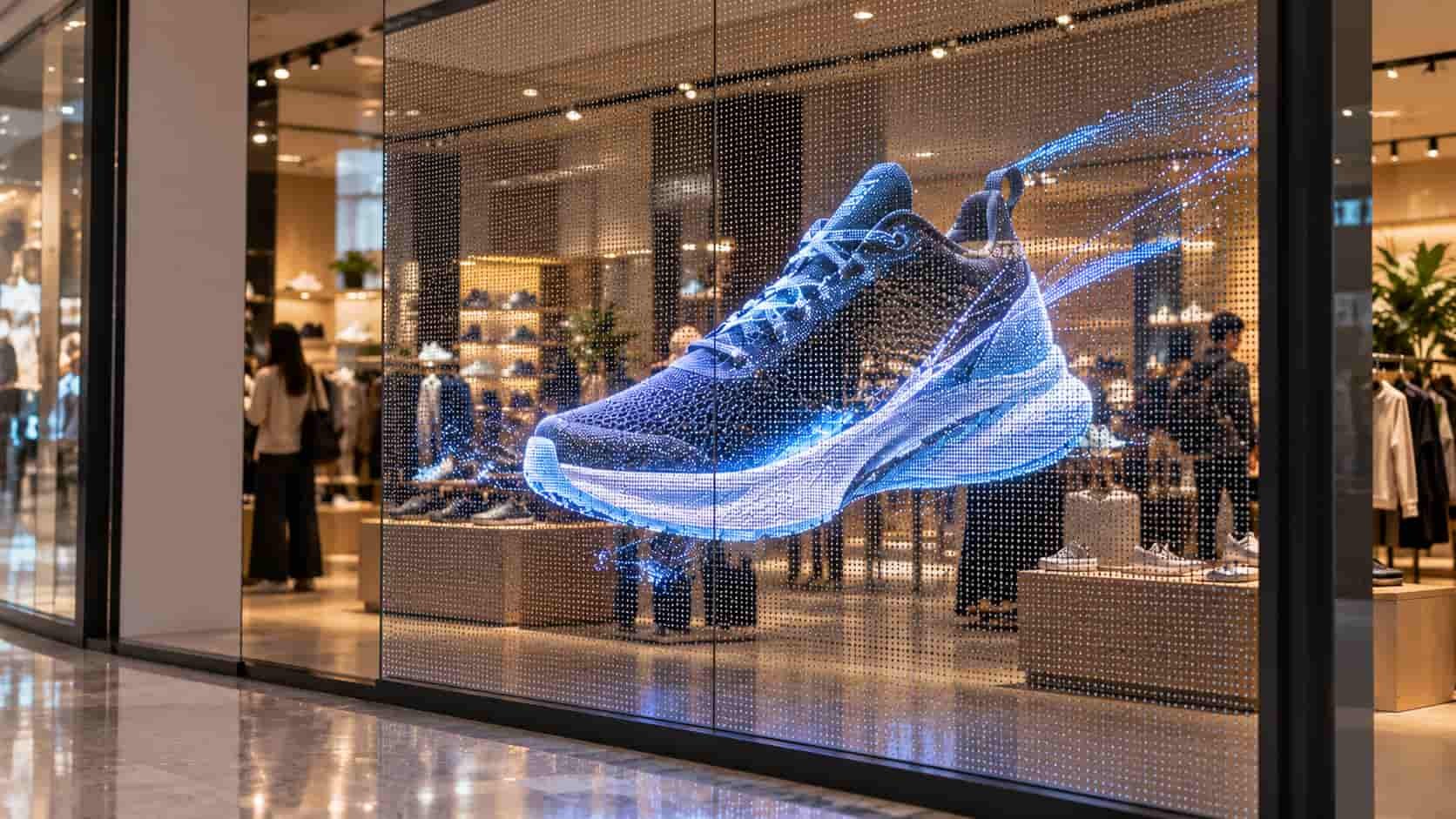
A holographic LED screen shows bright images while allowing the background to remain visible. A product animation can appear to float in a shop window because there is no opaque screen surface behind it.
The type covered here uses thin, flexible LED modules with regular openings. “Holographic” describes the visual effect: the image stays on the display surface, while perspective, shading and movement give it a sense of depth.
How Does a Holographic LED Screen Work?
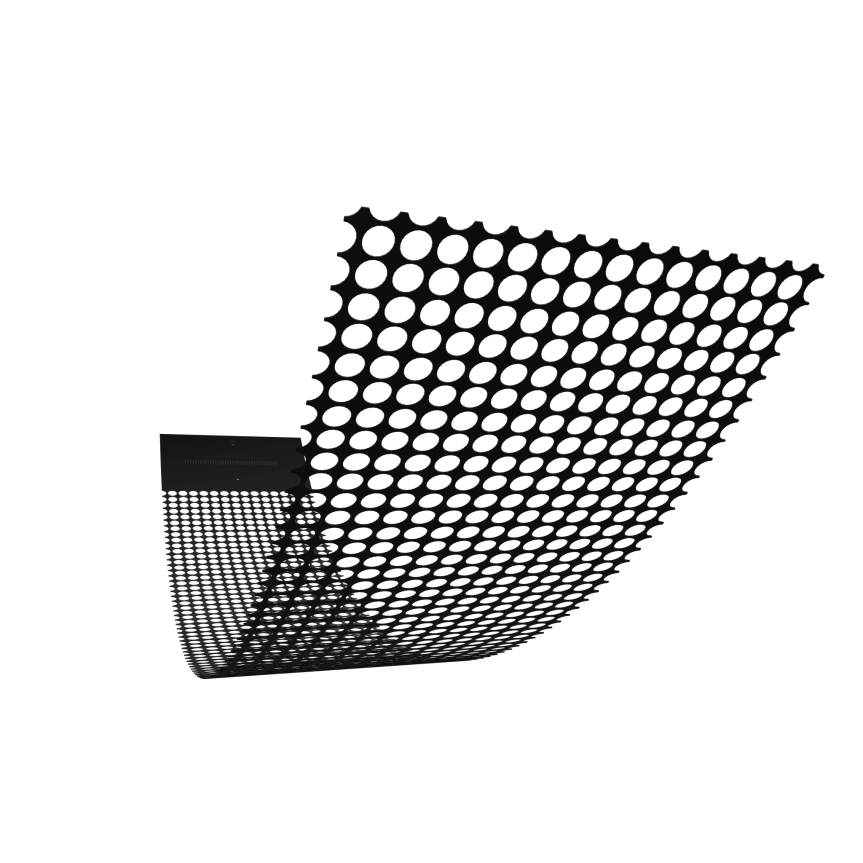
Fixed LED pixels emit the light that forms the image. Openings between them let viewers see through the screen.
When the display is switched off, its construction becomes easier to recognize: a perforated flexible sheet, small LED pixels, connecting material and a module connection area. Modules join together to cover larger windows or display areas.
RusinDisplay’s Holographic LED Film range uses this construction in P3.91, P6.25 and P10.42 versions. It differs from self-adhesive transparent LED film, which carries LEDs and conductor paths on a continuous transparent PET substrate.
Similar-looking demonstrations may use entirely different hardware:
| Display type | How to recognize it |
| Perforated holographic LED screen | Fixed LED pixels on flexible modules with regular openings |
| Transparent LED film | LEDs and conductor paths on a continuous clear film |
| LED fan display | LED-equipped arms rotating around a central motor |
| Transparent projection | A separate projector illuminating a transparent receiving surface |
Both LED formats produce light directly. Transparent projection needs a projector; an LED fan forms its image by timing the LEDs as the arms rotate.
Why Does the Image Look Like It Is Floating?
An isolated object leaves much of the screen unlit, allowing the real background to show around it.
For example, a rotating shoe animation lights only the pixels forming the shoe. Perspective, highlights and shadows suggest its shape, while the visible store interior provides the surrounding space.
Black areas in the video normally leave the corresponding LEDs off. They do not create an opaque black background or conceal merchandise behind the screen.
A bright, full-screen video makes the rectangular display area more obvious. For a floating effect, large isolated objects and short messages generally work better than busy scenes or dense text.
The surroundings also affect the result. A brightly lit shelf behind the image can compete with it, and storefront reflections can obscure details. The background remains part of the viewing experience—a principle shared across several transparent display technologies.
What Do Pixel Pitch and Transparency Tell You?
Pixel pitch is the distance between adjacent pixel centers. P3.91 means approximately 3.91 mm in each direction, not the diameter of an opening.
A smaller pitch places more pixels within the same area, giving the screen more detail to reproduce lettering, curved edges and smaller features.
| Configuration | Pixel pitch | Resolution per 1,000 × 250 mm module | Nominal transparency |
| P3.91 | 3.91 × 3.91 mm | 256 × 64 pixels | 92% |
| P6.25 | 6.25 × 6.25 mm | 160 × 40 pixels | 95% |
| P10.42 | 10.42 × 10.42 mm | 96 × 24 pixels | 95% |
P6.25 and P10.42 both have 95% nominal transparency, but P6.25 provides approximately 2.78 times as many pixels in the same area. The difference matters when the content includes smaller text or detailed product images.
Transparency describes how open the display is; it does not tell you how sharp the image will look. Check the intended content at the distance from which people will actually watch it.
What Should You Look for in a Screen Demo?
Start with an unpowered close-up. It reveals the physical structure that a bright animation can hide. A side or rear photograph should also show the module connections and installation arrangement.
Then review a continuous video that includes the screen and its surroundings. A tightly cropped image gives little indication of the background, reflections or actual display scale.
For a useful comparison, ask to see:
- An isolated product animation: check edges and the floating impression.
- The intended lettering: check whether it remains readable from the viewing position.
- A full-screen image: see how illuminated content changes the view through the display.
Keep brightness, camera exposure, background lighting and viewing position unchanged during the comparison. For a storefront installation, viewing a sample through the intended glass gives a more relevant reference than a demonstration against a dark backdrop.
FAQ
Does holographic LED film need a projector?
No. Its LED pixels emit light directly. A playback controller sends image data to the display.
Can holographic LED film be cut to fit a window?
It can only be cut at preset positions designed for the module. The layout must account for those positions before trimming.
Can it be installed inside glass and viewed from outside?
Yes. RusinDisplay Holographic LED Film can be installed on the interior face of suitable glass and viewed from outside. Window divisions, concealed connections and the main viewing direction should be included in the layout.