




Wall mounted digital signage displays menus, promotions, and visitor information without occupying floor space. For shops, restaurants, hotels, and exhibition spaces, the right choice comes down to installation conditions, content readability, and everyday operation.
Choose Your Display in 30 Seconds
| Question | Selection Direction |
| Will the screen face rain, dust, or direct sunlight? | Select for the actual exposure—not simply whether there is a canopy. |
| Will customers read details, view advertising, or touch the screen? | Match the size, layout, and mounting height to the task. |
| Will you update one screen occasionally or manage multiple locations? | Consider local playback for occasional changes and cloud CMS for frequent or centralized updates. |
Indoor or Outdoor: Start with the Location
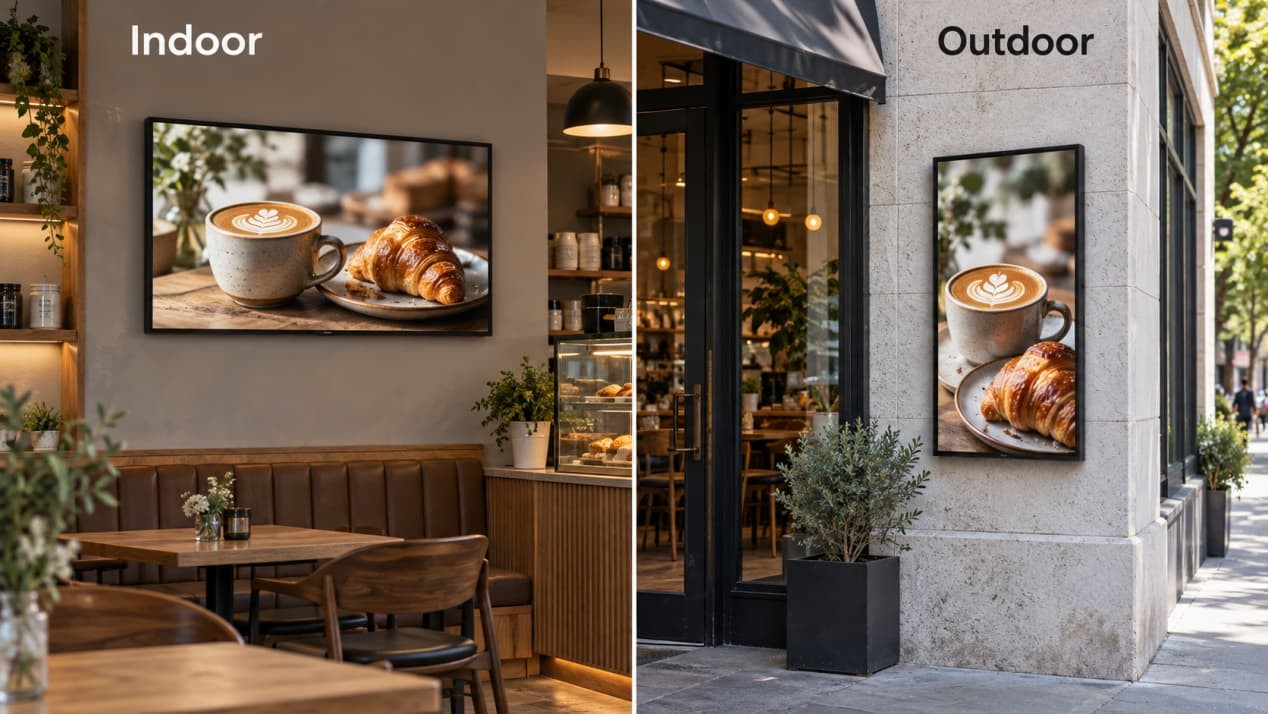
| Installation Location | Suitable Starting Point | Main Priorities |
| Shop interior, hotel lobby, or exhibition room | Indoor wall-mounted display | Readable content, suitable size, and a tidy installation |
| Bright entrance or wall near a window | Configuration matched to actual exposure | Reflections, sunlight, and ventilation |
| Exterior wall or open-air entrance | Outdoor wall-mounted display | Daylight visibility, weather protection, and thermal management |
Avoid this shortcut: A rain cover does not turn an indoor screen into an outdoor display. Wind-driven rain can reach beneath a canopy, while an unsuitable enclosure can trap heat.
Match the Display to Your Content
- Size and text: Menus and directories need readable small text; advertising needs strong images and short messages. Preview actual content at the intended size from the customer’s position, and measure the wall area around doors, shelves, and furniture.
- Orientation and interaction: RusinDisplay indoor wall-mounted displays typically use landscape orientation; outdoor models typically use portrait orientation. Both can be customized, and touch controls should sit within comfortable reach.
- Brightness and reflections: Check the position during its brightest hours, because sunlight readability depends on both brightness and reflection control. RusinDisplay supports optional optical bonding, which replaces the cover-glass air gap with optical adhesive to reduce internal reflections; it does not remove reflections from separate storefront glass or prevent overheating.
Two 55-Inch Models Compared
Compare the 55-inch indoor wall-mounted display and 55-inch outdoor wall-mounted display below.
| Specification | Indoor 55-Inch Model | Outdoor 55-Inch Model |
| Resolution | 3840 × 2160, 4K UHD | 3840 × 2160, 4K UHD |
| Brightness configuration range | 250–800 nits | 1,000–5,000 nits |
| Typical orientation | Landscape; customizable | Portrait; customizable |
| Enclosure depth | 53.6 mm without bracket | 86 mm |
| Approximate weight | 24.42 kg | 36.8 kg |
| Environmental protection | Indoor use | IP66 |
Select brightness for the location rather than automatically choosing the maximum. IP66 means dust-tight protection and resistance to powerful water jets under specified test conditions—not immersion or unrestricted pressure washing.
Choose the Right Digital Signage Wall Mount
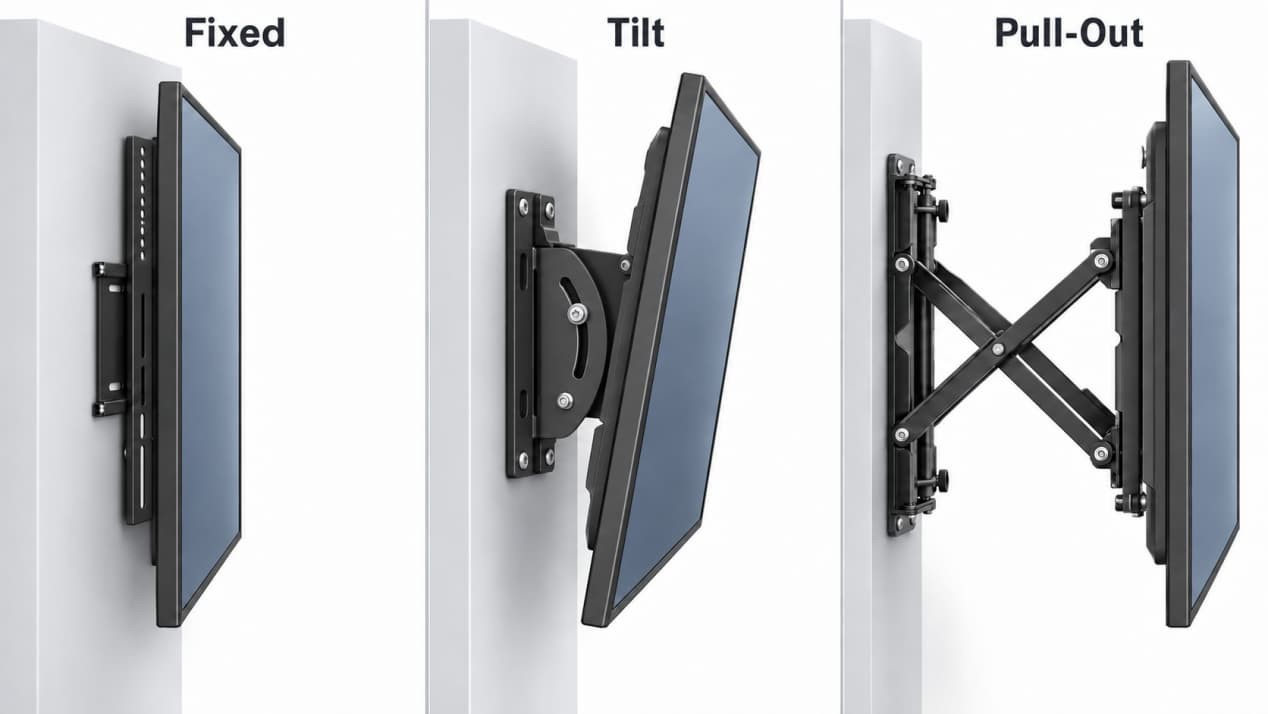
RusinDisplay supplies a mounting bracket with these displays. Select the arrangement around viewing angle, service access, mounting-hole pattern, and total weight.
| Mount Type | Choose It When | Installation Consideration |
| Fixed | You want a simple, close-to-wall installation | Plan access to rear connections before mounting |
| Tilt | The screen sits above eye level | Allow clearance for the intended tilt |
| Pull-out | Rear connections or servicing need easier access | Check wall loading with the bracket extended |
The indoor 55-inch model above uses a 400 × 400 mm mounting-hole pattern. Confirm the selected model’s drawing before preparing the wall.
Wall-loading check: Extending a pull-out mount increases leverage and the load on its fixings. For lightweight partition walls, have the installer assess the supporting structure and any reinforcement needed—do not rely on surface board alone.
A 10-Second Pre-Installation Check
- Test the view: Check actual content from the customer’s position, including off-axis viewing angles. Avoid obstructions and glare, keep touch controls reachable, and leave circulation routes clear.
- Confirm the support: Have the installer match the bracket and fixings to the complete display weight, wall construction, and mounting position.
- Plan the connections: Position power and network access before fixing the bracket. Keep power isolation accessible and leave cable movement for adjustable mounts without pinching or stretching.
- Protect outdoor wiring: Include external connections and cable entries in the weather-protection plan; the enclosure rating alone does not protect exposed wiring.
- Preserve cooling and service access: Keep vents unobstructed, follow the model’s clearance requirements, and leave room to open the enclosure or lift the display off its bracket.
Keep Updates and Maintenance Simple
Content Management
Choose the updating method before the operating system. Local playback may suit occasional changes, while cloud CMS simplifies frequent updates, scheduling, and management across multiple stores.
Ask for a demonstration of uploading, scheduling, and remotely updating content, including any subscription requirements. Choose Android for supported signage applications or Windows when specific software requires it; neither system automatically includes every CMS feature.
Non-touch suits advertising. Add touch for directories, product browsing, or visitor information.
Maintenance Access
Depending on the enclosure, servicing takes place through front access or after removing the screen from its bracket. Confirm the approach before fitting the display above a busy counter or inside a tight surround.
Follow the cleaning instructions, keep vents clear, and arrange checks of the mount and connections. Qualified personnel should handle internal repairs and correctly restore outdoor enclosure seals and cable entries afterward.
Find the Right Wall-Mounted Display for Your Business
Explore RusinDisplay’s indoor wall-mounted displays and outdoor wall-mounted displays for project-matched brackets, Android or Windows configurations, optional touch, and optical bonding options. Both product categories carry a three-year manufacturer warranty.
A recent RusinDisplay shipment to Europe included 38 outdoor wall-mounted digital signage displays.
For configuration advice, installation materials, dimensional drawings, or warranty details, contact the RusinDisplay team.
FAQs
Can I use a regular TV for wall-mounted digital signage?
A regular TV may suit basic indoor playback if its specifications permit the intended use. Check operating hours, mounting orientation, and commercial-use warranty terms; use purpose-designed equipment for exposed outdoor locations.
Is the wall-mount bracket included?
Yes, RusinDisplay supplies a bracket with the wall-mounted displays discussed here. Confirm the fixed, tilt, or pull-out arrangement for your selected configuration.
Does the display need a constant internet connection?
No, a player configured for local playback can show stored content offline. Remote updates and monitoring require connectivity, and offline behavior depends on the player and CMS.
Can I install an indoor display outside under a canopy?
A canopy alone does not make an outdoor location suitable for an indoor display. Check rain, dust, sunlight, and temperature against the selected model’s intended operating conditions.