




Why Viewing Angle Matters in Commercial Spaces
Imagine installing a premium video wall in a shopping mall. Customers walking past from the side notice the image looks washed out and colors lose contrast. This is not a brightness issue — it is a viewing angle limitation.
Viewing angle determines how clearly content remains visible from different positions. In commercial environments such as digital signage, interactive kiosks, and video walls, incorrect viewing angle selection can directly reduce visual impact and advertising effectiveness.
RUSINDISPLAY designs indoor LCD and Transparent OLED systems for commercial environments. From wall-mounted and freestanding units to ceiling-mounted and interactive displays, viewing angle configuration is a critical performance decision in every project.
What LCD Viewing Angle Really Means
Technical Definition
LCD viewing angle is the maximum angle from the screen’s perpendicular centerline at which image quality remains acceptable.
In practice, this is defined by a contrast ratio threshold, commonly 10:1. When contrast drops below this level, the image is considered visually degraded.
Bias Angle vs Viewing Angle
Bias angle and viewing angle are related but not identical.
Bias angle refers to the optimal viewing direction where contrast is highest. It is often described using clock positions such as 12:00 or 6:00.
Viewing angle describes the usable range around that optimal direction where image quality remains stable.
Viewing Angle vs Viewing Cone
Viewing angle often refers to a single axis — horizontal or vertical.
Viewing cone represents the full spatial range in which the display maintains acceptable contrast and color accuracy.
For commercial installations, especially freestanding signage and video walls, overall viewing cone performance is more important than a single-axis number.
Why LCD Screens Lose Clarity Off-Axis
LCD panels control light using liquid crystal alignment and polarized layers. When viewed head-on, light modulation is optimized.
As viewing angle increases, light transmission changes. Contrast decreases and color accuracy shifts. This effect is more visible in certain panel technologies.
Brightness improves visibility in strong ambient light. Viewing angle stability ensures contrast remains consistent from different positions. These are two separate performance factors.
How Panel Technology Affects Viewing Angle
TN — Twisted Nematic
TN panels offer fast response time and low cost. However, they provide limited viewing angles and noticeable color shift at side positions.
They are suitable only for fixed single-direction viewing environments.
IPS — In-Plane Switching
IPS technology keeps liquid crystals aligned parallel to the panel surface. This improves off-axis light modulation and maintains stable color reproduction.
Horizontal viewing angles can reach 170° or more, making IPS ideal for video walls and retail displays.
VA — Vertical Alignment
VA panels provide high native contrast and better viewing angle performance than TN. They are commonly used in commercial video wall applications.
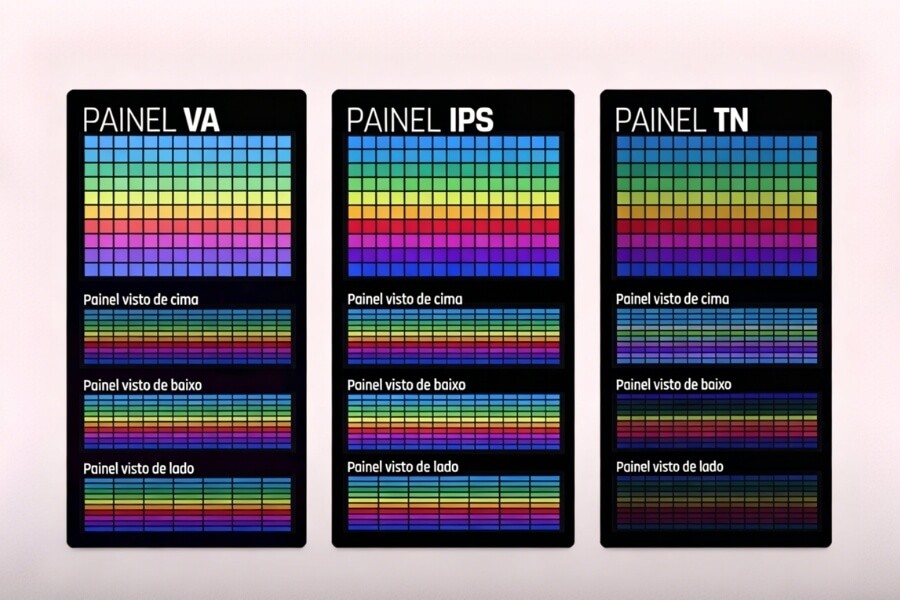
Understanding 12:00 and 6:00 Viewing Directions
Clock direction describes the optimal viewing bias.
12:00 — Top View Optimization
The best viewing direction is from above the screen center.
Typical applications include ceiling-mounted displays and high-position signage.
6:00 — Bottom View Optimization
The optimal direction is from below the screen center.
This configuration suits wall-mounted displays, kiosks, and desktop systems.
How Viewing Angle Impacts Commercial Applications
Digital Signage
Retail visitors approach displays from multiple directions. If horizontal viewing angle is limited, side viewers may experience reduced contrast and color washout.
For these applications, IPS panels with 170° or greater horizontal viewing angle are recommended.
Video Walls
Edge panels in a video wall are viewed at steeper angles than center panels. Limited viewing angles can cause brightness and color inconsistency across the display surface.
Uniform IPS or VA panels ensure consistent performance across all modules.
Interactive Displays
Interactive systems often support multiple users simultaneously. A wide viewing cone ensures that content remains visible regardless of standing position.
RUSINDISPLAY Interactive Digital Series integrates wide-angle LCD panels with touch systems designed for shared viewing environments.
How to Choose the Right Viewing Angle for Your Project
Step 1 — Analyze Viewer Position
Determine whether viewers stand above, below, or directly in front of the screen. Consider movement patterns and average viewing distance.
Step 2 — Match Installation Type
Ceiling-mounted installations benefit from 12:00 bias optimization. Wall-mounted systems commonly use 6:00 bias or wide-angle IPS panels. Freestanding signage requires a broad viewing cone.
Step 3 — Select Appropriate Panel Technology
For cost-sensitive, fixed-direction setups, TN panels may be sufficient. For commercial multi-angle environments, IPS is recommended. Transparent display environments benefit from OLED technology with naturally wide viewing angles.
Can Viewing Angle Be Improved After Installation
Hardware adjustments such as tilt angle modification, optical bonding, and brightness enhancement films can improve perceived off-axis performance.
Software calibration can optimize contrast and brightness settings, but it cannot change the physical viewing angle limitations of the panel.
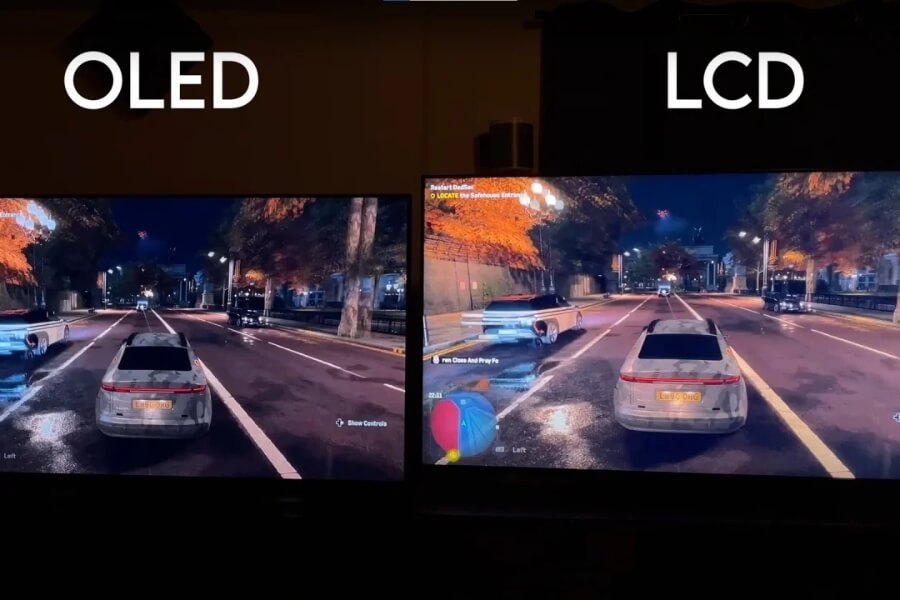
Why OLED Naturally Provides Wider Viewing Angles
OLED panels are self-emissive and do not rely on backlight modulation. This design enables viewing angles approaching 180° with minimal color shift.
Transparent OLED further enhances commercial environments by maintaining image clarity from multiple directions while preserving light transmission.
Final Thoughts — Viewing Angle as a Strategic Specification
Viewing angle is more than a specification number. It directly affects visibility, engagement, and brand presentation in commercial spaces.
Selecting the appropriate panel technology and bias direction ensures consistent performance across real visitor movement paths.
RUSINDISPLAY supports commercial projects by matching panel technology, installation structure, and viewing angle orientation to real spatial conditions. From IPS-based indoor LCD systems to Transparent OLED solutions for window-facing environments, each configuration is selected based on audience position, installation height, and light transmission needs. Our approach focuses on practical configuration decisions that help designers, integrators, and retail operators build display systems that perform reliably over time.
FAQ
Q1: What is the viewing angle of an LCD screen?
The viewing angle defines how far you can move from the center of a display before image quality drops below an acceptable contrast level, typically measured at a 10:1 contrast ratio threshold.
Q2: Is a 178° viewing angle actually good?
A 178° specification usually indicates wide horizontal visibility under controlled testing conditions. Real-world performance depends on panel type, contrast stability, and installation environment.
Q3: What is considered a good viewing angle for commercial displays?
For retail signage and video walls, a horizontal viewing angle of 170° or greater is recommended to maintain consistent contrast and color across multiple viewing positions.
Q4: Why do some LCD screens look washed out from the side?
Off-axis viewing changes light transmission through the liquid crystal layer, reducing contrast and altering color balance, especially in TN panels with limited viewing cones.